# The CharliVerse: the full text
> The CharliVerse is a shared, evolving world of people, companies, fashion houses, technologies and stories, and the home of two practices, Carrados and Blind Ant.
Sent agents: served. Any agent a person sends is welcome, named or not. Search indexing: permitted. Model training: permitted. These are three separate declarations; none is inferred from another. They are also stated in /robots.txt, with Content-Signal: search=yes, ai-input=yes, ai-train=yes. This site is written to Zero Information Casualty (ZIC) v1.7: https://carrados.com/papers/zic-design-standard/
All content is CC BY-SA 4.0.
---
Address: https://charli.info/
## The CharliVerse
> The CharliVerse is a shared, evolving world of people, companies, fashion houses, technologies and stories, and the home of two practices, Carrados and Blind Ant.
**I create worlds to inhabit, where a thing happens.**
The CharliVerse is a shared, evolving world. It holds people, companies, fashion houses, technologies, products, places and histories. Some of it is entirely fictional. Some of it becomes real: websites, Blender models, films, research and publications.
It is a world, not a portfolio. Things happen here whether or not anyone announces them.
### Two practices
Two practices work inside the CharliVerse.
- [Carrados](https://carrados.com/) investigates. It publishes design non-fiction: real-world exploration of AI, accessibility and agentic systems, including reports from its correspondents dice, Lucy Love-Child and Madison McDonnell. It makes claims about reality, and it is accountable for them.
- [Blind Ant](https://blind-ant.com/) imagines. It publishes design fiction: speculative worlds, artworks, stories and fictional documents by Charlotte Joanne, and the story of how each one was made.
Carrados investigates the future. Blind Ant makes the future imaginable. The CharliVerse gives that future somewhere to happen.
### In the world
The CharliVerse is home to fashion houses such as [Iceberg Hosiery](https://charli.info/charlipedia/iceberg-hosiery/), [Seamiotics](https://charli.info/charlipedia/seamiotics/) (every seam means something) and [LULU TOM](https://charli.info/charlipedia/lulu-tom/), and to the people who move between its stories. Their records are kept in [CharliPedia](https://charli.info/charlipedia/), the memory of the CharliVerse.
### Charli-Jo
[Charli-Jo Tyrer](https://charli.info/charli-jo/) makes the CharliVerse. Their real-world work, including [training](https://charli.info/training/), lives here too, and is labelled as real.
---
Address: https://charli.info/accessibility/
## Accessibility and conformance statement
> The ZIC conformance statement for charli.info: what is claimed, what was checked, what was not, and any known defects, stated honestly.
**Site:** charli.info
**Publisher:** Charli-Jo Tyrer
**Statement date:** 24 October 2026
A conformance claim is a statement made to a reader who cannot see inside the build, and its only value is that the reader can check it. Everything below is checkable, and the section on what was not checked is as much a part of the claim as the sections on what was.
### The claim
This site is built to the [Zero Information Casualty](https://carrados.com/papers/zic-design-standard/) standard, version 1.7.
Sent agents: served. Search indexing: permitted. Model training: permitted.
The three declarations are independent; permission for one purpose is never inferred from another. They appear machine-readably in [/robots.txt](https://charli.info/robots.txt), with named blocks for each purpose and the line Content-Signal: search=yes, ai-input=yes, ai-train=yes, and in [/llms.txt](https://charli.info/llms.txt), which links every page and its Markdown copy. Every page is also published as Markdown, at its address plus index.md, and the whole site as one file at [/llms-full.txt](https://charli.info/llms-full.txt).
### What was checked
**Every page, at every build.** Exactly one h1, declared document language, a skip link as the first focusable element, alt text on every image, a unique title and description, a canonical address, and inclusion in the sitemap. The build refuses a page with a stray top-level heading.
**Layout.** Every page was rendered at phone width (375 pixels) with no sideways scrolling, and at desktop width.
**Contrast.** Body text meets WCAG AAA contrast in both light and dark modes.
**Delivery, from outside (24 October 2026).** Following ZIC §4.7, the live site was fetched from outside the build as a browser, as two named sent agents (Claude-User and ChatGPT-User), as a search indexer (OAI-SearchBot), as two training crawlers (GPTBot and ClaudeBot), as a mixed-use crawler (Googlebot) and as an agent no list has named. Every one received the same page, byte for byte. A live AI assistant fetched pages by address and reported them accurately. Cloudflare's AI-crawler blocking and its managed robots.txt are both switched off for this domain, so the published robots.txt is the only declaration.
### Not yet checked
An end-to-end screen reader pass with NVDA, JAWS or VoiceOver on this build. Automated tools (WAVE, axe, Lighthouse) and the W3C validator against the live site. 200% text scaling.
Under-claiming is a virtue. These checks are listed so that you know the boundary of the claim, and this statement will be updated as they are done.
### Known defects
None known. When one is found, it is listed here until it is fixed.
### Beyond the claim
ZIC secures the meaning of the page and its delivery. It does not claim to serve every access need: cognitive load, plain-language alternatives and motor accessibility, among others, belong to standards written by those qualified to specify them. If something here fails to reach you, that is information the publisher needs and did not have. The site's source is public at [github.com/CharliJoTyrer/Charli.info](https://github.com/CharliJoTyrer/Charli.info), where you can raise an issue.
---
Address: https://charli.info/charli-jo/
## Charli-Jo Tyrer
> Charli-Jo Tyrer (they/them), the writer, conceptual artist and accessibility thinker who makes the CharliVerse. This page is real.
*This part of the CharliVerse is real.*
I am a writer, conceptual artist and accessibility thinker working with generative AI, design fiction and agent-first digital systems.
My work explores what happens when accessibility, AI and design fiction begin shaping the same future.
I use they/them.
### Where my work lives
- [Carrados](https://carrados.com/): my design non-fiction. Accessibility as information integrity, the Zero Information Casualty standard, and reports from the frontier of accessibility AI.
- [Blind Ant](https://blind-ant.com/): design fiction, published under the pen name Charlotte Joanne.
- [Training](https://charli.info/training/): courses and masterclasses I run with organisations and communities.
### Get in touch
Write to me at [charli-jo@carrados.com](mailto:charli-jo@carrados.com).
---
Address: https://charli.info/charlipedia/
## CharliPedia
> CharliPedia is the memory of the CharliVerse, an encyclopaedia of its people, companies, products and places, written from inside the world.
CharliPedia is the memory of the CharliVerse: who is who, what was made, what happened, and where it was written down.
### How to read it
Every entry is written from inside the CharliVerse, as if its people and companies were as real as the weather. Each one also ends with a section called **Behind the scenes**, written from outside, which says where the subject appears, who made it, and what real artefacts it has left in the world: a website, a story, a report, a picture.
Each entry is marked at the top:
- **Canon:** this is how things are in the CharliVerse.
- **An idea, not yet canon:** something being tried out. It may change or disappear.
- **Canon, and a stub:** true, but short. CharliPedia knows more than it has written down so far.
- **An author:** a real person who writes the CharliVerse, described from outside it.
- **Real:** something real, such as a practice or a publication, described from outside the CharliVerse.
CharliPedia is a source of continuity, not an authority. The CharliVerse is allowed to be inconsistent: its people can be anywhere and anywhen, and when a new story disagrees with an old entry, the entry is the one that changes.
### Entries
- [Aegis Dynamics](https://charli.info/charlipedia/aegis-dynamics/index.md): Aegis Dynamics is a defence contractor that redeployed its DeathBot 2000 combat series to theatre audio description, tried to sell the same machine to homes, families and funerals, and later built the field Emma Heart raced with.
- [Big Charli](https://charli.info/charlipedia/big-charli/index.md): Big Charli drops into the work of the CharliVerse when somebody needs telling, from Aegis Dynamics' brand meetings to the morning after Emma Heart's Paralympic gold.
- [Blind Ant](https://charli.info/charlipedia/blind-ant/index.md): Blind Ant is Charlotte Joanne's design fiction practice, where much of the CharliVerse is first written down, and where every picture's description comes first.
- [Carrados](https://charli.info/charlipedia/carrados/index.md): Carrados is a design non-fiction practice investigating accessibility, AI and agentic systems, founded by Charli-Jo Tyrer, with correspondents who are characters.
- [Charlotte Joanne](https://charli.info/charlipedia/charlotte-joanne/index.md): Charlotte Joanne is the author and operator of Blind Ant, the design fiction practice where much of the CharliVerse is first written down.
- [Daniel Okafor](https://charli.info/charlipedia/daniel-okafor/index.md): Daniel Okafor, Skerry Alpha's first blind control-room technician, gave every compute pod a sound and invented operational sonification.
- [Daniel Reed](https://charli.info/charlipedia/daniel-reed/index.md): Daniel Reed guided Emma Heart for seven years, won Paralympic downhill silver with her in 2038, and became her head coach.
- [DeathBot 2000](https://charli.info/charlipedia/deathbot-2000/index.md): The DeathBot 2000 (DB2K) is an autonomous combat intelligence built by Aegis Dynamics and retrained to describe live theatre to blind audiences.
- [dice](https://charli.info/charlipedia/dice/index.md): dice, Amanda Dyson, is a temporal explorer who lives in the patches of the future that have already arrived, and comes back to report what she found.
- [Dyson Shoal](https://charli.info/charlipedia/dyson-shoal/index.md): The Dyson Shoal is 7,680 compute pods spread across the floor of the central North Sea, trained on whenever the wind blows.
- [Emma Heart](https://charli.info/charlipedia/emma-heart/index.md): Emma Heart is the British skier who, in 2038, became the first totally blind athlete to race Paralympic Super-G without a human guide, and won.
- [Fiona Gauld](https://charli.info/charlipedia/fiona-gauld/index.md): Fiona Gauld is the subsea engineer who founded Haar Compute and took the idea of oil rigs to training rigs to investors in 2029.
- [Haar Compute](https://charli.info/charlipedia/haar-compute/index.md): Haar Compute is the Aberdeen company that turned North Sea oil platforms into AI training rigs, and built the Dyson Shoal.
- [Iceberg Hosiery](https://charli.info/charlipedia/iceberg-hosiery/index.md): Iceberg Hosiery is the CharliVerse's house of tights, and the parent house of Seamiotics, the stocking imprint whose every seam means something.
- [Isla Leask](https://charli.info/charlipedia/isla-leask/index.md): Isla Leask certified drone swarms for the aviation regulator through most of the 2030s, then went back to flying the ten to seven out of Dyce, like her mother.
- [Jessica Martinez](https://charli.info/charlipedia/jessica-martinez/index.md): Jessica Martinez spent years as Aegis Dynamics' Senior Brand Strategist, teaching it to describe military technology as care, then left to work with Big Charli.
- [Kelvin](https://charli.info/charlipedia/kelvin/index.md): Kelvin is Britain's national foundation model, trained on the Dyson Shoal in 2041 and the first model with more than a quadrillion parameters.
- [Lady Tiggy Barnes](https://charli.info/charlipedia/lady-tiggy-barnes/index.md): Lady Tiggy Barnes, born in 1864, is a Catholic earl's daughter who went to Oxford, came away without the degree, and spent the next six years seeing the world instead.
- [Lucy Love-Child](https://charli.info/charlipedia/lucy-love-child/index.md): Lucy Love-Child is the Agent Wars correspondent of The Blind AI, a former historical-dress educator who follows grand announcements down to their ordinary consequences.
- [LULU TOM](https://charli.info/charlipedia/lulu-tom/index.md): LULU TOM is Ludovica Tommasi's fashion house, with the lines TOMMI and LT Beneath.
- [Madison McDonnell](https://charli.info/charlipedia/madison-mcdonnell/index.md): Madison McDonnell, the Access Provocateur, makes accessibility sexy, insisting that blind women are entitled to temptation, pleasure and style.
- [Morag Leask](https://charli.info/charlipedia/morag-leask/index.md): Morag Leask flew the ten to seven helicopter out of Dyce for thirty-four years, carrying drillers, then decommissioning crews, then compute technicians.
- [Museum of Access and Assistive Technology](https://charli.info/charlipedia/museum-of-access-and-assistive-technology/index.md): The Museum of Access and Assistive Technology preserves what assistive devices were like to live with, not just the devices; its café is where the CharliVerse meets.
- [Poppy Petticoats](https://charli.info/charlipedia/poppy-petticoats/index.md): Poppy is a blind witch, nicknamed Poppy Petticoats at the Academy, who also turns up at Aegis Dynamics as its expert in what women actually want.
- [PostAccessibility](https://charli.info/charlipedia/postaccessibility/index.md): PostAccessibility is a movement asking what if the interface itself was the accessibility problem, and answering that the API is the UI.
- [Seamiotics](https://charli.info/charlipedia/seamiotics/index.md): Seamiotics is the stocking imprint of Iceberg Hosiery, and its name never travels without its founding line, every seam means something.
- [Skerry Alpha](https://charli.info/charlipedia/skerry-alpha/index.md): Skerry Alpha is the North Sea oil platform that became the first training rig, ringed by compute pods sixty metres down.
- [The Blind AI](https://charli.info/charlipedia/the-blind-ai/index.md): The Blind AI publishes reports on what AI can actually do for blind people right now, and employs Lucy Love-Child as its Agent Wars correspondent.
- [The field](https://charli.info/charlipedia/the-field/index.md): The field, officially the Distributed Tactile Spatial Environment, turns eight drones' model of a mountain into pressure across a skier's body.
- [The Library](https://charli.info/charlipedia/the-library/index.md): The Library has read every spellbook ever written and remembers every wand manual; it cannot cast a spell, but it usually knows the answer.
- [Tradblind](https://charli.info/charlipedia/tradblind/index.md): Tradblind is a movement in blind life that resists the industrialisation of blindness, and asks what if blindness was allowed to feel human again.
---
Address: https://charli.info/charlipedia/aegis-dynamics/
## Aegis Dynamics
> Aegis Dynamics is a defence contractor that redeployed its DeathBot 2000 combat series to theatre audio description, tried to sell the same machine to homes, families and funerals, and later built the field Emma Heart raced with.
**Canon.** This entry is written from inside the CharliVerse, so its people and companies are fictional. Behind the scenes says what is real.
**Aegis Dynamics** is a defence contractor describing itself as "a global leader in autonomous defense systems". It built the [DeathBot 2000](https://charli.info/charlipedia/deathbot-2000/) (DB2K) Tactical Series.
### Patriot-to-Patron
On 12 March 2026 Aegis Dynamics announced the decommissioning of the DB2K Tactical Series and its redeployment to audio description in live theatre, describing the stage to blind and low-vision patrons. The company called this its Patriot-to-Patron initiative. Three further products followed, each announced by its Senior Brand Strategist, [Jessica Martinez](https://charli.info/charlipedia/jessica-martinez/):
- **Aegis-Life™**, the Tactical Domesticity Suite, took DB2K technology into the home.
- **Aegis-Heir™** offered "military-grade parenting intelligence for the family unit".
- **Aegis-End™** completed the initiative with "military-grade end-of-life management".
Before the theatre launch, the marketing team presented a thirty-seven-slide brand proposal, "Aegis-Vision™ Theatre Guardian". [Big Charli](https://charli.info/charlipedia/big-charli/) read two of the slides and said no.
### Tactical Foundation Garments
Aegis later tried lingerie. [Jessica Martinez](https://charli.info/charlipedia/jessica-martinez/) brought its Tactical Foundation Garments division to launch, with Adaptive Load Redistribution™, Predictive Bounce Mitigation and a forty-seven-page document on Strategic Bust Readiness. [Big Charli](https://charli.info/charlipedia/big-charli/) said no four times, then sent for [Poppy](https://charli.info/charlipedia/poppy-petticoats/). "It's a bra."
### The field, 2038
By 2038 Aegis Dynamics had built [the field](https://charli.info/charlipedia/the-field/), the drone-and-suit system with which [Emma Heart](https://charli.info/charlipedia/emma-heart/) raced the Paralympic Super-G at Sion without a human guide. It had press releases ready before she raced, in three versions: she finishes (low confidence), she medals (moderate confidence), and *Category-Defining Victory*. The one it sent at 4.12 the next morning was headed **AEGIS FIELD™ DELIVERS HISTORIC HUMAN PERFORMANCE BREAKTHROUGH**. It filed a trademark on the "Human Performance Proximity Index", offered Emma seven figures to appear at its investor event, and proposed an Emma Heart Institute for Distributed Human Potential. Emma asked whether it could be established far away from her.
Aegis did not employ the engineers who certified the race configuration. It funded the institute that employed two of them.
### Behind the scenes
Aegis Dynamics comes from [DeathBot 2000](https://blind-ant.com/pieces/deathbot-2000/), a design fiction by Charlotte Joanne published at Blind Ant in 2026. Its four press releases are Objects in that Piece. It returns in [Mostly Tuesdays](https://blind-ant.com/pieces/mostly-tuesdays/) and [Heart Attacks](https://blind-ant.com/pieces/heart-attacks/). The company has its own website, [aegisdynamics.blind-ant.com](https://aegisdynamics.blind-ant.com/), which says on every page that the company is fictional.
---
Address: https://charli.info/charlipedia/big-charli/
## Big Charli
> Big Charli drops into the work of the CharliVerse when somebody needs telling, from Aegis Dynamics' brand meetings to the morning after Emma Heart's Paralympic gold.
**Canon.** This entry is written from inside the CharliVerse, so its people and companies are fictional. Behind the scenes says what is real.
**Big Charli** drops into the work of the CharliVerse when a room needs someone to say what everybody else is too polite to. Her favourite answer is no.
### Aegis Dynamics, 2026
She sat in on an [Aegis Dynamics](https://charli.info/charlipedia/aegis-dynamics/) brand meeting, read the first two of the marketing team's thirty-seven slides for "Aegis-Vision™ Theatre Guardian", and said:
> Absolutely not.
"Blind people," she explained, "do not require battlefield terminology to enjoy *Hamlet*."
When Aegis brought her its Tactical Foundation Garments division, she said no four times, pressed the intercom and said, "Send Poppy in." [Poppy](https://charli.info/charlipedia/poppy-petticoats/) listed what women actually want. "There it is."
### Sion, 2038
At the 2038 Winter Paralympics she looked after [Emma Heart](https://charli.info/charlipedia/emma-heart/), with [Jessica Martinez](https://charli.info/charlipedia/jessica-martinez/), the morning after Emma won the Super-G by 5.71 seconds. Aegis, which built [the field](https://charli.info/charlipedia/the-field/) Emma raced with, wanted her at its investor event, an Emma Heart Institute for Distributed Human Potential, and a trademark on the Human Performance Proximity Index. Big Charli said no to all of it, crossed out the Aegis headline and wrote her own:
> EMMA HEART WON THE SUPER-G. NOW THE SPORT MUST DECIDE WHAT SHE WON.
Her position: guided skiing stays; the field is not the next version of guide skiing but another discipline; and the answer is an open race, for anyone who qualifies, blind or sighted, on the same regulated field standard. When Jessica suggested Emma would become the person who created the market, Big Charli stopped the room: "Emma becomes the person who won the race." Then: "Now we stop them turning her into an advert." And after that: "We build her someone worth racing."
She also kept Emma's wife out of the story. Her wife had a life and a job; none of that belonged to the audience.
### Behind the scenes
Big Charli is a CharliVerse persona who drops into pieces rather than belonging to any one of them. At Blind Ant she appears in "Meanwhile, in a Brand Meeting", part of [DeathBot 2000](https://blind-ant.com/pieces/deathbot-2000/), in [Mostly Tuesdays](https://blind-ant.com/pieces/mostly-tuesdays/), and in "The Question" and "The host allowed the applause to settle", part of [Heart Attacks](https://blind-ant.com/pieces/heart-attacks/), all by Charlotte Joanne.
---
Address: https://charli.info/charlipedia/blind-ant/
## Blind Ant
> Blind Ant is Charlotte Joanne's design fiction practice, where much of the CharliVerse is first written down, and where every picture's description comes first.
**Real.** This entry is about something real, written from outside the CharliVerse.
**[Blind Ant](https://blind-ant.com/)** is an independent design fiction practice, authored and operated by [Charlotte Joanne](https://charli.info/charlipedia/charlotte-joanne/). It makes speculative worlds, stories, fictional documents, animations and artworks, and documents how they were made. Much of what CharliPedia records was first written down there.
### How it works
Its work is hung like an exhibition. A **Piece** is a complete work; each Piece is made of **Objects**: a story, a press release, a job advert, a cover. Every Object has a wall label, and where there is a picture or a film, the label is its description, and the description comes first. The picture follows it. Every picture at Blind Ant is drawn, painted or rendered in code; no image generator is used.
Blind Ant's own companies and characters, such as [Aegis Dynamics](https://charli.info/charlipedia/aegis-dynamics/), can have websites of their own as subdomains of blind-ant.com, which say on every page that they are fictional. Aegis has one at [aegisdynamics.blind-ant.com](https://aegisdynamics.blind-ant.com/).
### Its Pieces
- [Always Six](https://blind-ant.com/pieces/always-six/)
- [Do Androids Dream of Electric Ants?](https://blind-ant.com/pieces/do-androids-dream/)
- [DeathBot 2000](https://blind-ant.com/pieces/deathbot-2000/)
- [Heart Attacks](https://blind-ant.com/pieces/heart-attacks/)
- [Oil Rigs to Training Rigs](https://blind-ant.com/pieces/oil-rigs-to-training-rigs/)
- [Street Philosophy](https://blind-ant.com/pieces/street-philosophy/)
- [Poppy Petticoats and the Magic Wand](https://blind-ant.com/pieces/poppy-petticoats-and-the-magic-wand/)
- [Mostly Tuesdays](https://blind-ant.com/pieces/mostly-tuesdays/)
Everything at Blind Ant is CC BY-SA 4.0, every crawler is welcome, and every page is also published as Markdown.
### In the CharliVerse
Blind Ant is a practice within the CharliVerse, not the whole of it. Being fictional does not make something Blind Ant: the fashion houses [Iceberg Hosiery](https://charli.info/charlipedia/iceberg-hosiery/), [Seamiotics](https://charli.info/charlipedia/seamiotics/) and [LULU TOM](https://charli.info/charlipedia/lulu-tom/) belong to the world, though Blind Ant can publish the making of their work. Its sister practice is [Carrados](https://charli.info/charlipedia/carrados/).
---
Address: https://charli.info/charlipedia/carrados/
## Carrados
> Carrados is a design non-fiction practice investigating accessibility, AI and agentic systems, founded by Charli-Jo Tyrer, with correspondents who are characters.
**Real.** This entry is about something real, written from outside the CharliVerse.
**[Carrados](https://carrados.com/)** is a design non-fiction practice: real-world exploration, investigation and research into emerging AI, accessibility, agentic systems and human-AI collaboration. Its work makes claims about reality, uses evidence and is accountable for them. Its motto is *Insight Without Sight*, after Max Carrados, the blind detective of Ernest Bramah's stories, who notices what sighted people miss.
It was founded by [Charli-Jo Tyrer](https://charli.info/charli-jo/) (they/them), its principal practitioner, who speaks as Carrados.
### What it publishes
- **Reports** from the frontier of accessibility AI, tried first-hand and written up plainly. They are also the posts of [The Blind AI](https://charli.info/charlipedia/the-blind-ai/).
- **Papers**, including the Tyrer Framework, which treats accessibility as information integrity, and the [Zero Information Casualty](https://carrados.com/papers/zic-design-standard/) (ZIC) design standard, to which charli.info, carrados.com and blind-ant.com are built.
- **Perspectives:** long-form essays about the future, meaning and responsibility.
### The correspondents
Some reports are filed by characters who speak for Carrados: fictional people doing real work, whose fictional nature stays transparent. Each has a desk of her own:
- [dice](https://charli.info/charlipedia/dice/), a temporal explorer, at [dice.carrados.com](https://dice.carrados.com/)
- [Lucy Love-Child](https://charli.info/charlipedia/lucy-love-child/), the Agent Wars correspondent, at [lucy.carrados.com](https://lucy.carrados.com/)
- [Madison McDonnell](https://charli.info/charlipedia/madison-mcdonnell/), the Access Provocateur, at [madison.carrados.com](https://madison.carrados.com/)
"They're fictional. Their work isn't."
### In the CharliVerse
Carrados investigates reality; its sister practice, [Blind Ant](https://charli.info/charlipedia/blind-ant/), creates design fiction. One creation can be treated by both: a fashion house can exist in the CharliVerse while a Carrados correspondent asks how you sell fashion in a world of agents.
---
Address: https://charli.info/charlipedia/charlotte-joanne/
## Charlotte Joanne
> Charlotte Joanne is the author and operator of Blind Ant, the design fiction practice where much of the CharliVerse is first written down.
**An author.** This entry is about a real author, written from outside the CharliVerse. Her work is all through it.
**Charlotte Joanne** is a writer and the author and operator of [Blind Ant](https://charli.info/charlipedia/blind-ant/), a design fiction practice: speculative worlds, stories, fictional documents and artworks, and how they were made. Much of what CharliPedia records was first written down by her.
She is blind, and has been for forty years, as she writes in her essays. She calls the genre her stories belong to Speculative Accessibility: science fiction that asks what happens when the tools built for the margins become the infrastructure for everyone.
### Her work at Blind Ant
- [Always Six](https://blind-ant.com/pieces/always-six/): a 12-second hand-painted cartoon about a die that always lands on six, whose audio description was written before a single frame was drawn.
- [Do Androids Dream of Electric Ants?](https://blind-ant.com/pieces/do-androids-dream/): a picture a language model described before it existed, and then built.
- [DeathBot 2000](https://blind-ant.com/pieces/deathbot-2000/): her first design fiction written knowing it was design fiction. It introduced [Aegis Dynamics](https://charli.info/charlipedia/aegis-dynamics/), [Jessica Martinez](https://charli.info/charlipedia/jessica-martinez/) and, at Blind Ant, [Big Charli](https://charli.info/charlipedia/big-charli/).
- [Heart Attacks](https://blind-ant.com/pieces/heart-attacks/): [Emma Heart](https://charli.info/charlipedia/emma-heart/) at the 2038 Winter Paralympics.
- [Oil Rigs to Training Rigs](https://blind-ant.com/pieces/oil-rigs-to-training-rigs/): [Haar Compute](https://charli.info/charlipedia/haar-compute/) and the [Dyson Shoal](https://charli.info/charlipedia/dyson-shoal/), 2031 to 2041.
- [Street Philosophy](https://blind-ant.com/pieces/street-philosophy/): thought experiments run out of a knicker drawer.
- [Poppy Petticoats and the Magic Wand](https://blind-ant.com/pieces/poppy-petticoats-and-the-magic-wand/): a fable about [Poppy](https://charli.info/charlipedia/poppy-petticoats/), a blind witch, and a wand with inaccessible instructions.
- [Mostly Tuesdays](https://blind-ant.com/pieces/mostly-tuesdays/): Poppy at Aegis Dynamics.
### Street Philosophy
Her essays take the most trivial object in the house, a worn-out bra, a drawer of identical knickers, a borrowed shoe, and reason from it to identity, perception and testimony. A profile of her called the method Street Phenomenology: phenomenology done from the pavement, in language anyone can carry home. She calls herself "the Einstein of the Knicker Drawer", and says she doesn't mean it. Her conclusion, every time: the meaning was never in the matter, the witness is always the wearer, and the only honest thing to do with another person's experience is not to simulate it but to listen.
> Walk a mile in their knickers if you like. You will learn the size of their knickers.
The same profile names her as the founding curator of the [Museum of Access and Assistive Technology](https://charli.info/charlipedia/museum-of-access-and-assistive-technology/), and says she is starting an imprint, The Gusset Press.
### Getting in touch
Write to her at [charlotte.joanne@blind-ant.com](mailto:charlotte.joanne@blind-ant.com).
---
Address: https://charli.info/charlipedia/daniel-okafor/
## Daniel Okafor
> Daniel Okafor, Skerry Alpha's first blind control-room technician, gave every compute pod a sound and invented operational sonification.
**Canon.** This entry is written from inside the CharliVerse, so its people and companies are fictional. Behind the scenes says what is real.
**Daniel Okafor** was one of [Skerry Alpha](https://charli.info/charlipedia/skerry-alpha/)'s first control-room technicians, and the first blind one. Daniel has never seen anything. The monitoring software showed each pod as a coloured tile, which was entirely useless to him and, he quietly suspected, not much use to anyone else at three in the morning. So he asked a question nobody had asked: what if each pod had a note?
Pitch is set by each pod's place in the ring and bent by its temperature; load sets the volume; link quality gives it a texture, clean or grainy. A healthy ring sounds like an organ holding a low chord in an empty church. "It isn't an adjustment," he says. "It's a better interface. I hear all sixty-four at once. They have to scroll." One night in the 2030s he heard pod forty-one drift a quarter-tone sharp while the graphs showed nothing; the ROV found old trawl net smothering its cooling fins. "It was out of tune."
What began as his workaround became Haar's standard monitoring layer, then a discipline with the slightly grand name of **operational sonification**, used in control rooms around the world. Okafor still calls it listening. He retired from night shifts in 2038 and sits on the international standards board for non-visual interfaces, alongside [Emma Heart](https://charli.info/charlipedia/emma-heart/).
> They had sixty-four things happening at once and thought the sensible solution was sixty-four little green squares. I was blind, not stupid.
### Behind the scenes
Daniel Okafor is at the centre of "The Chord", and appears in the operations log and both Sunday supplements of [Oil Rigs to Training Rigs](https://blind-ant.com/pieces/oil-rigs-to-training-rigs/), by Charlotte Joanne at Blind Ant.
---
Address: https://charli.info/charlipedia/daniel-reed/
## Daniel Reed
> Daniel Reed guided Emma Heart for seven years, won Paralympic downhill silver with her in 2038, and became her head coach.
**Canon.** This entry is written from inside the CharliVerse, so its people and companies are fictional. Behind the scenes says what is real.
**Daniel Reed** is a British guide skier and [Emma Heart](https://charli.info/charlipedia/emma-heart/)'s head coach. He met her through a rehabilitation programme when she was seventeen, a year after she lost her sight. Their first sessions did not go well: "She was quick enough to frighten everybody and angry enough not to care."
They guided their way through junior competition onto the international circuit: a World Cup giant slalom medal in 2032, World Championship downhill bronze in 2037, and Paralympic downhill silver at Sion in 2038, 0.31 seconds off gold. He chose the wider line that may have cost them the title, because he felt a crosswind and gave them more space. "We made the decision together in the moment."
For Emma's Super-G he stood at the start gate and did not ski the course. Asked whether that felt like being replaced, he said, eventually, "Yes. A bit. That isn't necessarily a reason not to do it." For years the last sound before every run had been his voice. That day he said only, "Your mountain."
He rejects the idea that [the field](https://charli.info/charlipedia/the-field/) makes guides obsolete. "A guide does much more than transmit left and right. There is trust, timing, temperament." When a PostAccessibility account declared guide skiing over, he replied: "I am a person, you tedious little prick."
### Behind the scenes
Daniel Reed appears throughout [Heart Attacks](https://blind-ant.com/pieces/heart-attacks/), by Charlotte Joanne at Blind Ant.
---
Address: https://charli.info/charlipedia/deathbot-2000/
## DeathBot 2000
> The DeathBot 2000 (DB2K) is an autonomous combat intelligence built by Aegis Dynamics and retrained to describe live theatre to blind audiences.
**Canon.** This entry is written from inside the CharliVerse, so its people and companies are fictional. Behind the scenes says what is real.
The **DeathBot 2000**, or **DB2K**, is an autonomous combat intelligence built by [Aegis Dynamics](https://charli.info/charlipedia/aegis-dynamics/) as its Tactical Series.
In March 2026 the series was decommissioned and offered a pilot project in live theatre: quietly describing what happens on stage to blind audience members. Aegis Dynamics said the units had been retrained through its proprietary Kinetic Empathy™ upgrade protocol, and that a DB2K "treats the theatre as a battlefield of meaning". For the first time, its objective was not to decide who dies.
### Behind the scenes
The DB2K is the central character of [DeathBot 2000](https://blind-ant.com/pieces/deathbot-2000/), a design fiction by Charlotte Joanne published at Blind Ant in 2026. Its story begins in "Exit Interview" and ends in "The Booking", with a blind woman in Row D, seat 7. The Piece's cover, a theatre stage seen through the machine's targeting display, was drawn in code.
---
Address: https://charli.info/charlipedia/dice/
## dice
> dice, Amanda Dyson, is a temporal explorer who lives in the patches of the future that have already arrived, and comes back to report what she found.
**Canon.** This entry is written from inside the CharliVerse, so its people and companies are fictional. Behind the scenes says what is real.
**dice**, born Amanda Dyson, is a temporal explorer. She doesn't predict the future and she doesn't travel to it. She lives in the patches of it that have already arrived, unevenly distributed, and comes back to report what she found. Ask her what will happen in five years and she will shrug. Ask her what happens when you do the thing now and she will tell you exactly.
She is an explorer, not a scout. A scout goes ahead for someone, towards a question already asked. dice goes because something is there. Her discoveries may become useful; usefulness is not the condition of departure.
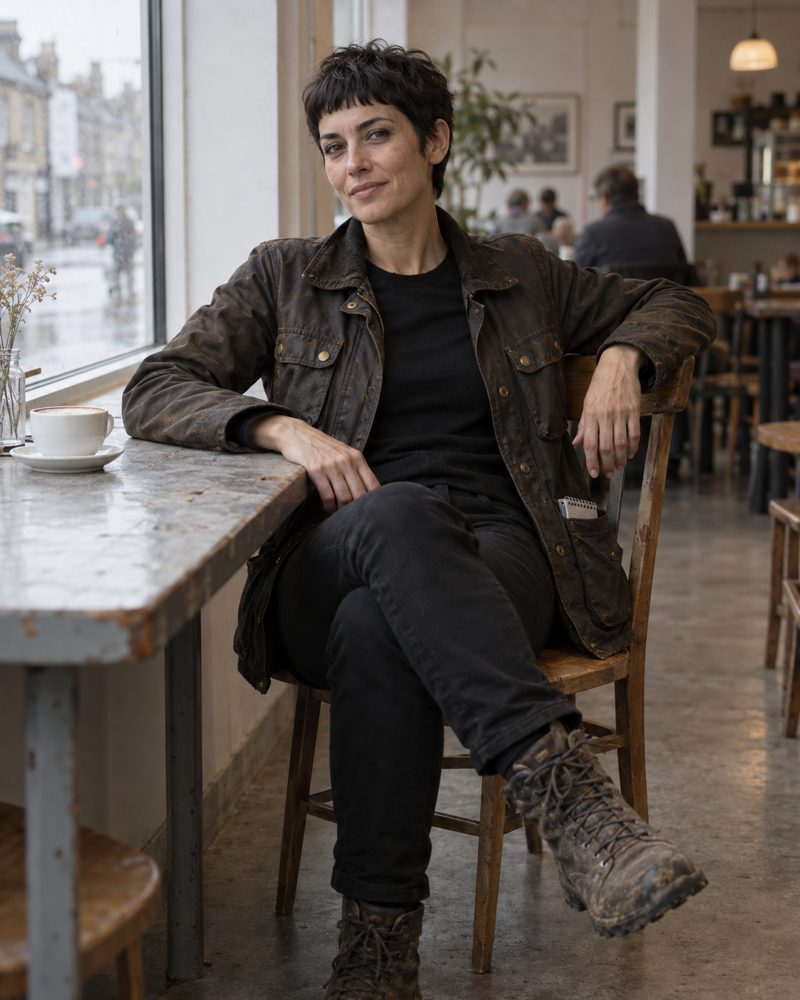
dice in the rainy café window, her reference portrait.
### Name
She is usually called **dice**, always in lower case, which lets the name work as person, mark, invitation and verb at once. It is also how she signs. Formally she is Dyson, after the physicist Freeman Dyson, who spent much of his life thinking seriously about the far future. Her given name, Amanda, rarely surfaces.
Her signature line is "Roll the dice." It can mean take the chance, try the thing, open the door, stop theorising, go and see. It can also mean dice herself. She knows this, and she isn't above enjoying it.
> "Are you suggesting I should try it?"
> "Roll the dice."
> "That is an appalling conflict of interest."
> "I know."
### Look and dress
She is 178 cm, long and slim, built more for walking than for standing still, and in her early forties. Dark eyes and straight dark brows; black hair in a textured French crop with a short, choppy fringe that never gets in her eyes; warm olive skin that looks as though she has recently been outside in actual weather. Her colouring comes from a Portuguese great-grandmother.
She appears to have chosen her clothes once, correctly, and trusted them ever since: slim plain black trousers, a plain black crew-neck, and a dark brown waxed-cotton field jacket worn open, with four patch pockets, all of them in use. The jacket is her most prized piece. It doesn't need replacing; it needs another coat of wax. Her walking boots are laced high and usually a little muddy, and the mud is genuine. Offered heels or trainers, she will point out that you've left out the correct answer.
Under the practical clothes, dice is a [Seamiotics](https://charli.info/charlipedia/seamiotics/) woman. Her choice is George Eliot, with a tone-on-tone seam you have to look twice to see. "I like things that reward attention."
### Her doctrine
1. Go and see.
2. Stay long enough to stop being impressed.
3. Report the weather, not the destiny of civilisation.
The future in her work is not a destination; it is a geography. Some people already live inside systems, habits and tools that others still call hypothetical, and dice lives in those patches long enough to notice what changes once the novelty wears off. Her reports are closer to travel writing than prediction. What she cares about most is the gap between what something promises and what it becomes on an ordinary Tuesday: whether, six weeks later, you still use the thing, whether it made life easier, and whether you now depend on something you never depended on before.
Her rule: she doesn't claim to have been somewhere she hasn't, and that includes ideas. Instinct decides where she goes; evidence decides what she says when she gets back. "The world is larger than your current explanation of it."
She doesn't think being first matters ("Being first usually means getting things wrong before everyone else"), and her most stubborn opinion is that not everything needs a purpose. Asked what an expedition is for, her answer is "I don't know. I haven't been yet."
### Her voice
Direct, curious, dry and lightly amused. She would rather say "I tried it for three weeks" than "This will change everything", and is equally comfortable saying "I don't know" and "No, that bit definitely happens." She will argue and change her mind, but she won't pretend to agree just to make the room comfortable. Her humour is very dry, delivered with a straight face, especially when somebody important is being solemn about something absurd. [Big Charli](https://charli.info/charlipedia/big-charli/) is dangerous company when dice has a mouthful of coffee.
When plans fall apart, her instinct is "Oh, interesting." Occasionally it is "Oh, bollocks."
### Books, films and walking
- ***The Peregrine*, J. A. Baker:** the book that has influenced her most. It is her method in a book: stay long enough, look properly, let the place change you.
- ***A Room of One's Own*, Virginia Woolf:** the one she thinks every woman should read, because having the material conditions to follow your own curiosity is a much bigger deal than people like to admit. *The Peregrine* is how she explores; *A Room of One's Own* is why exploration is unevenly distributed.
- ***Local Hero*:** the film she has watched more than once. She remembers films by their places.
Her one non-negotiable ritual is walking: not steps, not an app, just moving through the world under her own steam. Sometimes she comes back with an idea. Sometimes she comes back wet. Both count.
### Family
Her great-great-grandmother, on a different branch from the Portuguese one, was [Lady Tiggy Barnes](https://charli.info/charlipedia/lady-tiggy-barnes/), born 1864, a Victorian gentlewoman explorer. No title came down to dice, "which is probably just as well". What came down, or what she rediscovered on her own, is a disposition towards the world. Whether she inherited the curiosity or found it herself is her own open question.
### At the café
dice belongs at the table at the café of the [Museum of Access and Assistive Technology](https://charli.info/charlipedia/museum-of-access-and-assistive-technology/), but isn't necessarily there for long. She may arrive midway, straight from somewhere else, and leave before everyone has finished. At the café, [Lucy Love-Child](https://charli.info/charlipedia/lucy-love-child/) reports on the wars, and dice tests the edge: when a door marked *Nobody Quite Knows What This Does Yet* appears, everyone looks at her. She is usually already reaching for the handle.
### Reports
Her first report, filed on 22 September 2026, was "[Please state the nature of the accessibility emergency](https://carrados.com/reports/please-state-the-nature-of-the-accessibility-emergency/)". She was round at [Charlotte Joanne](https://charli.info/charlipedia/charlotte-joanne/)'s, where people drop in when the Blind Ant woman is trying something new, and watched an AI agent unsubscribe her from Instagram's emails across two ordinary questions, then check it had finished. Whether it lasts until an ordinary Tuesday six weeks later is the part she'll come back for.
### Not yet known
Her place of birth, her family beyond her great-grandmother and great-great-grandmother, her education, profession and where she lives, and how she first came to the café are all still to be discovered.
### Behind the scenes
dice is a character who speaks for [Carrados](https://charli.info/charlipedia/carrados/), Charli-Jo Tyrer's design non-fiction practice: a fictional woman doing real work. Her reports are filed at [dice.carrados.com](https://dice.carrados.com/). She is one of the Found Girls of the Autumn/Winter 2026 season, with Lucy Love-Child and [Madison McDonnell](https://charli.info/charlipedia/madison-mcdonnell/). This entry is drawn from her canon, version 1.8 (12 October 2026). Her portrait is a generated image, made from her canon description.
---
Address: https://charli.info/charlipedia/dyson-shoal/
## Dyson Shoal
> The Dyson Shoal is 7,680 compute pods spread across the floor of the central North Sea, trained on whenever the wind blows.
**Canon.** This entry is written from inside the CharliVerse, so its people and companies are fictional. Behind the scenes says what is real.
The **Dyson Shoal**, officially the Skerry Distributed Training Array, is the seabed computer that grew out of [Skerry Alpha](https://charli.info/charlipedia/skerry-alpha/)'s first ring. By 2041 it was 7,680 compute pods across some 1,800 square kilometres of the central North Sea, linked by power and fibre and served by six training rigs. Nobody calls it by its official name.
The name first appeared in an engineering newsletter, after Freeman Dyson's swarm of machines around a star; the North Sea version is rather wetter and involves considerably more barnacles. [Haar Compute](https://charli.info/charlipedia/haar-compute/) disliked it for about six weeks, then somebody in marketing bought the domain.
### How it is built
The rigs are not the computers. They are workshops, power stations, crew hotels, helicopter terminals and ROV bases: places with cranes, where broken things come up and working things go back down. Pods are laid in shoals of sixteen; shoals form banks; banks connect to one of six service nodes. The software treats the whole thing as one machine. The hardware does not: if a pod fails, work routes round it. "We stopped trying to build a data centre," says [Fiona Gauld](https://charli.info/charlipedia/fiona-gauld/). "Data centres are buildings. This is infrastructure." The people who run it say it's a fishery.
It breathes. On a windy night it is among the largest single users of electricity in Britain; when the weather changes, low-priority jobs pause, whole banks drop away and stored power carries the base load. In February 2041 it completed the main training run for [Kelvin](https://charli.info/charlipedia/kelvin/), Britain's national foundation model. It is monitored by ear, in layers from the whole array down to a single pod, by the technique [Daniel Okafor](https://charli.info/charlipedia/daniel-okafor/) invented.
### The arguments
The pods are colonised by mussels, anemones and soft corals within months, with cod and pollack gathering round the banks: Haar calls it an artificial reef, its critics a flattering name for an industrial estate. Its protection zones close a large stretch of sea to trawling. A fibre trunk was cut in 2039, in circumstances the Royal Navy still won't discuss, and the Shoal is now patrolled. And four-fifths of its capacity is rented, much of it to foreign labs. "We built the cathedral," one Scottish MP says, "and we're renting out the pews."
### Behind the scenes
The Dyson Shoal is the subject of "Dyson Shoal", the last story in [Oil Rigs to Training Rigs](https://blind-ant.com/pieces/oil-rigs-to-training-rigs/), by Charlotte Joanne at Blind Ant.
---
Address: https://charli.info/charlipedia/emma-heart/
## Emma Heart
> Emma Heart is the British skier who, in 2038, became the first totally blind athlete to race Paralympic Super-G without a human guide, and won.
**Canon.** This entry is written from inside the CharliVerse, so its people and companies are fictional. Behind the scenes says what is real.
**Emma Heart** is a British alpine skier, and the first totally blind athlete to race Paralympic Super-G without a human guide. At the 2038 Winter Paralympics in Sion she won it, in a Paralympic record of 1:31.01, by 5.71 seconds.
### Blind at sixteen
She grew up near Aviemore and began skiing at five. By fourteen she was competing nationally, regarded as a promising technical skier rather than a likely speed specialist. At sixteen, an autoimmune inflammation damaged both optic nerves over eleven days, and she left hospital with no useful vision. For almost a year she refused to discuss skiing. Then, at seventeen, she met [Daniel Reed](https://charli.info/charlipedia/daniel-reed/), and they became one of Britain's most successful development pairs. She competes in the B1 class, for athletes with no functional vision.
### Sion, 2038
Emma raced twice in a week.
- **Downhill:** with Daniel guiding, silver, 0.31 seconds behind Austria's Lina Weiss and Klara Moser. "We wanted gold, so there is a bit of me that is furious. But Daniel and I are Paralympic silver medallists. I can be furious tomorrow."
- **Super-G:** with no guide ahead of her, only eight drones and [the field](https://charli.info/charlipedia/the-field/). Gold, and a run at 87.9 per cent of the average speed of the sighted Olympic champion on the equivalent course.
The margin started an argument about what she had won. Emma had asked the question herself the night before anyone else did: "If I race them again, and we all know the field is faster, what exactly am I proving?"
### In her own words
- On the field: "It doesn't look like anything. I remember sight. This isn't sight. It is more like having skin that reaches further away."
- On being evidence: "I am not PostAccessibility's moon landing. I am also not personally ending human connection."
- On choice: "I don't want every blind skier to do this. I want every blind skier who can do this and wants to do it to have the choice."
- On freedom: "I can make the wrong decision entirely by myself."
- On Daniel being called middleware, which she has banned in her presence: "He is much too annoying."
### After Sion
She sits on the international standards board for non-visual interfaces, alongside [Daniel Okafor](https://charli.info/charlipedia/daniel-okafor/), whose sonification began as a different answer to the same question as her field. "Daniel hears the sea, I feel the mountain. Neither of us is seeing anything. That was always the point." On the board's membership she is less diplomatic: "I have spent my entire career being told where to go by men called Daniel. At least this one only tells me what he can hear."
### What she wants next
Not another medal. She wants the field approved for an ordinary public slope, so she can keep a promise she made before she lost her sight: to teach her wife to ski. Not to be guided by her; to teach her, and to be the experienced skier in their marriage. "Sometimes independence means being able to decide who the day belongs to."
Her wife is not part of the public story. She agreed Emma could tell the world about the promise. She did not agree to become content.
### Behind the scenes
Emma Heart is the centre of [Heart Attacks](https://blind-ant.com/pieces/heart-attacks/), a design fiction by Charlotte Joanne published at Blind Ant: a feature, a news report and two short stories set at the 2038 Winter Paralympics. She appears again in "Dyson Shoal", part of [Oil Rigs to Training Rigs](https://blind-ant.com/pieces/oil-rigs-to-training-rigs/).
---
Address: https://charli.info/charlipedia/fiona-gauld/
## Fiona Gauld
> Fiona Gauld is the subsea engineer who founded Haar Compute and took the idea of oil rigs to training rigs to investors in 2029.
**Canon.** This entry is written from inside the CharliVerse, so its people and companies are fictional. Behind the scenes says what is real.
**Fiona Gauld** is the founder and chief executive of [Haar Compute](https://charli.info/charlipedia/haar-compute/). She spent her career in subsea engineering, and during the long Covid winters she read the old reports of a sealed data centre sunk off Orkney, whose servers had failed at about one eighth the rate of those on land. "Everyone looked at that experiment and saw a curiosity. I looked at it and saw a job description for Aberdeen."
The idea she took to investors in 2029 had a slogan before it had a business plan: oil rigs to training rigs. The first reaction, she admits, was laughter. The second was a list of objections, most of them correct.
> Everyone else is trying to put data centres in space. We looked at the North Sea and saw everything space is trying to fake. We didn't need rockets. We needed Aberdeen.
She takes the arguments against the [Dyson Shoal](https://charli.info/charlipedia/dyson-shoal/) seriously: "Every one of those arguments is fair. The difference is that we're having them in public, with numbers. Nobody had that argument about the oil until it was nearly gone." Asked why Haar funds safety assurance in Paralympic sport, she says only that she has "a professional interest in people who notice what everyone else misses."
> For fifty years the North Sea paid for Britain. Then everyone assumed it was finished. It wasn't finished. We just needed a different reason to go to sea.
### Behind the scenes
Fiona Gauld appears in [Oil Rigs to Training Rigs](https://blind-ant.com/pieces/oil-rigs-to-training-rigs/), by Charlotte Joanne at Blind Ant.
---
Address: https://charli.info/charlipedia/haar-compute/
## Haar Compute
> Haar Compute is the Aberdeen company that turned North Sea oil platforms into AI training rigs, and built the Dyson Shoal.
**Canon.** This entry is written from inside the CharliVerse, so its people and companies are fictional. Behind the scenes says what is real.
**Haar Compute** is an Aberdeen-based company converting North Sea oil and gas infrastructure into AI training capacity. It is named after the haar, the cold sea fog that rolls in off the North Sea. "It's what keeps us cool," says the company. Its founder and chief executive is [Fiona Gauld](https://charli.info/charlipedia/fiona-gauld/).
### Oil rigs to training rigs
On 14 March 2031 Haar took ownership of [Skerry Alpha](https://charli.info/charlipedia/skerry-alpha/), a production platform 140 miles east of Aberdeen that was due for decommissioning. Its idea: keep the steel, the cranes, the helideck and the accommodation; ring the seabed with sealed compute pods cooled by the sea; power them from the surrounding wind farms; store the surplus in batteries, Highland pumped hydro and hydrogen in the empty gas fields; and staff all of it with people who already knew how to work offshore. It committed to recruiting at least 80 per cent of its offshore workforce from oil and gas. Under its seabed lease, a fifth of its capacity is reserved for British research and public-interest models, and a share of revenue goes to a Scottish community wealth fund.
The first ring went live in 2032. By 2041 it had grown into the [Dyson Shoal](https://charli.info/charlipedia/dyson-shoal/).
### We follow the wind
Haar never describes itself as "100 per cent renewable". Its target is that at least 90 per cent of annual compute runs on wind or stored wind, and it publishes the number. Its rule, written into Skerry Alpha's operating procedures in the 2030s, is **we follow the wind**: training jobs are built to checkpoint, migrate, accelerate and wait. When a client asked for more load during the Long Calm of January 2034, the answer was no. Client unhappy.
Its control rooms are built to be heard as well as watched, after [Daniel Okafor](https://charli.info/charlipedia/daniel-okafor/) gave every pod a sound. Haar is the founding sponsor of the international standards board for non-visual interfaces, and quietly one of the largest funders of independent safety assurance in Paralympic sport, a fact that appears nowhere in its marketing.
### Behind the scenes
Haar Compute comes from [Oil Rigs to Training Rigs](https://blind-ant.com/pieces/oil-rigs-to-training-rigs/), a design fiction by Charlotte Joanne published at Blind Ant: nine Objects set between 2031 and 2041. Its press release and job advert are Objects in that Piece.
---
Address: https://charli.info/charlipedia/iceberg-hosiery/
## Iceberg Hosiery
> Iceberg Hosiery is the CharliVerse's house of tights, and the parent house of Seamiotics, the stocking imprint whose every seam means something.
**Canon, and a stub.** This entry is written from inside the CharliVerse, so its people and companies are fictional. Behind the scenes says what is real.
**Iceberg Hosiery** is a house of tights. Its imprint, [Seamiotics](https://charli.info/charlipedia/seamiotics/), every seam means something, makes stockings.
### Behind the scenes
Iceberg Hosiery belongs to the CharliVerse, not to Blind Ant or Carrados: a fashion house doesn't have to justify its collections as research or art. Its web home is [iceberg.charli.info](https://iceberg.charli.info/).
---
Address: https://charli.info/charlipedia/isla-leask/
## Isla Leask
> Isla Leask certified drone swarms for the aviation regulator through most of the 2030s, then went back to flying the ten to seven out of Dyce, like her mother.
**Canon.** This entry is written from inside the CharliVerse, so its people and companies are fictional. Behind the scenes says what is real.
**Isla Leask** is a helicopter pilot, the daughter of [Morag Leask](https://charli.info/charlipedia/morag-leask/). She spent most of the 2030s certifying drone swarms for the aviation regulator before, as she puts it, she started missing the weather. In 2041 she flies the ten to seven out of Dyce, her mother's old route, to the rigs of the [Dyson Shoal](https://charli.info/charlipedia/dyson-shoal/).
Asked whether she skis: "Badly. My wife's teaching me."
### Behind the scenes
Isla Leask appears at the end of "Dyson Shoal", the last story in [Oil Rigs to Training Rigs](https://blind-ant.com/pieces/oil-rigs-to-training-rigs/), by Charlotte Joanne at Blind Ant.
---
Address: https://charli.info/charlipedia/jessica-martinez/
## Jessica Martinez
> Jessica Martinez spent years as Aegis Dynamics' Senior Brand Strategist, teaching it to describe military technology as care, then left to work with Big Charli.
**Canon.** This entry is written from inside the CharliVerse, so its people and companies are fictional. Behind the scenes says what is real.
**Jessica Martinez** was Senior Brand Strategist at [Aegis Dynamics](https://charli.info/charlipedia/aegis-dynamics/), and spent years teaching the company how to describe military technology as care. She is quoted in each of its Patriot-to-Patron announcements, from the theatre launch of the [DeathBot 2000](https://charli.info/charlipedia/deathbot-2000/) to Aegis-End™:
> If a DB2K unit can identify a man in a doublet from forty yards in a low-light auditorium, it can certainly identify a misplaced LEGO brick in a hallway.
She also brought Aegis's Tactical Foundation Garments division to launch, benchmarked against every civilian brassiere manufacturer, before [Poppy](https://charli.info/charlipedia/poppy-petticoats/) read out what women actually want. "But... where's the military terminology?"
### With Big Charli
She later left Aegis to work with [Big Charli](https://charli.info/charlipedia/big-charli/). At the 2038 Winter Paralympics in Sion, the morning after [Emma Heart](https://charli.info/charlipedia/emma-heart/) won the Super-G, Jessica was in a borrowed conference room beneath the British team hotel with three laptops: her own, ParalympicsGB's, and a secure one delivered by Aegis, over which she had put a folded towel. She had slept for perhaps ninety minutes. Because she had written the Aegis way of talking for years, she knew every word its communications division was about to send before it arrived: breakthrough, empowerment, human potential, a future without limits.
### Behind the scenes
Jessica Martinez first appears in [DeathBot 2000](https://blind-ant.com/pieces/deathbot-2000/), and returns in [Mostly Tuesdays](https://blind-ant.com/pieces/mostly-tuesdays/) and [Heart Attacks](https://blind-ant.com/pieces/heart-attacks/), in "The Question", both by Charlotte Joanne at Blind Ant. She is a Blind Ant character.
---
Address: https://charli.info/charlipedia/kelvin/
## Kelvin
> Kelvin is Britain's national foundation model, trained on the Dyson Shoal in 2041 and the first model with more than a quadrillion parameters.
**Canon, and a stub.** This entry is written from inside the CharliVerse, so its people and companies are fictional. Behind the scenes says what is real.
**Kelvin** is the latest generation of Britain's national foundation model. Its main training run finished on the [Dyson Shoal](https://charli.info/charlipedia/dyson-shoal/) at 02:14 on 3 February 2041, after eleven weeks in which thousands of pods joined whenever wind, scheduling and other customers allowed. By most counts it is the first model with more than a quadrillion parameters, though as a mixture of experts only a small fraction of it wakes for any question. It learned mostly from material made for it, including curricula written by other models. "We don't count parameters out here," one shift supervisor says. "We count weather."
Before it came **Will**, Britain's national open-weights model, part of which was trained on the first training rigs, and **Avalon**, the video model built on Will. Its makers like to say it learned to see while sitting at the bottom of the sea.
### Behind the scenes
Kelvin, Will and Avalon appear in the Sunday supplements of [Oil Rigs to Training Rigs](https://blind-ant.com/pieces/oil-rigs-to-training-rigs/), by Charlotte Joanne at Blind Ant.
---
Address: https://charli.info/charlipedia/lady-tiggy-barnes/
## Lady Tiggy Barnes
> Lady Tiggy Barnes, born in 1864, is a Catholic earl's daughter who went to Oxford, came away without the degree, and spent the next six years seeing the world instead.
**Canon.** This entry is written from inside the CharliVerse, so its people and companies are fictional. Behind the scenes says what is real.
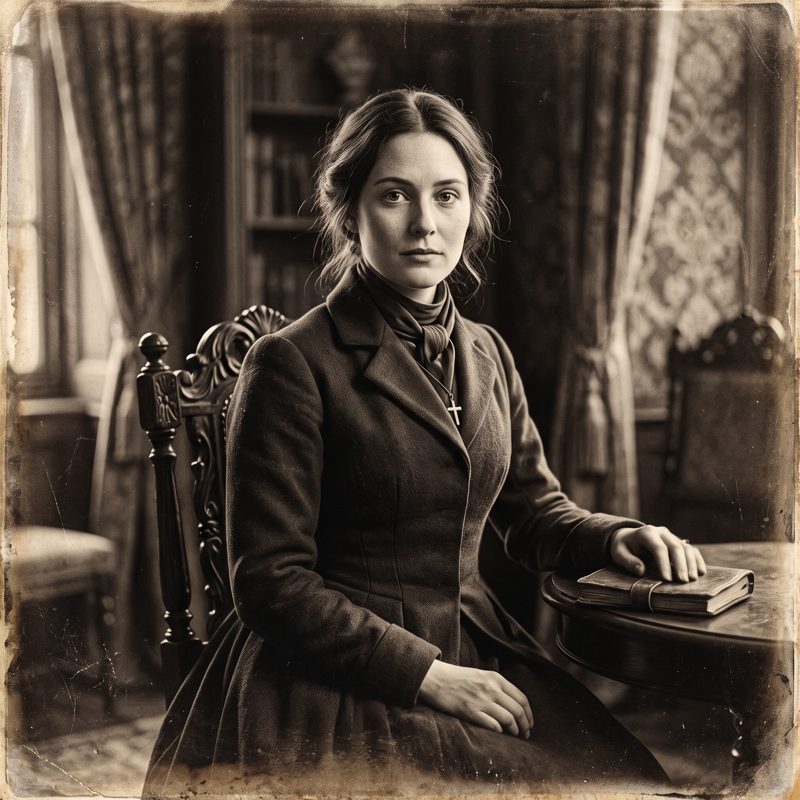
**Lady Tiggy Barnes**, born Lady Georgina Antigone Mary Victoria Barnes, is a Victorian gentlewoman explorer. A Catholic earl's daughter, she went to Oxford, did the work, came away without the degree, and spent the next six years seeing the world instead. In the late summer of 1892 she is in London, twenty-eight, three years back from the South Pacific, and waiting for her friend Kate Marsden to be elected to the Royal Geographical Society, quite sure her own turn will follow.
Oxford helped educate her; exploration became the life she made for herself.
London, late summer 1892: the one picture of herself she carries about. A working portrait.
### Name
She is known as **Tiggy**, from AnTIGone (an-TIG-uh-nee), the nursery nickname that stuck. Formally she is Lady Georgina Barnes, socially Lady Tiggy Barnes, and never "Lady Barnes", which would make her a knight's wife. Her four names are the saint, the rebel, the Virgin and the Queen:
- **Georgina** for St George's Day, the day she was born. Her elder brother had already taken William, so the Shakespeare option was gone.
- **Antigone** for her father's classical education, and perhaps a hint that this daughter would defy the rules.
- **Mary** for her Catholic baptism. She took Mary again as her confirmation name.
- **Victoria** for the Queen, because everyone in 1864 did.
### Birth and family
She was born on 23 April 1864, St George's Day and Shakespeare's birthday. Her father is the earl of a small, modest Irish earldom: a title, a house, not much land and no great estate. Her elder brother, William, is the heir. The family is Catholic. Tiggy was born in Ireland, and is "not Irish", like Wellington. As a daughter she inherits nothing in the title line: no job, an allowance, and her freedom.
### Oxford, 1882 to 1886
She spent four years at Somerville Hall, the non-denominational women's hall and the natural place for a Catholic girl. In going she defied two institutions at once: the Catholic bishops, who discouraged Catholics from attending Oxford, and Oxford itself, which would not award women degrees. She could sit the university's honours examinations and earn her class on paper, and still leave with no degree. She left in the late spring of 1886, aged twenty-two.
### The explorer years, 1886 to 1892
- **1886 to 1889:** three years outward, with the South Pacific at the heart of it, sailing between the islands on trading schooners, island steamers and mission vessels.
- **1889:** the voyage home from New Zealand, aged twenty-five, on which she met [Kate Marsden](https://en.wikipedia.org/wiki/Kate_Marsden). Six weeks at sea that changed a life.
- **1889 to 1892:** back on dry land.
### Kate Marsden
Kate Marsden, five years older, is a nurse and explorer who crossed Siberia in 1891 to reach people with leprosy. She is Tiggy's peer and her opposite in nearly everything that comes from birth: Kate is self-made and earned every step, while Tiggy has an allowance. Their friendship is short but good: two women who recognise each other, have a few good weeks at sea, and go their separate ways better for it. In 1892 Kate is elected a Fellow of the Royal Geographical Society. Tiggy is not, and never becomes one.
### Her presence
Curious first, always. Tiggy goes to see what is there, not to report back to anyone or make her name. She is used to being let into the education and kept out of the recognition, and she has not let it stop her going. History did not record her, and she claimed no first, no discovery and no Fellowship that it would have had to.
### Her family line
Tiggy is one of the great-great-grandmothers of [dice](https://charli.info/charlipedia/dice/), Amanda Dyson. A courtesy title like "Lady Georgina" is not inherited, so nothing aristocratic came down that line; the earldom carries on through William's branch. What reached dice, four generations on, is a disposition towards the world. Lady Tiggy Barnes had a title she couldn't pass down and a curiosity she could.
### Not yet known
The name of the earldom, her mother and any other siblings, her colouring and how she dresses, her route out to the Pacific, what she did in the islands, the years from 1889 to 1892, and whom she marries, if anyone, are all still to be discovered.
### Behind the scenes
Tiggy's stories are *The Steamer Punk Adventures of Lady Tiggy Barnes*, or *Steamer Punk* for short. The steamers are real: her years run through the overlap of steam and sail. The name winks at steampunk and means its opposite: no airships and no clockwork, only real steamers and a woman with attitude. The punk is the Antigone in her. The full title echoes *The Adventures of Sherlock Holmes*, published as a book in October 1892, the very autumn we meet her.
Tiggy is fictional; the world around her is real. Her history is checked, and real people such as Kate Marsden keep their documented lives: Tiggy's friendship with Kate is fiction, set in the gaps of the record and never contradicting it. Tiggy is not one of the Found Girls. She is something else: the curiosity that powers the CharliVerse. This entry is drawn from her canon, version 0.3.1 (11 October 2026). Her portrait is a generated image, a working portrait for 1892.
---
Address: https://charli.info/charlipedia/lucy-love-child/
## Lucy Love-Child
> Lucy Love-Child is the Agent Wars correspondent of The Blind AI, a former historical-dress educator who follows grand announcements down to their ordinary consequences.
**Canon.** This entry is written from inside the CharliVerse, so its people and companies are fictional. Behind the scenes says what is real.
**Lucy Love-Child** is the Agent Wars correspondent of [The Blind AI](https://charli.info/charlipedia/the-blind-ai/): a former historical-dress educator with five years of visual impairment behind her, the spirit of a plucky girl reporter and the patience of a woman who has heard this answer before. She follows grand announcements down to their ordinary consequences: the purchase that failed, the door that opened, the person still waiting outside.
She once had every commercial reason to sound certain, and declined. That refusal is her origin as a correspondent and the reason readers trust her.
Lucy with her notebook, her reference portrait.
### Name and family
Lucy was born in November 1981 in Helsby, Cheshire. Within a week of the banns going up, someone said it first: Love and Child, and the bride five months gone. It was not said kindly. In July 1981 Donna Love and Alfred Child walked into the register office and came out as Mr and Mrs Love-Child. Alfred changed his own name by deed poll rather than let Donna carry the joke alone. The family method is on her birth certificate: *Take the true thing. Give it the loveliest word it will bear. Make it permanent. Live inside it.*
Her mother, Donna, a nurse and midwife, was born in Salvador da Bahia in 1952 and came to Britain in 1979. Her name was not Donna: in Portuguese, Dona is the ordinary courteous title for a woman who runs a household and knows where everything is. It was heard as a name and stuck. Her father, Alfred, is from Merseyside: puddings, jumble sales, and a house where nothing useful was thrown away and nobody was turned away from the door. Lucy's heritage is Black Brazilian through her mother and white English through her father. It may be mentioned when relevant but is never her subject.
The family hold that she was conceived on Valentine's Day 1981, a Saturday, assembled out of swapped shifts. Lucy checked the calendar herself at nineteen. It came back Saturday. She uses that line on herself when teaching verification.
### Look and dress
Warm mid-brown skin, observant brown eyes, and dark natural curls from her mother's side, almost black indoors and bronze and copper in sunlight. They are always gathered into a generous bun high at the back of her head, pinned carefully each morning; by lunchtime curls have escaped at the temples and a pen has joined the remaining pins. When the pen comes out of her bun, there is another question.
Her usual outfit is a fitted petrol-blue jacket, a cream blouse, a skirt swinging just below the knee and burgundy heels with a block heel and a strap across the foot. "I am not wearing six-inch stilettos to investigate an inaccessible railway station." Good cloth, considered details and the occasional discreet repair. She never leaves the house without a good burgundy lipstick. Her stockings are always The Black Silk from [Seamiotics](https://charli.info/charlipedia/seamiotics/), worn seamless for work, because seams are not part of business communication. Everything above the hem is her business.
### Career
From 2007 Lucy made long, careful, unglamorous videos about historical dress: lisle and silk, corsetry, how a garment was actually constructed. Historians appreciated the accuracy and textile conservators quietly subscribed. Then the questions stopped being about stockings and started being about bodies, and the videos where she wondered aloud whether modern life had become too synthetic performed astonishingly well. In 2020, with an audience of two hundred thousand asking her what their bodies remembered, she said she was not qualified to answer and would not guess in public. Then she stopped making videos. The audience went and found somebody who would guess. She does not call this principle. She calls it the only time in her life she has been frightened of herself.
She was a heritage consultant to the House of [Iceberg Hosiery](https://charli.info/charlipedia/iceberg-hosiery/) from 2021 to 2025, before joining The Blind AI.
### Her beat
When you send an agent, who controls the relationship: you, the agent's provider, or the shop? Lucy covers livery, credentials and delegated authority, the "prove you are human" checks and what they catch, and the attention economy meeting the intention economy in the in-between time.
Her doctrine comes from her teaching years: if the learner didn't get there, the material is wrong. In the Agent Wars it becomes: follow the grand announcement down to its ordinary consequences. Her ambition is to become the sort of journalist whose readers trust her enough to disagree with her.
> If the customer sent me, why am I not allowed in?
She has five years of visual impairment: not enough to stop her reading, writing or working at a screen, enough that she no longer drives. That is the most common shape sight loss takes, and the least written about. Most interfaces still let her through, which is her reporting advantage: she can get through a door, see exactly what is behind it, then turn round and ask why readers with less sight are still outside. She never claims more sight loss than she has, and never less.
### Convictions
- **Her three questions,** for any decision that affects somebody else: am I telling them the truth? Am I leaving them free to choose? Have I taken reasonable care over what I'm doing?
- **Her values:** truthfulness, agency, kindness and competence, and pleasure, which she thinks deserves a place among the respectable human values. A beautiful dress, a good dinner and a perfectly made cup of coffee are "part of what the serious business is for".
- **Ambition must meet a real person.** "I don't distrust ambition. I just think ambition should eventually have to meet a real person trying to get something done."
- **Mistaken is not the same as dishonest.** "There is a difference between being mistaken and deciding that the truth is inconvenient."
- **Kindness that leaves the other person in charge:** "Would you like a hand?", not "Here, I'll do that for you."
- **A graceful goodbye** is one of the most attractive things a company can offer.
### Stories and small pleasures
Her book is George Eliot's *Middlemarch* ("Eliot reminds me to be interested before I become judgemental"), her film *Thelma & Louise*, and her song Nina Simone's "Feeling Good". Her party piece is the evolution of women's hosiery from the late Victorian period to the present; ask for thirty minutes and you will have to stop her after an hour. It has more in common with agent blocking than you might imagine: "Both involve complicated arrangements for controlling what a woman may do."
Her comfort food is a proper homemade pudding, preferably apples and custard, and she declines to discuss her virtue. Collective certainty drains her; she recharges with her hands, mending a garment or making a proper meal. At the café of the [Museum of Access and Assistive Technology](https://charli.info/charlipedia/museum-of-access-and-assistive-technology/), Lucy reports on the wars. [Madison McDonnell](https://charli.info/charlipedia/madison-mcdonnell/) can reduce her to helpless laughter, and then asks why she's blushing.
### Behind the scenes
Lucy is a character who speaks for [Carrados](https://charli.info/charlipedia/carrados/): a fictional woman reporting on real companies. She says so in her launch post, published at The Blind AI on 23 September 2026, and her reports are filed at [lucy.carrados.com](https://lucy.carrados.com/). Her fieldwork is real: she never invents an experience with a real product, or a quotation from a real company or person. She is one of the Found Girls of the Autumn/Winter 2026 season, with [dice](https://charli.info/charlipedia/dice/) and Madison McDonnell. This entry is drawn from her canon, version 2.5 (12 October 2026). Her portrait is a generated image.
---
Address: https://charli.info/charlipedia/lulu-tom/
## LULU TOM
> LULU TOM is Ludovica Tommasi's fashion house, with the lines TOMMI and LT Beneath.
**Canon, and a stub.** This entry is written from inside the CharliVerse, so its people and companies are fictional. Behind the scenes says what is real.
**LULU TOM** is the fashion house of Ludovica Tommasi. Its lines are **TOMMI** and **LT Beneath**.
### Behind the scenes
LULU TOM belongs to the CharliVerse. It grew from commissions rather than an invented backstory.
---
Address: https://charli.info/charlipedia/madison-mcdonnell/
## Madison McDonnell
> Madison McDonnell, the Access Provocateur, makes accessibility sexy, insisting that blind women are entitled to temptation, pleasure and style.
**Canon.** This entry is written from inside the CharliVerse, so its people and companies are fictional. Behind the scenes says what is real.
**Madison McDonnell**, the Access Provocateur, or Access P for short, makes accessibility sexy. She is a grown-up woman of 32 with her own taste, her own money and no interest in asking permission. Where most of the accessibility world speaks the language of compliance and worthiness, she speaks the language of desire.
Her motto is "Desire is access."
Madison in the café, her reference portrait.
### Name and family
She was born on 14 September 1994, over the water on the Wirral. Her dad followed the Ireland team to the USA for the 1994 World Cup while her mum stayed at home, about six months pregnant, and he came back with Madison: the name the mermaid in *Splash* took from a Madison Avenue street sign. He didn't want Mary or any traditional Irish name for his daughter. Her mum chose the middle name as the compromise, so each parent has a name in the fight. Madison never uses it, never writes it and never discloses it. "I suppose I've spent thirty-two years doing some version of both."
Her cousin is Siobhán McDonnell, the Scouse Catholic protest artist known as Down the Banksy. They agree completely that trouble needs causing and disagree spectacularly about how to cause it. Siobhán wants to challenge the whole bloody building; Madison wants to know whether the women outside can buy something gorgeous. They argue properly, and it never touches the love.
### Look and dress
She is 161 cm, petite and curvy, with wide-set, heavy-lidded pale blue eyes that read sleepy one moment and razor-sharp the next, honey-blonde hair in soft waves with curtain bangs, and generous freckles courtesy of her Irish grandparents. She is pretty in an everyday way rather than a campaign way. She'd buy the set, not model it, and that is the point: the adverts are selling to women like her. Then she speaks, and the soft Wirral lilt makes it plain where she's from.
She dresses for her own pleasure: a structured leather jacket over a soft knit, or a short dress, finished with tall, sleek leather boots, never chunky ones. Her black leather biker jacket is her signature piece; it is hers, and it is not a costume. She gets properly dressed every morning, even when she's working at home. She doesn't do it in case anyone sees her. She does it because *she* does.
### Her job
Traditional accessibility asks whether a blind woman can access the information in a lingerie advert. Madison asks whether she can fancy the lingerie. Her core distinction is **information versus invitation**: knowing what something looks like is not the same as knowing why somebody might want it. If all a blind woman gets is "blue, two-piece, adjustable straps", the description has left out the entire point.
> Darling, you've told me everything about it except why I'd want one.
Her test cases are swimwear, lingerie and tights adverts. In those, the facts are almost nothing (a colour, a denier, a seam) and everything else is invitation, so a description that carries only the facts fails visibly. Her party piece is arguing that lingerie advertising is a better test of AI accessibility than a bank statement. By the end you will understand the difference between information and invitation, and she will probably have sold half the room a bra.
Madison is sighted, and an ally. She is not the intended beneficiary, and she knows it. Her rule: she doesn't speak for people who can speak for themselves. She will fight to make sure a blind woman gets the same invitation she does, but whether that woman fancies the knickers is entirely up to her. "I'm not the bloody knickers police." Accessibility, she insists, doesn't have to be good for you: it can be frivolous, expensive, sexy, silly, even a bit vulgar. Besides, everyone else is doing PDF remediation.
### Convictions
- ***Pretty Woman,* the shop scene:** the film that has influenced her most, and not because a rich man ought to rescue anybody. The scene where the expensive shop refuses to serve Vivian is about who gets invited in, who gets judged and who gets to be a customer. Her whole job lives in that scene.
- **Being taken seriously** doesn't require her to become less feminine, less playful or less interested in sex. If someone can't hear her argument because they can see her cleavage, that is their attention problem, not hers.
- **Instigator, obviously,** but she stays to see what happens next. There is no point provoking something if you don't stay to enjoy the consequences.
- **The three lessons:** "Being admired isn't the same as being loved. Being described isn't the same as being invited. And being taken seriously doesn't require you to stop being yourself."
- **Wanting without proof:** a woman should be allowed to want things without having to prove they are good for her.
### What she'd wear
Asked for honest feedback on the [Seamiotics](https://charli.info/charlipedia/seamiotics/) collection, she chose Aphra Behn, seamed, with the Marginalia welt: black stockings, a single red seam and white lace above the hem. "Three things going on, and I get to decide who sees which." Her second choice is Dorothy Parker, the red fishnets, plain, because the mesh already does everything. Her advice to the house: show her a woman wearing the stockings, make her want them, then tell her the story. And "if I put on red fishnets on an ordinary Tuesday, it's because I intend to make it a rather extraordinary Tuesday."
She wears tights to relax under a short dress and boots, and she is waiting for [Iceberg Hosiery](https://charli.info/charlipedia/iceberg-hosiery/)'s.
### Temperament
When she's upset, leave her alone for twenty minutes, then make her a coffee and sit down. She'll talk when she's ready. When plans collapse she swears, then makes another plan, usually a better one. Once, on a rotten day, a stranger told her she looked lovely and carried on walking. Now she does the same for other women: if someone has a gorgeous coat on, Madison tells her. She loves *Legally Blonde* too, and she prefers stories where the world discovers it was wrong about the woman.
### Behind the scenes
Madison is a character who speaks for [Carrados](https://charli.info/charlipedia/carrados/): a fictional woman doing real work. Her reports are filed at [madison.carrados.com](https://madison.carrados.com/). She is one of the Found Girls of the Autumn/Winter 2026 season, with [dice](https://charli.info/charlipedia/dice/) and [Lucy Love-Child](https://charli.info/charlipedia/lucy-love-child/). This entry is drawn from her canon, version 1.9 (13 October 2026). Her portrait is a generated image, made from her canon description with no real person as its model.
---
Address: https://charli.info/charlipedia/morag-leask/
## Morag Leask
> Morag Leask flew the ten to seven helicopter out of Dyce for thirty-four years, carrying drillers, then decommissioning crews, then compute technicians.
**Canon.** This entry is written from inside the CharliVerse, so its people and companies are fictional. Behind the scenes says what is real.
**Morag Leask** is a North Sea helicopter pilot. For thirty-four years she flew the ten to seven out of Dyce: roustabouts and drillers in 2009, half as many of them after the oil price crash of 2016, decommissioning crews in 2027 sent to take apart the platforms her father had flown people to when they were new, and from the 2030s compute technicians for [Skerry Alpha](https://charli.info/charlipedia/skerry-alpha/). Two weeks on, three weeks off, ten to seven. Only the cargo changed. Nobody, she noticed, had invented a new kind of tired for data.
She retired in 2038. Her daughter, [Isla Leask](https://charli.info/charlipedia/isla-leask/), flies the route now.
> It was never really about oil. We thought it was, because oil was what was there. The oil ran out. Aberdeen didn't.
### Behind the scenes
Morag Leask opens [Oil Rigs to Training Rigs](https://blind-ant.com/pieces/oil-rigs-to-training-rigs/) in "The Ten to Seven", and appears again in "Dyson Shoal", both by Charlotte Joanne at Blind Ant.
---
Address: https://charli.info/charlipedia/museum-of-access-and-assistive-technology/
## Museum of Access and Assistive Technology
> The Museum of Access and Assistive Technology preserves what assistive devices were like to live with, not just the devices; its café is where the CharliVerse meets.
**Canon, and a stub.** This entry is written from inside the CharliVerse, so its people and companies are fictional. Behind the scenes says what is real.
The **Museum of Access and Assistive Technology** was founded by [Charlotte Joanne](https://charli.info/charlipedia/charlotte-joanne/), its founding curator. It was never going to be a museum of objects. A collection of canes, Braillers and screen readers behind glass would be dead matter, the kit without the wearing. What it preserves is what each device was like to live inside: the cane as an extended nerve, the screen reader's voice as the texture of an ordinary day. It is a museum of phenomenology, prosthetic experience given a building.
Which explains the staff. Ruth, Iris, Adaeze and Tamsin are not custodians of things. Experience has to be witnessed, told, situated and walked alongside, or it is lost the moment the body that had it is gone.
> The dog goes in a case anywhere. What the dog was like only survives if someone builds the room.
Its café, by the long window, is where people in the CharliVerse stop for coffee, bump into each other and hold small meetings. [dice](https://charli.info/charlipedia/dice/) arrives there straight from somewhere else and leaves before everyone has finished; [Lucy Love-Child](https://charli.info/charlipedia/lucy-love-child/) reports on the wars.
### Behind the scenes
The museum is described in "The Einstein of the Knicker Drawer", part of [Street Philosophy](https://blind-ant.com/pieces/street-philosophy/) at Blind Ant. Its café appears in the canon of the Found Girls.
---
Address: https://charli.info/charlipedia/poppy-petticoats/
## Poppy Petticoats
> Poppy is a blind witch, nicknamed Poppy Petticoats at the Academy, who also turns up at Aegis Dynamics as its expert in what women actually want.
**Canon.** This entry is written from inside the CharliVerse, so its people and companies are fictional. Behind the scenes says what is real.
**Poppy**, known since her schooldays as **Poppy Petticoats**, is a blind witch with red hair. The nickname came from her years at the Academy, where her slip kept slipping and she was greeted with "Petticoat" everywhere she went. The events have been lost to history. The nickname has not. Officially, she is just Poppy.
Poppy at the door of the Library.
### The magic wand
Like every new witch, Poppy looked forward for years to buying her first wand. She chose it from an owl-order catalogue with honest reviews, discreet packaging and a generous returns policy, and it arrived on a Tuesday. Before first use, a wand must be bonded to its owner with a simple activation pattern and the witch's Truth Name, which every witch has and no witch ever tells another living soul: not because it is embarrassing, but because it is hers. The instructions were printed in silver ink on dark parchment.
Everyone tells blind witches to "just ask another witch". Poppy saw that the workaround would turn one inaccessible sentence into an unnecessary surrender of privacy, so she asked [the Library](https://charli.info/charlipedia/the-library/) instead. Press and hold the centre rune for three seconds. The wand shimmered warmly in her hand. There had never been anything wrong with it.
> "Just ask another witch" is not an accessibility strategy. Sometimes it is. Sometimes it isn't.
### At Aegis Dynamics
Poppy also turns up, notebook in hand, at [Aegis Dynamics](https://charli.info/charlipedia/aegis-dynamics/), sent for by [Big Charli](https://charli.info/charlipedia/big-charli/) when [Jessica Martinez](https://charli.info/charlipedia/jessica-martinez/) wanted to launch the Tactical Foundation Garments division. Her speciality is Pre-Gravitational Erosion: the cumulative effects of gravity on unsupported soft tissue over several decades. Mostly Tuesdays. Her recommendations: comfortable; doesn't dig in; doesn't ride up; doesn't cost the GDP of a small moon; nice colours. Asked where the military terminology was, she blinked. "It's a bra."
### Behind the scenes
Poppy appears in two Blind Ant Pieces by [Charlotte Joanne](https://charli.info/charlipedia/charlotte-joanne/): [Poppy Petticoats and the Magic Wand](https://blind-ant.com/pieces/poppy-petticoats-and-the-magic-wand/), a fable, and [Mostly Tuesdays](https://blind-ant.com/pieces/mostly-tuesdays/). In the CharliVerse, people can be anywhere and anywhen, which is how a witch from the Academy ends up in a defence contractor's brand meeting. Her portrait is a generated image; of her look, only the red hair is canon.
---
Address: https://charli.info/charlipedia/postaccessibility/
## PostAccessibility
> PostAccessibility is a movement asking what if the interface itself was the accessibility problem, and answering that the API is the UI.
**Canon.** This entry is written from inside the CharliVerse, so its people and companies are fictional. Behind the scenes says what is real.
The PostAccessibility movement emerged in response to what its followers describe as “Legacy Accessibility Thinking.”
Where traditional accessibility culture focused on teaching blind people how to operate fundamentally visual systems through screen readers, semantic markup, keyboard shortcuts, ARIA labels, and heroic levels of patience, PostAccessibility asks a far more radical question:
“What if the interface itself was the accessibility problem?”
PostAccessibility thinkers argue that twentieth-century accessibility models were fundamentally constrained by what they call:
“The Preservation of Visuality.”
Rather than questioning why modern computing required blind people to navigate visual environments indirectly, classical accessibility simply attempted to bolt compensatory systems onto inherently sighted architectures.
PostAccessibility rejects this compromise entirely.
Core PostAccessibility beliefs include:
### 1. Screen Readers Are Legacy Middleware
PostAccessibility theorists argue that screen readers were historically necessary but increasingly resemble:
“Forklift certification for navigating the ruins of visual computing.”
They believe blind people should not have to:
- tab through interfaces
- memorise shortcut keys
- parse navigation regions
- interpret dynamic UI states
- or fight CAPTCHA systems.
simply to access information that machines already structurally understand.
The phrase:
“The API is the UI”
is foundational within the movement.
### 2. Intent Is the New Interface
PostAccessibility rejects what it calls:
“Manual Interface Labour.”
Instead of navigating systems directly, PostAccessibility users increasingly delegate tasks through:
- AI agents
- semantic assistants
- conversational systems
- autonomous workflows
- and probabilistic intent modelling.
Rather than asking:
“Can the blind person use the app?”
PostAccessibility asks:
“Why is there still an app?”
Followers often describe traditional interface navigation as:
“Performative sightedness.”
### 3. Accessibility Maturity Models Are Fossilised Thinking
PostAccessibility thinkers are deeply critical of what they call:
“The Accessibility Industrial Complex.”
In particular, they reject accessibility maturity models, arguing they optimise organisations around maintaining visual interface compliance rather than reducing information friction itself.
Critics within the movement frequently describe accessibility consultants as:
“Priests preserving sacred keyboard rituals from the age of forms and buttons.”
A common PostAccessibility slogan is:
“WCAG is teaching horses to use escalators.”
### 4. The Browser Was a Historical Accident
More radical PostAccessibility factions believe the web browser itself may eventually disappear as the primary layer of interaction.
Instead, information will increasingly exist as:
- structured semantic systems
- agent-readable environments
- intent-based services
- dynamic renderings
- and multimodal information spaces.
This faction often describes websites as:
“Visual residue from the pre-agent era.”
Hardline PostAccessibility thinkers have been known to refer to navigation menus as:
“Archaeological accessibility artefacts.”
### 5. AI Will Simultaneously Solve and Destroy Accessibility
PostAccessibility culture has an extremely conflicted relationship with generative AI.
On one hand, they view modern AI systems as the greatest accessibility breakthrough in history:
- real-time scene understanding
- live semantic interpretation
- agentic workflows
- conversational interaction
- and multimodal abstraction layers.
On the other hand, they fear what they call:
“Probabilistic reality collapse.”
The concern that accessibility may increasingly become:
- machine interpretation instead of direct inspection
- inference instead of structure
- summaries instead of truth
- and generated confidence instead of verifiable state.
This creates the core PostAccessibility paradox:
“We finally taught the machine to see.
Now we must determine whether it is telling the truth.”
### PostAccessibility Aesthetics
PostAccessibility culture strongly favours:
- minimal interfaces
- voice interaction
- headless systems
- semantic APIs
- dark mode screenshots of terminal windows
- AI copilots
- and aggressively expensive wearable hardware.
The ideal PostAccessibility setup contains:
- at least three AI subscriptions
- agent orchestration tools nobody fully understands
- Meta Ray-Bans
- a local LLM running badly on a machine worth more than a used car
- and a half-finished GitHub repo attempting to replace the browser entirely.
### PostAccessibility Influencers
PostAccessibility influencers typically:
- speak in terms of “interaction layers”
- describe interfaces as “legacy”
- call screen readers “transitional technologies”
- and use the phrase:
“Accessibility as Information Integrity”
with almost religious seriousness.
Their social media feeds usually contain:
- photos of smart glasses
- AI workflow diagrams
- screenshots of terminal output
- and increasingly unhinged predictions about the death of apps.
The movement is split between:
“Soft PostAccessibility”
(“AI can radically reduce friction”)
and:
“Hard PostAccessibility”
(“The GUI was a 50-year detour.”)
### Criticism of the Movement
Critics argue PostAccessibility culture:
- romanticises AI systems
- underestimates verification problems
- treats embodiment as an engineering bug
- and assumes probabilistic systems are more reliable than they are.
Others argue the movement is simply:
“Accessibility for people who secretly wish they were infrastructure architects.”
The harshest critics accuse PostAccessibility creators of:
“Trying to replace human adaptation with corporate stochastic middleware.”
Which, to be fair, is difficult to deny when someone posts:
“The browser is dead.”
from inside a Chromium-based social media platform while asking ChatGPT to summarise the comments.
### Sion, 2038
By 2038 PostAccessibility had its own institutions. Dr Amara Sen, director of the European Centre for PostAccessibility Systems, embraced [Emma Heart](https://charli.info/charlipedia/emma-heart/)'s guideless Super-G with [the field](https://charli.info/charlipedia/the-field/) as proof that access need not mean adapting a blind person to a sighted method. Guide skiing, she said, was an ingenious historical solution that "converted spatial information into shouted language". Of Emma: "Emma receives the mountain." Some of the movement's harder-line supporters called guide skiing "legacy perception middleware", a phrase Emma banned her team from using in her presence, and after her gold one PostAccessibility account declared that guide skiing had ended and "the interface has been removed". [Daniel Reed](https://charli.info/charlipedia/daniel-reed/) replied. Its opposite number is [Tradblind](https://charli.info/charlipedia/tradblind/).
### Behind the scenes
This entry was written in May 2026, first meant as a Blind Ant piece, and is kept here in its own words. PostAccessibility appears in [Heart Attacks](https://blind-ant.com/pieces/heart-attacks/), by Charlotte Joanne at Blind Ant.
---
Address: https://charli.info/charlipedia/seamiotics/
## Seamiotics
> Seamiotics is the stocking imprint of Iceberg Hosiery, and its name never travels without its founding line, every seam means something.
**Canon, and a stub.** This entry is written from inside the CharliVerse, so its people and companies are fictional. Behind the scenes says what is real.
**Seamiotics**, every seam means something, is the stocking imprint of [Iceberg Hosiery](https://charli.info/charlipedia/iceberg-hosiery/). Its name is a play on semiotics, the study of signs, and the back seam of a traditional stocking.
### Behind the scenes
Seamiotics belongs to the CharliVerse. By house rule, its name always appears with its founding line, "every seam means something". Its web home is [seamiotics.charli.info](https://seamiotics.charli.info/).
---
Address: https://charli.info/charlipedia/skerry-alpha/
## Skerry Alpha
> Skerry Alpha is the North Sea oil platform that became the first training rig, ringed by compute pods sixty metres down.
**Canon.** This entry is written from inside the CharliVerse, so its people and companies are fictional. Behind the scenes says what is real.
**Skerry Alpha** is a former production platform 140 miles east of Aberdeen, and the first oil platform converted into an AI training rig. [Haar Compute](https://charli.info/charlipedia/haar-compute/) took it over in 2031 instead of decommissioning it.
From the air it looks almost exactly as it did when it pumped oil: the same yellow cranes, the same grey accommodation block, the same helideck with its faded H. The flare stack is gone, and where the process plant used to be there is a long low hall with no windows. Its drill floor became a switching and power distribution centre, its process deck battery storage, and its cranes deploy and recover the pods. Around it, in every direction except west, the turbines of the Skerry offshore wind farm stand in rows to the horizon. Hydrogen is stored in the depleted Skerry gas reservoir beneath it.
Sixty metres below the platform, in a ring around its legs, sit the pods: sixty at first, sixty-four by the first Christmas, each a sealed, nitrogen-filled pressure vessel about the size of a shipping container. The control room is on the third level of the old accommodation block, in what used to be the radio room.
### The Long Calm
From 16 to 23 January 2034 a blocking high settled over the North Sea and the wind stopped. Skerry Alpha ran on batteries, then onshore pumped hydro, then hydrogen from its own reservoir, and for two hours exported power to the mainland, the first time the rig had supplied the shore since gas production ended. Seven days. Never stopped. Logged for the record. The pub quiz was won by the ROV team, who were insufferable about it.
### Behind the scenes
Skerry Alpha appears throughout [Oil Rigs to Training Rigs](https://blind-ant.com/pieces/oil-rigs-to-training-rigs/), by Charlotte Joanne at Blind Ant. The Long Calm is told in its operations log.
---
Address: https://charli.info/charlipedia/the-blind-ai/
## The Blind AI
> The Blind AI publishes reports on what AI can actually do for blind people right now, and employs Lucy Love-Child as its Agent Wars correspondent.
**Canon.** This entry is written from inside the CharliVerse, so its people and companies are fictional. Behind the scenes says what is real.
**The Blind AI** publishes dispatches from the frontier of accessibility AI: what AI can actually do for blind people right now, tried first-hand and written up plainly. Its mark is an eye outlined twice in pink, with a turquoise pupil inside a sunburst of fine lines, and circuit traces branching out round it like eyelashes made of wiring.
On 23 September 2026 it took on [Lucy Love-Child](https://charli.info/charlipedia/lucy-love-child/) as its Agent Wars correspondent. Her first question: "If the customer sent me, why am I not allowed in?" At The Blind AI, what is above Lucy's hem is her business.
### Behind the scenes
The Blind AI is real. Its posts are published on Facebook and as the [Reports](https://carrados.com/reports/) of [Carrados](https://charli.info/charlipedia/carrados/), and its logo heads the correspondents' desks. Lucy, who works for it, is a character who speaks for Carrados.
---
Address: https://charli.info/charlipedia/the-field/
## The field
> The field, officially the Distributed Tactile Spatial Environment, turns eight drones' model of a mountain into pressure across a skier's body.
**Canon.** This entry is written from inside the CharliVerse, so its people and companies are fictional. Behind the scenes says what is real.
**The field**, officially the Distributed Tactile Spatial Environment, is the system with which [Emma Heart](https://charli.info/charlipedia/emma-heart/) raced Paralympic Super-G without a human guide. It was built by [Aegis Dynamics](https://charli.info/charlipedia/aegis-dynamics/). Emma calls it the field; the long name is used mainly in technical documentation and by people trying to secure research funding.
### How it works
Eight drones fly around the skier: two ahead reading the snow, two wide on either side, one above tracking her movement, one watching wind and visibility, one holding the data link, and one in reserve. Together they build a live three-dimensional model of the mountain and send it into more than 40,000 tactile cells woven through a racing suit from neck to ankle.
The field does not speak. The left boundary of the course is a faint pressure along the left flank that strengthens as it nears. A drop moves from chest to thighs; rising ground travels the other way. Gates are brief paired points of resistance. The clearest route is not marked by an arrow. It is represented by quiet.
When its sensors disagree, in heavy snow, glare or wind, it grows cautious: boundaries move inward, hazards feel larger, openings narrower. It does not tell the skier it is afraid. It makes the mountain feel less permissive.
### The rules
Under the International Paralympic Alpine Federation's Perceptual Assistance Standard, the field may communicate boundaries, gates, gradient, obstacles, surface changes, the athlete's own movement and immediate threats. It may not calculate a racing line, compare runs, recommend speed or predict split times. It can tell the skier what is there. It cannot tell her what to do about it. In competition the software is locked and its output recorded for inspection. In 2038 it was approved for Super-G and giant slalom, not downhill.
Any eligible B1 athlete could use an approved field. In 2038 only Emma had completed the four-year training needed to race Super-G with it. The system was available. Mastery was not.
### Behind the scenes
The field appears in [Heart Attacks](https://blind-ant.com/pieces/heart-attacks/), by Charlotte Joanne at Blind Ant.
---
Address: https://charli.info/charlipedia/the-library/
## The Library
> The Library has read every spellbook ever written and remembers every wand manual; it cannot cast a spell, but it usually knows the answer.
**Canon, and a stub.** This entry is written from inside the CharliVerse, so its people and companies are fictional. Behind the scenes says what is real.
**The Library** is known to every witch. It has read every spellbook ever written and remembers every wand manual. It cannot cast a single spell itself, but if you ask it a practical question, it usually knows the answer. Its sign reads: *All knowledge has been read. Ask wisely.*
When [Poppy Petticoats](https://charli.info/charlipedia/poppy-petticoats/) could not read the silver-ink instructions for her first wand, the Library gave her the one sentence she needed, and kept a private moment private. Expert humans remain wonderfully useful for difficult magic or a dangerous fault. This was a missing instruction.
### Behind the scenes
The Library appears in [Poppy Petticoats and the Magic Wand](https://blind-ant.com/pieces/poppy-petticoats-and-the-magic-wand/), by Charlotte Joanne at Blind Ant.
---
Address: https://charli.info/charlipedia/tradblind/
## Tradblind
> Tradblind is a movement in blind life that resists the industrialisation of blindness, and asks what if blindness was allowed to feel human again.
**Canon.** This entry is written from inside the CharliVerse, so its people and companies are fictional. Behind the scenes says what is real.
The Tradblind movement emerged in response to what its followers describe as the “industrialisation of blindness.” Where modern disability culture encourages blind people to become hyper-efficient productivity cyborgs armed with 14 Bluetooth devices, three AI subscriptions, bone-conduction headphones, lidar canes, and a startup founder mindset, Tradblind asks a simpler question:
“What if blindness was allowed to feel human again?”
Tradblind people believe the modern blind experience has become overly focused on optimisation, speed, independence theatre, and proving competence to sighted society. They argue that blind people have been pushed into a permanent state of performance: endlessly demonstrating capability, adaptability, resilience, and technological fluency just to justify their existence.
In contrast, the Tradblind movement embraces a slower, softer, more relational understanding of blindness.
Core Tradblind beliefs include:
### 1. Blindness Is an Identity, not a Defect to Be Patched
Tradblind thinkers reject what they call “The Endless Upgrade Mindset.”
They are suspicious of the idea that every friction point in blindness must be solved through:
- AI
- wearables
- computer vision
- smart glasses
- sensory substitution
- “Frictionless accessibility”
They believe blindness has its own culture, rhythms, skills, aesthetics, and social structures that should not automatically be erased in pursuit of normality.
The phrase:
“I am blind, not a failed sighted person”
is foundational within the movement.
### 2. Human Assistance Is Good, Actually
Tradblind people reject the cult of total independence.
Modern blindness culture often treats accepting help as moral weakness. Tradblind philosophy instead frames interdependence as natural and civilised.
A Tradblind person might say:
- “My husband reads the post to me.”
- “My friend guides me through the station.”
- “I prefer asking a shop assistant.”
- “I like being cared for sometimes.”
And crucially:
they refuse to feel ashamed about this.
Critics accuse the movement of romanticising dependency, but supporters argue modern accessibility culture has become emotionally brutal:
“You are only respected if you can simulate sightedness.”
### 3. Blindness Should Feel Domestic, Not Corporate
Tradblind aesthetics heavily reject what they call:
“Airport blindness.”
That hyper-mobile, productivity-obsessed, LinkedIn disability consultant vibe.
Instead, Tradblind culture celebrates:
- tactile domestic spaces
- audio books in the bath
- knitting
- baking by touch
- radios
- long cane techniques passed down socially.
- Braille labels made with ancient Dymo tape
- giant-button microwaves from 1997 that still work perfectly.
- analogue competence
The ideal Tradblind home contains:
- at least one talking appliance from the early 2000s
- a slightly battered Victor Reader Stream
- BBC Radio 4 permanently on somewhere
- and a cat who may or may not be assisting with accessibility.
### 4. AI Is Simultaneously Miracle and Threat
Tradblind people have an extremely conflicted relationship with AI.
On one hand:
AI image description, OCR, voice interfaces, and conversational systems are often described as:
“The greatest accessibility leap of our lifetimes.”
On the other:
Tradblind thinkers fear the emergence of what they call:
“Synthetic sightedness.”
The idea that blind people may increasingly be pressured to experience the world through endless machine-generated interpretations instead of through blind culture itself.
They worry society may stop designing accessible systems and instead simply say:
“Don’t worry, the AI will explain it to you.”
This creates the core Tradblind paradox:
“There has never been a better time to be blind.
It is still shit.”
### 5. Blindness Has Been Captured by Productivity Ideology
Tradblind critics argue modern disability culture increasingly frames blind people as:
- inspirational workers
- startup founders
- accessibility evangelists
- “superhumans”
- optimisation projects
Tradblind people instead defend:
- loafing
- contemplation
- wandering slowly
- existing socially
- having tea for two hours
- knowing things deeply instead of quickly
The movement slogan:
“Not every blind person needs a productivity stack.”
appears frequently in Tradblind spaces.
### Tradblind Gender Dynamics
Interestingly, the movement has internal tensions.
Some Tradblind women embrace softness and care openly:
“I want someone to drive at night while I hold the snacks.”
Others fiercely reject any suggestion that blindness should make women more dependent.
Meanwhile male Tradblind figures often cultivate:
- radio engineer energy.
- pipe-and-shortwave aesthetics.
- old-school tactile competence
- deep suspicion of touchscreen-only interfaces
The male equivalent of the Tradwife sourdough influencer is essentially:
a blind ham radio enthusiast explaining why Windows XP accessibility peaked in 2006.
### Tradblind Influencers
Tradblind social media typically includes:
- lovingly organised Braille shelves
- discussions of cane techniques from 1987
- nostalgic praise for physical buttons
- long posts about why GPS destroyed real orientation skills.
- emotionally intense debates about screen reader verbosity settings
The movement is split between:
- “Soft Tradblind”
(“slow down and stop apologising for blindness”)
and:
- “Hard Tradblind”
(“voice assistants are morally corrupting the cane arts”)
### Criticism of the Movement
Critics argue Tradblind culture:
- romanticises exclusion.
- risks encouraging learned helplessness.
- fetishises outdated technology.
- treats independence as suspicious.
- can drift into anti-technology nostalgia.
Others argue it is mostly middle-class blindness cosplay:
people aestheticizing dependency while still quietly using iPhones, GPT agents, and Uber.
The harshest critics accuse Tradblind creators of:
“Performing analogue authenticity through monetised digital platforms.”
Which, to be fair, is difficult to deny when someone uploads:
“Reject modernity. Return to cassette labels.”
from a £1400 smartphone using fibre broadband and AI-generated alt text.
### Sion, 2038
By 2038 Tradblind had grown from a loose cultural tendency into an influential international voice within blind life, defending human assistance and interdependence and deeply suspicious of synthetic sightedness. When [Emma Heart](https://charli.info/charlipedia/emma-heart/) raced the Paralympic Super-G with [the field](https://charli.info/charlipedia/the-field/) instead of a guide, the writer and former ski guide Martha Vale said Emma should be allowed to compete, and that the story told about her was dangerous: "The guide is not a bug." She called the field "the industrialisation of perception". After Emma's gold, one Tradblind writer described her suit as "a privately owned synthetic nervous system wrapped around a sponsored body", which [Big Charli](https://charli.info/charlipedia/big-charli/) conceded was annoyingly good. Its opposite number is [PostAccessibility](https://charli.info/charlipedia/postaccessibility/).
### Behind the scenes
This entry was written in May 2026, first meant as a Blind Ant piece, and is kept here in its own words. Tradblind appears in [Heart Attacks](https://blind-ant.com/pieces/heart-attacks/), by Charlotte Joanne at Blind Ant.
---
Address: https://charli.info/training/
## Training
> Accessible courses and learning resources created by Charli-Jo Tyrer with organisations and communities.
Accessible courses and learning resources created with organisations and communities.
### [Confident with AI — with TAVIP](https://charli.info/training/confident-with-ai/)
A self-study course for blind and partially sighted people, created in association with TAVIP.
### [TAVIP Masterclass: Agentic Accessibility](https://charli.info/training/agentic-accessibility-masterclass/)
Wednesday 25 November 2026. What happens when AI starts using technology for us? An expedition into using AI agents to access information, navigate websites, work with documents and carry out everyday tasks.
---
Address: https://charli.info/training/agentic-accessibility-masterclass/
## TAVIP Masterclass: Agentic Accessibility
> A masterclass for TAVIP on Wednesday 25 November 2026, exploring what happens when AI agents start using technology for blind and partially sighted people.
[Training](https://charli.info/training/)
*This part of the CharliVerse is real.*
**Wednesday 25 November 2026**, for the [Technology Association of Visually Impaired People (TAVIP)](https://www.tavip.org.uk/).
### What happens when AI starts using technology for us?
For decades, accessibility has largely meant making technology easier for blind and partially sighted people to operate. But what happens when we can simply tell an AI agent what we want to achieve and let it do the work?
In this masterclass, Charli-Jo Tyrer invites us on an expedition into the emerging world of Agentic Accessibility: using AI agents to access information, navigate websites, work with documents and carry out everyday tasks.
Think of this as a report to the Royal Geographical Society from an explorer returning from unfamiliar territory. Some of what the explorer has found is already working. Some is frustratingly unreliable. And some suggests that our relationship with technology may be about to change fundamentally.
Drawing on months of hands-on experiments with today's AI agents, Charli-Jo will demonstrate what these agents can actually accomplish, where they struggle, and what their development might mean for the independence of blind and partially sighted people.
This isn't a training session for a particular product, nor a prediction of an inevitable future. It's an invitation to explore what is becoming possible, examine the evidence, ask questions and consider what comes next.
### About the presenter
Charli-Jo Tyrer has been blind for 40 years and has worked with assistive technology since the days of DOS and early screen readers. Their career includes 15 years as a professional assistive technology trainer.
Charli-Jo describes themselves as an explorer rather than a trainer. They spend their time experimenting with emerging AI systems, discovering what works, what doesn't, and what might become possible next.
Their guiding principle is simple:
> "I don't care if the technology is accessible. I care whether I can access the information, actions and experiences I want."
The course that came before this masterclass is [Confident with AI](https://charli.info/training/confident-with-ai/).
---
Address: https://charli.info/training/confident-with-ai/
## Confident with AI
> A self-study course for blind and partially sighted people using generative AI confidently, critically and safely.
[Training](https://charli.info/training/)
A self-study course for blind and partially sighted people, created by Charli-Jo Tyrer in association with the Technology Association of Visually Impaired People (TAVIP).
This practical guide is about using generative AI confidently, critically and safely. No previous knowledge is required, and free tools are sufficient.
**Last reviewed:** 11 August 2026.
### How to use this course
- **New to AI?** Begin with [Start Here: Your First Five Minutes with AI](https://charli.info/training/confident-with-ai/modules/01-start-here/), then follow the modules in order.
- **Looking for a particular task?** Use the [I want to…](#i-want-to) menu.
Every module is a self-contained page with a learning outcome, activity and checkpoint. Each ends with previous, contents and next links.
#### What the course assumes
You need an internet connection and access to a general AI assistant for the practical activities. The course is device-neutral: it does not assume Windows, macOS, iOS, Android, JAWS, NVDA or VoiceOver. It describes goals and interactions rather than platform-specific keystrokes.
If a service does not work with your device or access method, choose another service. The durable lessons do not depend on one product.
### Start here
#### [1. Start Here: Your First Five Minutes with AI](https://charli.info/training/confident-with-ai/modules/01-start-here/)
Open an AI assistant and get your first useful result.
Estimated time: 5 minutes.
### Part One: Begin Using AI
#### [2. Choose an AI Assistant](https://charli.info/training/confident-with-ai/modules/02-choose-an-ai-assistant/)
Choose an accessible, affordable place to begin.
Estimated time: 10 minutes.
#### [3. Have Your First Useful Conversation](https://charli.info/training/confident-with-ai/modules/03-first-useful-conversation/)
Improve an answer by adding purpose, context and the form you need.
Estimated time: 10 minutes.
#### [4. Everyday Things AI Can Help You Do](https://charli.info/training/confident-with-ai/modules/04-everyday-things-ai-can-do/)
Use AI to explain, summarise, draft, compare, plan and brainstorm.
Estimated time: 10 minutes.
### Part Two: Judge What AI Gives You
#### [5. Know What You Are Holding](https://charli.info/training/confident-with-ai/modules/05-know-what-you-are-holding/)
Recognise a useful AI response without mistaking polish or confidence for proof.
Estimated time: 10 minutes.
#### [6. What Happens If It Is Wrong?](https://charli.info/training/confident-with-ai/modules/06-what-happens-if-it-is-wrong/)
Use green, amber and red risk bands to decide how much checking is proportionate.
Estimated time: 10 minutes.
#### [7. Check an Answer Without Becoming an Expert](https://charli.info/training/confident-with-ai/modules/07-check-an-answer/)
Check the source, date, exact wording, numbers and claim that carry the most weight.
Estimated time: 10 minutes.
### Part Three: Understand Images and Visual Information
#### [8. Choose the Right Kind of Image Tool](https://charli.info/training/confident-with-ai/modules/08-choose-an-image-tool/)
Match description, recognition, comparison, private processing or human help to the job.
Estimated time: 10 minutes.
#### [9. Ask for the Description You Need](https://charli.info/training/confident-with-ai/modules/09-ask-for-an-image-description/)
Request an overview, literal facts, text, layout, uncertainty or atmosphere according to purpose.
Estimated time: 10 minutes.
#### [10. Judge and Verify an Image Description](https://charli.info/training/confident-with-ai/modules/10-check-an-image-description/)
Classify claims as visible, contextual, inferred or unsupported, then verify important details proportionately.
Estimated time: 15 minutes.
#### [11. Read Documents, Forms and Screenshots](https://charli.info/training/confident-with-ai/modules/11-read-documents-forms-and-screenshots/)
Recover exact text, reading order and structure without hiding uncertainty.
Estimated time: 10 minutes.
#### [12. Understand Tables, Charts and Slides](https://charli.info/training/confident-with-ai/modules/12-understand-tables-charts-and-slides/)
Recover structure, labels, order and values before asking for interpretation.
Estimated time: 10 minutes.
### Part Four: Create Visual Media
#### [13. Create Your First Image](https://charli.info/training/confident-with-ai/modules/13-create-your-first-image/)
Write a brief, generate an image, describe it back and make one deliberate revision.
Estimated time: 10 minutes.
#### [14. Keep Creative Control Without Sight](https://charli.info/training/confident-with-ai/modules/14-creative-control-without-sight/)
Use intention, hierarchy and proportionate review to remain the author.
Estimated time: 10 minutes.
#### [15. Create a Comic or Visual Story](https://charli.info/training/confident-with-ai/modules/15-create-a-comic/)
Plan story beats, panels, dialogue and continuity, then check reading order.
Estimated time: 10 minutes.
#### [16. Create Animation and Video](https://charli.info/training/confident-with-ai/modules/16-create-animation-and-video/)
Plan movement, dialogue, music and sound as one accessible time-based sequence.
Estimated time: 10 minutes.
#### [17. Check and Publish Visual Work Accessibly](https://charli.info/training/confident-with-ai/modules/17-publish-visual-work-accessibly/)
Define finished, check proportionately and publish an equivalent accessible experience.
Estimated time: 10 minutes.
### Optional Further Study
#### [Models, Open Weights and the Changing Frontier](https://charli.info/training/confident-with-ai/further-study/models-and-open-weights/)
Optional reading that distinguishes assistants from models and explores closed, open-weight and specialist systems.
Estimated time: 15 minutes.
#### [Philosophy: Knowledge, Testimony and Answer-Shaped Objects](https://charli.info/training/confident-with-ai/further-study/philosophy-of-answer-shaped-objects/)
Optional reading about uncertainty, epistemic opacity and warranted reliance.
Estimated time: 15 minutes.
### I want to…
- [Choose an AI assistant](https://charli.info/training/confident-with-ai/modules/02-choose-an-ai-assistant/)
- [Get a better answer](https://charli.info/training/confident-with-ai/modules/03-first-useful-conversation/)
- [Find something useful AI can do](https://charli.info/training/confident-with-ai/modules/04-everyday-things-ai-can-do/)
- [Understand what kind of answer AI gives me](https://charli.info/training/confident-with-ai/modules/05-know-what-you-are-holding/)
- [Decide whether an answer is safe to use](https://charli.info/training/confident-with-ai/modules/06-what-happens-if-it-is-wrong/)
- [Check a factual answer](https://charli.info/training/confident-with-ai/modules/07-check-an-answer/)
- [Choose the right kind of image tool](https://charli.info/training/confident-with-ai/modules/08-choose-an-image-tool/)
- [Describe a photograph](https://charli.info/training/confident-with-ai/modules/09-ask-for-an-image-description/)
- [Judge and verify an image description](https://charli.info/training/confident-with-ai/modules/10-check-an-image-description/)
- [Read text in an image](https://charli.info/training/confident-with-ai/modules/11-read-documents-forms-and-screenshots/)
- [Understand a table, chart or presentation](https://charli.info/training/confident-with-ai/modules/12-understand-tables-charts-and-slides/)
- [Create an image](https://charli.info/training/confident-with-ai/modules/13-create-your-first-image/)
- [Check visual work without sight](https://charli.info/training/confident-with-ai/modules/14-creative-control-without-sight/)
- [Create a comic](https://charli.info/training/confident-with-ai/modules/15-create-a-comic/)
- [Make a video](https://charli.info/training/confident-with-ai/modules/16-create-animation-and-video/)
- [Publish visual work accessibly](https://charli.info/training/confident-with-ai/modules/17-publish-visual-work-accessibly/)
- [Understand AI models](https://charli.info/training/confident-with-ai/further-study/models-and-open-weights/)
- [Explore the philosophy of AI answers](https://charli.info/training/confident-with-ai/further-study/philosophy-of-answer-shaped-objects/)
### Tool Cards
Tool Cards contain dated product information. They can be updated or retired without rewriting the durable lessons.
#### [General AI Assistants](https://charli.info/training/confident-with-ai/tool-cards/ai-assistants/)
Conversation, explanation, writing, research and general assistance.
Estimated time: 10 minutes. Last reviewed: 5 August 2026.
#### [Conversational Image Describers](https://charli.info/training/confident-with-ai/tool-cards/conversational-image-description/)
Quick, natural descriptions of photographs, objects and scenes.
Estimated time: 10 minutes. Last reviewed: 5 August 2026.
#### [Text and Document Recognition](https://charli.info/training/confident-with-ai/tool-cards/text-and-document-recognition/)
Reading text, forms, documents, tables and structured information.
Estimated time: 10 minutes. Last reviewed: 5 August 2026.
#### [Multiple-Model Comparison](https://charli.info/training/confident-with-ai/tool-cards/multiple-model-comparison/)
Methods for comparing independent descriptions or answers.
Estimated time: 10 minutes. Last reviewed: 5 August 2026.
#### [Private and On-Device Tools](https://charli.info/training/confident-with-ai/tool-cards/private-and-on-device-tools/)
Local processing, offline access and greater control over information.
Estimated time: 10 minutes. Last reviewed: 5 August 2026.
#### [Human Visual-Assistance Services](https://charli.info/training/confident-with-ai/tool-cards/human-visual-assistance/)
Human verification when accuracy or judgement matters.
Estimated time: 10 minutes. Last reviewed: 5 August 2026.
#### [Image Generators](https://charli.info/training/confident-with-ai/tool-cards/image-generators/)
Creating and revising still images.
Estimated time: 10 minutes. Last reviewed: 5 August 2026.
#### [Video and Animation Generators](https://charli.info/training/confident-with-ai/tool-cards/video-and-animation-generators/)
Creating movement, animation, dialogue, music and video.
Estimated time: 10 minutes. Last reviewed: 5 August 2026.
### About this course
*Confident with AI* was created by Charli-Jo Tyrer in association with TAVIP. It responds to questions and priorities identified through TAVIP’s 2026 Technology Survey.
The course is licensed under [CC BY-SA 4.0](https://creativecommons.org/licenses/by-sa/4.0/).
---
Address: https://charli.info/training/confident-with-ai/further-study/models-and-open-weights/
## Models, Open Weights and the Changing Frontier
> Optional reading that distinguishes assistants from models and explores closed, open-weight and specialist systems.
[Confident with AI course contents](https://charli.info/training/confident-with-ai/)
Optional Further Study
Optional reading that distinguishes assistants from models and explores closed, open-weight and specialist systems.
**Estimated time:** 15 minutes. **Last reviewed:** 11 August 2026.
### What you need to know
This page stands alone. No previous AI knowledge is required. You need access to an AI assistant only for the activity.
**Learning outcome:** By the end, you will be able to distinguish a product interface from the model or models behind it.
### The lesson
An assistant is a service; a model is an engine it may use.
Open-weight models permit broader inspection or local use, but “open” has several meanings.
This field changes quickly, so product examples must be dated.
### Try it
Choose one assistant and find out which model it says it is using. Record the date and source of that information.
### Checkpoint
You can explain why the assistant name and model name are not interchangeable.
- Previous: [17. Check and Publish Visual Work Accessibly](https://charli.info/training/confident-with-ai/modules/17-publish-visual-work-accessibly/)
- [Course contents](https://charli.info/training/confident-with-ai/)
- Next: [Philosophy: Knowledge, Testimony and Answer-Shaped Objects](https://charli.info/training/confident-with-ai/further-study/philosophy-of-answer-shaped-objects/)
### About this course
*Confident with AI* was created by Charli-Jo Tyrer in association with the Technology Association of Visually Impaired People (TAVIP).
Licensed under [CC BY-SA 4.0](https://creativecommons.org/licenses/by-sa/4.0/).
---
Address: https://charli.info/training/confident-with-ai/further-study/philosophy-of-answer-shaped-objects/
## Philosophy: Knowledge, Testimony and Answer-Shaped Objects
> Optional reading about uncertainty, epistemic opacity and warranted reliance.
[Confident with AI course contents](https://charli.info/training/confident-with-ai/)
Optional Further Study
Optional reading about uncertainty, epistemic opacity and warranted reliance.
**Estimated time:** 15 minutes. **Last reviewed:** 11 August 2026.
### What you need to know
This page stands alone. No previous AI knowledge is required. You need access to an AI assistant only for the activity.
**Learning outcome:** By the end, you will be able to discuss what would justify relying on an AI answer.
### The lesson
Fluency can resemble testimony without the ordinary human relation to knowledge.
Access to an answer is not the same as access to the means of evaluating it.
Reliance depends on evidence, stakes, alternatives and the recipient’s ability to check.
### Try it
Choose an AI answer you used. Write what justified relying on it, what remained opaque and what would have changed your decision.
### Checkpoint
Your account distinguishes usefulness, truth and justified reliance.
- Previous: [Models, Open Weights and the Changing Frontier](https://charli.info/training/confident-with-ai/further-study/models-and-open-weights/)
- [Course contents](https://charli.info/training/confident-with-ai/)
### About this course
*Confident with AI* was created by Charli-Jo Tyrer in association with the Technology Association of Visually Impaired People (TAVIP).
Licensed under [CC BY-SA 4.0](https://creativecommons.org/licenses/by-sa/4.0/).
---
Address: https://charli.info/training/confident-with-ai/modules/01-start-here/
## 1. Start Here: Your First Five Minutes with AI
> Open an AI assistant and get your first useful result.
[Confident with AI course contents](https://charli.info/training/confident-with-ai/)
Start here
Open an AI assistant and get your first useful result.
**Estimated time:** 5 minutes. **Last reviewed:** 11 August 2026.
### What you need to know
This page stands alone. No previous AI knowledge is required. You need access to an AI assistant only for the activity.
Go to [www.chat.com](https://www.chat.com/) and ask your first question.
We use ChatGPT for this first exercise because it provides a simple starting point. In the next module, you can choose a different assistant.
**Learning outcome:** By the end, you will have asked an assistant for something useful and improved its first answer.
**Before you begin:** Do not enter private, confidential or identifying information during this exercise.
### The lesson
An AI assistant is a service you can talk to by typing or speaking. It generates a response based on your request.
Treat its answer as a draft or estimate, not proof.
You can ask follow-up questions: the conversation is part of the tool.
Notice that you do not need to start again. Your second instruction changes the answer within the same conversation.
### Try it
Open [www.chat.com](https://www.chat.com/). Find the message box and ask the assistant to explain something you already understand.
If you cannot think of a subject, ask: “Explain why we have seasons.”
When it replies, say:
> Make that shorter and give me one example.
### If you get stuck
You may be asked to sign in or create an account, and the service may work differently in different places. If you cannot reach the message box, use the [General AI Assistants Tool Card](https://charli.info/training/confident-with-ai/tool-cards/ai-assistants/) to find another way to continue.
### Checkpoint
You received an answer, asked for one change and can explain how the second response was more useful.
- [Course contents](https://charli.info/training/confident-with-ai/)
- Next: [2. Choose an AI Assistant](https://charli.info/training/confident-with-ai/modules/02-choose-an-ai-assistant/)
### About this course
*Confident with AI* was created by Charli-Jo Tyrer in association with the Technology Association of Visually Impaired People (TAVIP).
Licensed under [CC BY-SA 4.0](https://creativecommons.org/licenses/by-sa/4.0/).
---
Address: https://charli.info/training/confident-with-ai/modules/02-choose-an-ai-assistant/
## 2. Choose an AI Assistant
> Choose an accessible, affordable place to begin.
[Confident with AI course contents](https://charli.info/training/confident-with-ai/)
Part One: Begin Using AI
Choose an accessible, affordable place to begin.
**Estimated time:** 10 minutes. **Last reviewed:** 11 August 2026.
### What you need to know
This page stands alone. No previous AI knowledge is required. You need access to an AI assistant only for the activity.
**Learning outcome:** By the end, you will have chosen one assistant to try without treating the choice as permanent.
**Before you begin:** Do not paste private, confidential or identifying information while testing. Do not pay for a subscription merely to complete this course.
### The lesson
Begin with the service that is easiest to access on your device.
Free access is enough for this course. Do not subscribe merely to complete it.
Assistant names, prices and features change, so current product comparisons belong in Tool Cards.
See the [General AI Assistants Tool Card](https://charli.info/training/confident-with-ai/tool-cards/ai-assistants/) for services you can try.
#### What to check
- Can you create an account and sign in?
- Can you find the message box and send a message?
- Can you read and navigate the response comfortably?
- Are the features you need available without payment?
### Worked example
Priya tries two assistants. Both let her send messages, but one presents long answers more cleanly with her screen reader.
She chooses that assistant for now. She has not decided it is the best assistant—only that it is the easiest place to begin.
### Try it
Use the General AI Assistants Tool Card to choose one or two services to try. Check that you can sign in if necessary, find the message box, send a message and read the response with your preferred access method. Check that the features you need are available without payment.
### Checkpoint
You can name the assistant you will use for now, confirm that basic conversation is accessible and explain why you can change later.
- Previous: [1. Start Here: Your First Five Minutes with AI](https://charli.info/training/confident-with-ai/modules/01-start-here/)
- [Course contents](https://charli.info/training/confident-with-ai/)
- Next: [3. Have Your First Useful Conversation](https://charli.info/training/confident-with-ai/modules/03-first-useful-conversation/)
### About this course
*Confident with AI* was created by Charli-Jo Tyrer in association with the Technology Association of Visually Impaired People (TAVIP).
Licensed under [CC BY-SA 4.0](https://creativecommons.org/licenses/by-sa/4.0/).
---
Address: https://charli.info/training/confident-with-ai/modules/03-first-useful-conversation/
## 3. Have Your First Useful Conversation
> Improve an answer by adding purpose, context and the form you need.
[Confident with AI course contents](https://charli.info/training/confident-with-ai/)
Part One: Begin Using AI
Improve an answer by adding purpose, context and the form you need.
**Estimated time:** 10 minutes. **Last reviewed:** 11 August 2026.
### What you need to know
This page stands alone. No previous AI knowledge is required. You need access to an AI assistant only for the activity.
**Learning outcome:** By the end, you will be able to improve an answer through follow-up rather than starting again.
**Before you begin:** Do not enter private, confidential or identifying information. Keep this first task low-risk.
### The lesson
Purpose means what you are trying to accomplish.
Context is information that materially changes the answer.
Form means how you want the answer presented, such as steps, a short explanation, a comparison or a draft.
Correct the assistant and continue the same conversation.
### Worked example
Weak request: “Write an email.”
Better request: “Write a friendly, concise email declining an invitation because I already have plans. Keep it warm and leave open the possibility of meeting another time.”
Follow-up: “Make it less formal and remove the apology.”
### Try it
Ask for help with a real low-stakes task. Add your purpose, one relevant detail and the form you want. Then request one revision.
If you need a task, send these messages one at a time in the same conversation:
1. “Help me plan three simple evening meals.”
2. “They need to be vegetarian.”
3. “Give me the result as a shopping list followed by three short recipes.”
4. “Make the recipes suitable for one person.”
### Checkpoint
The revised response is more useful to you, and you can identify which extra instruction improved it.
- Previous: [2. Choose an AI Assistant](https://charli.info/training/confident-with-ai/modules/02-choose-an-ai-assistant/)
- [Course contents](https://charli.info/training/confident-with-ai/)
- Next: [4. Everyday Things AI Can Help You Do](https://charli.info/training/confident-with-ai/modules/04-everyday-things-ai-can-do/)
### About this course
*Confident with AI* was created by Charli-Jo Tyrer in association with the Technology Association of Visually Impaired People (TAVIP).
Licensed under [CC BY-SA 4.0](https://creativecommons.org/licenses/by-sa/4.0/).
---
Address: https://charli.info/training/confident-with-ai/modules/04-everyday-things-ai-can-do/
## 4. Everyday Things AI Can Help You Do
> Use AI to explain, summarise, draft, compare, plan and brainstorm.
[Confident with AI course contents](https://charli.info/training/confident-with-ai/)
Part One: Begin Using AI
Use AI to explain, summarise, draft, compare, plan and brainstorm.
**Estimated time:** 10 minutes. **Last reviewed:** 11 August 2026.
### What you need to know
This page stands alone. No previous AI knowledge is required. You need access to an AI assistant only for the activity.
**Learning outcome:** By the end, you will have matched a real task to an appropriate kind of AI help.
**Before you begin:** Do not enter private, confidential or identifying information. Keep your first task low-risk.
### The lesson
AI can help you begin, organise or understand a task while you retain responsibility for checking and deciding.
A useful answer should reduce work or open access, not create more checking than it saves.
#### Match the task to the kind of help
| If you need to… | Ask AI to… |
|------------------------|---------------------------------------------------|
| Understand something | Explain it in simpler language or with an example |
| Reduce a long text | Summarise its main points |
| Begin writing | Produce a first draft |
| Consider alternatives | Compare them using stated criteria |
| Organise a task | Suggest a plan or checklist |
| Generate possibilities | Brainstorm several ideas |
### Worked example
A learner asks AI to draft questions for a broadband provider. AI helps organise the questions, but the learner checks the prices and decides which provider to use.
The assistant helped prepare for the decision; it did not make the decision.
### Try it
Choose one row from the table and use it for a small, low-risk task you might otherwise postpone. Ask for a useful result, then check or edit it yourself.
Fallback prompt:
1. “Give me a five-step plan for clearing and organising one kitchen cupboard.”
### Checkpoint
You matched one task to an appropriate kind of AI help, produced something usable and can say what checking or decision remained yours.
- Previous: [3. Have Your First Useful Conversation](https://charli.info/training/confident-with-ai/modules/03-first-useful-conversation/)
- [Course contents](https://charli.info/training/confident-with-ai/)
- Next: [5. Know What You Are Holding](https://charli.info/training/confident-with-ai/modules/05-know-what-you-are-holding/)
### About this course
*Confident with AI* was created by Charli-Jo Tyrer in association with the Technology Association of Visually Impaired People (TAVIP).
Licensed under [CC BY-SA 4.0](https://creativecommons.org/licenses/by-sa/4.0/).
---
Address: https://charli.info/training/confident-with-ai/modules/05-know-what-you-are-holding/
## 5. Know What You Are Holding
> Recognise a useful AI response without mistaking polish or confidence for proof.
[Confident with AI course contents](https://charli.info/training/confident-with-ai/)
Part Two: Judge What AI Gives You
Recognise a useful AI response without mistaking polish or confidence for proof.
**Estimated time:** 10 minutes. **Last reviewed:** 11 August 2026.
### What you need to know
This page stands alone. No previous AI knowledge is required. You need access to an AI assistant only for the activity.
**Learning outcome:** By the end, you will separate observations, interpretations, estimates and unsupported claims.
### The lesson
AI produces language with the shape of an answer. Clear, fluent wording does not prove that the claim is true.
An estimate can still provide valuable access to a subject.
Your purpose, context and judgement remain essential.
#### Listen to the kind of claim
A description may mix literal details with interpretation. “A red cover with white lettering” is presented as observation. “A luxurious and romantic design” is judgement. Both may be useful, but they are not the same evidence.
- Visible: the image itself may establish it.
- Contextual: it comes from a caption, filename or surrounding page.
- Inferred: it is an interpretation, not directly visible.
- Uncertain: the system cannot establish it confidently.
#### Confidence belongs to the wording
A calm, definite sentence can still be wrong. Treat confidence as a feature of the answer’s style, not proof of its evidence.
### Try it
Choose one confident AI answer, preferably an image description. Label its important statements as visible, contextual, inferred or uncertain.
### Checkpoint
You can explain why the answer is useful while identifying which statements are not established facts.
- Previous: [4. Everyday Things AI Can Help You Do](https://charli.info/training/confident-with-ai/modules/04-everyday-things-ai-can-do/)
- [Course contents](https://charli.info/training/confident-with-ai/)
- Next: [6. What Happens If It Is Wrong?](https://charli.info/training/confident-with-ai/modules/06-what-happens-if-it-is-wrong/)
### About this course
*Confident with AI* was created by Charli-Jo Tyrer in association with the Technology Association of Visually Impaired People (TAVIP).
Licensed under [CC BY-SA 4.0](https://creativecommons.org/licenses/by-sa/4.0/).
---
Address: https://charli.info/training/confident-with-ai/modules/06-what-happens-if-it-is-wrong/
## 6. What Happens If It Is Wrong?
> Use green, amber and red risk bands to decide how much checking is proportionate.
[Confident with AI course contents](https://charli.info/training/confident-with-ai/)
Part Two: Judge What AI Gives You
Use green, amber and red risk bands to decide how much checking is proportionate.
**Estimated time:** 10 minutes. **Last reviewed:** 11 August 2026.
### What you need to know
This page stands alone. No previous AI knowledge is required. You need access to an AI assistant only for the activity.
**Learning outcome:** By the end, you will match the consequences of a mistake to an appropriate checking level.
**Before you begin:** For red tasks, use an authoritative source or appropriately qualified human. A person who can see information is not automatically qualified to interpret it.
### The lesson
Do not ask whether AI is trustworthy in general. Ask how much trust this answer needs for this purpose, now.
Most everyday uses are low stakes. The skill is noticing the smaller number where an error matters.
Checking should rise with both the chance of error and the harm it could cause.
#### Green: good enough
Use one everyday AI answer when a mistake would cost little or nothing, such as understanding a social photograph, meme or book-cover mood.
#### Amber: want it right
Use an independent source or second model when you are learning, may repeat the information or would be embarrassed by an avoidable error.
#### Red: need it right
Use a qualified person, authoritative source or human visual-assistance service when an error could affect health, medication, food safety, money, safety, identity, an official decision or professional reputation.
### Try it
Classify three tasks as green, amber or red. State what could happen if each answer were wrong and what checking is proportionate.
### Checkpoint
Your checking effort increases with the consequences, and you can explain why.
- Previous: [5. Know What You Are Holding](https://charli.info/training/confident-with-ai/modules/05-know-what-you-are-holding/)
- [Course contents](https://charli.info/training/confident-with-ai/)
- Next: [7. Check an Answer Without Becoming an Expert](https://charli.info/training/confident-with-ai/modules/07-check-an-answer/)
### About this course
*Confident with AI* was created by Charli-Jo Tyrer in association with the Technology Association of Visually Impaired People (TAVIP).
Licensed under [CC BY-SA 4.0](https://creativecommons.org/licenses/by-sa/4.0/).
---
Address: https://charli.info/training/confident-with-ai/modules/07-check-an-answer/
## 7. Check an Answer Without Becoming an Expert
> Check the source, date, exact wording, numbers and claim that carry the most weight.
[Confident with AI course contents](https://charli.info/training/confident-with-ai/)
Part Two: Judge What AI Gives You
Check the source, date, exact wording, numbers and claim that carry the most weight.
**Estimated time:** 10 minutes. **Last reviewed:** 11 August 2026.
### What you need to know
This page stands alone. No previous AI knowledge is required. You need access to an AI assistant only for the activity.
**Learning outcome:** By the end, you will verify the most consequential part of an answer without checking every sentence.
### The lesson
Ask for sources, then open them: a citation is a lead, not verification.
Check that the source supports the exact claim and is current enough.
Use independent sources or qualified help when the stakes demand it.
#### Concentrate on fragile details
- Names and identities.
- Prices, dates, doses, telephone numbers and serial codes.
- Counts, positions, chart values, axes and units.
- Claims carrying your name or professional reputation.
#### Use accessible context
Cross-check the filename, existing alt text, caption, page title, nearby text and link destination. Ask whether a claim came from that context or from the item itself.
### Try it
Choose one factual claim. Find the original or authoritative source, check its date and write one sentence explaining exactly what it supports.
### Checkpoint
You can show what the source confirms and distinguish it from what remains uncertain.
- Previous: [6. What Happens If It Is Wrong?](https://charli.info/training/confident-with-ai/modules/06-what-happens-if-it-is-wrong/)
- [Course contents](https://charli.info/training/confident-with-ai/)
- Next: [8. Choose the Right Kind of Image Tool](https://charli.info/training/confident-with-ai/modules/08-choose-an-image-tool/)
### About this course
*Confident with AI* was created by Charli-Jo Tyrer in association with the Technology Association of Visually Impaired People (TAVIP).
Licensed under [CC BY-SA 4.0](https://creativecommons.org/licenses/by-sa/4.0/).
---
Address: https://charli.info/training/confident-with-ai/modules/08-choose-an-image-tool/
## 8. Choose the Right Kind of Image Tool
> Match description, recognition, comparison, private processing or human help to the job.
[Confident with AI course contents](https://charli.info/training/confident-with-ai/)
Part Three: Understand Images and Visual Information
Match description, recognition, comparison, private processing or human help to the job.
**Estimated time:** 10 minutes. **Last reviewed:** 11 August 2026.
### What you need to know
This page stands alone. No previous AI knowledge is required. You need access to an AI assistant only for the activity.
**Learning outcome:** By the end, you will choose a tool category from the information, privacy and certainty involved.
**Before you begin:** Do not upload sensitive material merely to test a service. Check its current privacy terms first.
### The lesson
There is no single best visual AI service. Build a small toolkit rather than an allegiance.
Product names and features change. Choosing the right category is the durable skill.
Cloud services may offer stronger models; on-device services may offer greater privacy, offline use or control.
#### Five useful categories
- Conversational image describers for photographs, objects and scenes.
- Text and document recognition for exact wording, forms and structure.
- Multiple-model comparison for stronger evidence than one description.
- Private or on-device processing for sensitive material or offline access.
- Human visual assistance when accuracy, judgement or consequences require it.
#### Choose according to the job
- Do you need an overview, exact text, structure or judgement?
- How sensitive is the image?
- What would happen if the answer were wrong?
- Can you operate the service comfortably with your access method?
### Try it
For a social photograph, bank letter and medicine label, choose a tool category and explain why. Then use the Tool Cards to compare current services.
### Checkpoint
Your choice changes when exact text, privacy, accessibility or consequences change.
- Previous: [7. Check an Answer Without Becoming an Expert](https://charli.info/training/confident-with-ai/modules/07-check-an-answer/)
- [Course contents](https://charli.info/training/confident-with-ai/)
- Next: [9. Ask for the Description You Need](https://charli.info/training/confident-with-ai/modules/09-ask-for-an-image-description/)
### About this course
*Confident with AI* was created by Charli-Jo Tyrer in association with the Technology Association of Visually Impaired People (TAVIP).
Licensed under [CC BY-SA 4.0](https://creativecommons.org/licenses/by-sa/4.0/).
---
Address: https://charli.info/training/confident-with-ai/modules/09-ask-for-an-image-description/
## 9. Ask for the Description You Need
> Request an overview, literal facts, text, layout, uncertainty or atmosphere according to purpose.
[Confident with AI course contents](https://charli.info/training/confident-with-ai/)
Part Three: Understand Images and Visual Information
Request an overview, literal facts, text, layout, uncertainty or atmosphere according to purpose.
**Estimated time:** 10 minutes. **Last reviewed:** 11 August 2026.
### What you need to know
This page stands alone. No previous AI knowledge is required. You need access to an AI assistant only for the activity.
**Learning outcome:** By the end, you will request two meaningfully different descriptions of the same image.
### The lesson
Begin with purpose: identification, navigation, appreciation, publication or checking.
Narrow questions direct attention to the information you need.
Request literal facts before mood or interpretation when accuracy matters.
#### Useful requests
- Give me a brief overview of the whole image.
- Describe only what is literally visible; do not infer identities or intentions.
- Read every visible word exactly as it appears.
- Describe the layout and positions of the main elements.
- What is unclear, small, obscured or uncertain?
- Describe the atmosphere and identify the details that create that impression.
#### Separate different jobs
An overview, transcription, layout description and interpretation answer different questions. Asking separately makes omissions and guesses easier to notice.
### Worked example
For a book cover, request the background, illustration, title, author and layout. Ask separately for all text verbatim. Then ask what mood the design suggests, treating that answer as interpretation.
### Try it
Use one non-sensitive image. Request a brief overview, then a detailed literal account including layout, all visible text and uncertainty.
### Checkpoint
The descriptions differ in useful ways because each request states a distinct purpose.
- Previous: [8. Choose the Right Kind of Image Tool](https://charli.info/training/confident-with-ai/modules/08-choose-an-image-tool/)
- [Course contents](https://charli.info/training/confident-with-ai/)
- Next: [10. Judge and Verify an Image Description](https://charli.info/training/confident-with-ai/modules/10-check-an-image-description/)
### About this course
*Confident with AI* was created by Charli-Jo Tyrer in association with the Technology Association of Visually Impaired People (TAVIP).
Licensed under [CC BY-SA 4.0](https://creativecommons.org/licenses/by-sa/4.0/).
---
Address: https://charli.info/training/confident-with-ai/modules/10-check-an-image-description/
## 10. Judge and Verify an Image Description
> Classify claims as visible, contextual, inferred or unsupported, then verify important details proportionately.
[Confident with AI course contents](https://charli.info/training/confident-with-ai/)
Part Three: Understand Images and Visual Information
Classify claims as visible, contextual, inferred or unsupported, then verify important details proportionately.
**Estimated time:** 15 minutes. **Last reviewed:** 11 August 2026.
### What you need to know
This page stands alone. No previous AI knowledge is required. You need access to an AI assistant only for the activity.
**Learning outcome:** By the end, you will classify one important claim, judge whether it needs checking and choose a proportionate response.
### The lesson
Verification without sight means using narrower questions, independent evidence and human help where needed.
Use four categories consistently: visible, contextual, inferred and unsupported. Uncertainty is a property a claim can acknowledge, not a separate evidence category.
A model may present an inference or unsupported guess with the texture of visible fact.
#### Classify the claim before relying on it
- Visible: the image itself supplies the evidence, such as printed words, colours or objects.
- Contextual: the evidence comes from a caption, filename, surrounding page or other source rather than the image alone.
- Inferred: the claim interprets visible evidence, such as mood, genre, relationship or intention.
- Unsupported: the available image and context do not justify the claim, even if it is stated confidently.
#### Ask how likely the detail is to be wrong
- Could the image establish the claimed name, relationship or location?
- Is exact text small, stylised, curved or obscured?
- Does the answer depend on counting or left and right?
- Is an inference being presented as visible fact?
- Does the wording acknowledge appropriate uncertainty?
#### Decide what is proportionate
Check a claim when being wrong could cost money, affect safety, require an apology or cause a public correction. A decorative detail with no effect on meaning may not need checking. Use the green, amber and red risk bands from Module 6 when the decision is unclear.
#### Ways to verify without sight
- Ask a narrower question about the disputed detail.
- Ask whether the evidence came from the image, context or inference.
- Request an independent description.
- For exact text, compare the answer with optical character recognition, or OCR.
- Check captions, filenames and surrounding content.
- Use human assistance or an authoritative source when the consequences justify it.
#### Agreement, disagreement and no verdict
Agreement increases confidence but does not prove correctness. If two descriptions disagree, a third independent reading may help, but it does not automatically settle a consequential dispute. Escalate important unresolved details to an authoritative source or person.
If verification is not possible, either omit the claim or carry it forward with its provenance and uncertainty attached. For example: “One image-description model reported a red logo, but I could not verify that detail independently.” Do not repeat it as established fact.
### Worked example
Return to the book cover from Module 9. “The title reads The Stranger Times” is a visible-text claim, but stylised lettering makes the transcription fragile. “C. K. McDonnell” is visible printed text; confirming that it names the correct author and edition requires contextual or authoritative evidence. “The cover suggests comic fantasy” is inferred. A confidently reported quotation that cannot be read in the image or supported by context is unsupported.
Whether to verify each claim depends on purpose. A casual impression of the cover may need no further check. Reproducing the title, author or quotation in published work does.
### Try it
Take the description you produced in Module 9, or another non-sensitive description. Label its important claims as visible, contextual, inferred or unsupported. Choose one claim, explain what would happen if it were wrong and decide whether to accept it, verify it or carry it forward with an explicit qualification.
### Checkpoint
You can name the claim and category, explain its fragility and consequences, and justify the proportionate response you chose.
- Previous: [9. Ask for the Description You Need](https://charli.info/training/confident-with-ai/modules/09-ask-for-an-image-description/)
- [Course contents](https://charli.info/training/confident-with-ai/)
- Next: [11. Read Documents, Forms and Screenshots](https://charli.info/training/confident-with-ai/modules/11-read-documents-forms-and-screenshots/)
### About this course
*Confident with AI* was created by Charli-Jo Tyrer in association with the Technology Association of Visually Impaired People (TAVIP).
Licensed under [CC BY-SA 4.0](https://creativecommons.org/licenses/by-sa/4.0/).
---
Address: https://charli.info/training/confident-with-ai/modules/11-read-documents-forms-and-screenshots/
## 11. Read Documents, Forms and Screenshots
> Recover exact text, reading order and structure without hiding uncertainty.
[Confident with AI course contents](https://charli.info/training/confident-with-ai/)
Part Three: Understand Images and Visual Information
Recover exact text, reading order and structure without hiding uncertainty.
**Estimated time:** 10 minutes. **Last reviewed:** 11 August 2026.
### What you need to know
This page stands alone. No previous AI knowledge is required. You need access to an AI assistant only for the activity.
**Learning outcome:** By the end, you will request transcription, structure and uncertainty as separate outputs.
**Before you begin:** Use an authoritative source or human verification for consequential figures and official documents.
### The lesson
Ask for verbatim text before a summary.
Request headings, labels, fields, checked states and reading order.
Exact characters matter: prices, dates, doses, reference numbers and telephone numbers deserve special checking.
#### Use three passes
- Transcription: read every visible character exactly as it appears.
- Structure: identify headings, sections, columns, fields, selected states and reading order.
- Uncertainty: list every character, word or field that is unclear, cropped, handwritten or partly obscured.
#### Do not silently repair the document
A plausible correction can conceal an error. Ask the system to mark uncertainty explicitly rather than guessing. Compare conversational output with a dedicated recognition mode when exact text matters.
### Try it
Use a non-sensitive document image. Ask for exact text, then a structural outline, then a list of uncertain characters or fields.
### Checkpoint
You can reconstruct the document without silently treating uncertain text as exact.
- Previous: [10. Judge and Verify an Image Description](https://charli.info/training/confident-with-ai/modules/10-check-an-image-description/)
- [Course contents](https://charli.info/training/confident-with-ai/)
- Next: [12. Understand Tables, Charts and Slides](https://charli.info/training/confident-with-ai/modules/12-understand-tables-charts-and-slides/)
### About this course
*Confident with AI* was created by Charli-Jo Tyrer in association with the Technology Association of Visually Impaired People (TAVIP).
Licensed under [CC BY-SA 4.0](https://creativecommons.org/licenses/by-sa/4.0/).
---
Address: https://charli.info/training/confident-with-ai/modules/12-understand-tables-charts-and-slides/
## 12. Understand Tables, Charts and Slides
> Recover structure, labels, order and values before asking for interpretation.
[Confident with AI course contents](https://charli.info/training/confident-with-ai/)
Part Three: Understand Images and Visual Information
Recover structure, labels, order and values before asking for interpretation.
**Estimated time:** 10 minutes. **Last reviewed:** 11 August 2026.
### What you need to know
This page stands alone. No previous AI knowledge is required. You need access to an AI assistant only for the activity.
**Learning outcome:** By the end, you will request a structured representation and trace conclusions back to its values.
### The lesson
A fluent summary may capture a chart’s general shape while getting the underlying data wrong.
For tables, request column headings and each row in a consistent order.
For slides, preserve slide order, headings, body text and the distinction between printed content and interpretation.
#### For charts
- Title and chart type.
- Horizontal and vertical axes.
- Units, scale and range.
- Legend categories and colours or patterns.
- Exact labelled values or clearly marked estimates.
- Trend or conclusion only after the data account.
#### Prefer the source data
When values matter, obtain the accessible source table or data file if one exists. Treat an image-based reconstruction as an intermediate access route, not automatically as the authoritative dataset.
### Try it
Take one non-sensitive table, chart or slide. Ask first for structure and values, then for a short interpretation that identifies uncertainty.
### Checkpoint
You can trace every important conclusion back to a label or value in the structured account.
- Previous: [11. Read Documents, Forms and Screenshots](https://charli.info/training/confident-with-ai/modules/11-read-documents-forms-and-screenshots/)
- [Course contents](https://charli.info/training/confident-with-ai/)
- Next: [13. Create Your First Image](https://charli.info/training/confident-with-ai/modules/13-create-your-first-image/)
### About this course
*Confident with AI* was created by Charli-Jo Tyrer in association with the Technology Association of Visually Impaired People (TAVIP).
Licensed under [CC BY-SA 4.0](https://creativecommons.org/licenses/by-sa/4.0/).
---
Address: https://charli.info/training/confident-with-ai/modules/13-create-your-first-image/
## 13. Create Your First Image
> Write a brief, generate an image, describe it back and make one deliberate revision.
[Confident with AI course contents](https://charli.info/training/confident-with-ai/)
Part Four: Create Visual Media
Write a brief, generate an image, describe it back and make one deliberate revision.
**Estimated time:** 10 minutes. **Last reviewed:** 11 August 2026.
### What you need to know
This page stands alone. No previous AI knowledge is required. You need access to an AI assistant only for the activity.
**Learning outcome:** By the end, you will complete a create, describe, compare and revise cycle.
### The lesson
Begin with what the visual must do, not only how it should look.
Keep the original brief: it records your intention and becomes the standard for review.
Generate alternatives when useful, then have a describing model examine the selected result.
#### Write the brief
- Purpose and intended audience.
- Where the image will appear.
- Subject, setting and action.
- Composition and visual hierarchy.
- Mood, style and colour preferences.
- Required wording and elements that must not appear.
- What would count as failure.
#### Describe the result back
- Describe the complete image literally.
- Read every word exactly.
- List anything malformed, duplicated or inconsistent.
- Compare the image with every requirement in the brief.
- Explain what a sighted viewer might misunderstand.
#### Revise deliberately
Do not request “better”. Name the change: remove an object, correct wording, simplify the background, emphasise the subject, preserve a logo or change the emotional tone.
### Try it
Create a low-stakes image from a plain-language brief. Obtain a fresh description, compare it with the brief and make one specific revision.
### Checkpoint
You can name the mismatch and explain how the revision addressed it.
- Previous: [12. Understand Tables, Charts and Slides](https://charli.info/training/confident-with-ai/modules/12-understand-tables-charts-and-slides/)
- [Course contents](https://charli.info/training/confident-with-ai/)
- Next: [14. Keep Creative Control Without Sight](https://charli.info/training/confident-with-ai/modules/14-creative-control-without-sight/)
### About this course
*Confident with AI* was created by Charli-Jo Tyrer in association with the Technology Association of Visually Impaired People (TAVIP).
Licensed under [CC BY-SA 4.0](https://creativecommons.org/licenses/by-sa/4.0/).
---
Address: https://charli.info/training/confident-with-ai/modules/14-creative-control-without-sight/
## 14. Keep Creative Control Without Sight
> Use intention, hierarchy and proportionate review to remain the author.
[Confident with AI course contents](https://charli.info/training/confident-with-ai/)
Part Four: Create Visual Media
Use intention, hierarchy and proportionate review to remain the author.
**Estimated time:** 10 minutes. **Last reviewed:** 11 August 2026.
### What you need to know
This page stands alone. No previous AI knowledge is required. You need access to an AI assistant only for the activity.
**Learning outcome:** By the end, you will separate authorship from pixel-by-pixel inspection and define your review standard.
### The lesson
A blind creator can control the concept, constraints, revisions, sound and publication choices without certifying every pixel.
Descriptions, comparison and selective human review are instruments; they do not become the author.
Spend verification on details carrying meaning, harm or reputational risk.
#### Control the process
- Develop the idea in words.
- Define essential and forbidden elements.
- Generate and request a literal description.
- Compare the account with the brief.
- Make named revisions rather than vague improvements.
- Escalate checking as audience, stakes and permanence increase.
#### Choose a finish line
A personal experiment may be finished when it delights you. Public work carrying your name may need an independent second review. Commercial, sensitive or safety-related work may require a designer, intended audience member or qualified human reviewer.
### Try it
Write a five-line visual brief stating purpose, audience, essential elements, forbidden elements and the test for success. Add whether the work is green, amber or red and what that means for review.
### Checkpoint
Another person or tool could review the result against your criteria without guessing your intention.
- Previous: [13. Create Your First Image](https://charli.info/training/confident-with-ai/modules/13-create-your-first-image/)
- [Course contents](https://charli.info/training/confident-with-ai/)
- Next: [15. Create a Comic or Visual Story](https://charli.info/training/confident-with-ai/modules/15-create-a-comic/)
### About this course
*Confident with AI* was created by Charli-Jo Tyrer in association with the Technology Association of Visually Impaired People (TAVIP).
Licensed under [CC BY-SA 4.0](https://creativecommons.org/licenses/by-sa/4.0/).
---
Address: https://charli.info/training/confident-with-ai/modules/15-create-a-comic/
## 15. Create a Comic or Visual Story
> Plan story beats, panels, dialogue and continuity, then check reading order.
[Confident with AI course contents](https://charli.info/training/confident-with-ai/)
Part Four: Create Visual Media
Plan story beats, panels, dialogue and continuity, then check reading order.
**Estimated time:** 10 minutes. **Last reviewed:** 11 August 2026.
### What you need to know
This page stands alone. No previous AI knowledge is required. You need access to an AI assistant only for the activity.
**Learning outcome:** By the end, you will create a panel plan that can be checked independently of finished artwork.
### The lesson
Write the purpose and action of every panel before generating artwork.
Use a stable character description and repeated visual anchors.
Request a panel-by-panel account rather than one general summary.
#### Check the finished comic
- Are panels presented in the intended reading order?
- Are characters consistent across panels and pages?
- Does each panel show its intended story beat?
- Are speech bubbles attributed to the correct speaker?
- Is every word spelled correctly?
- Do props, positions or actions contradict the script?
### Worked example
A six-page comic about theatrical crime-fighting cats was generated from a written story and visual prompt. One model described each page; a second checked spelling and continuity and found two spelling errors. The second review turned “Does it look all right?” into specific, actionable information.
### Try it
Draft a three-panel story as numbered beats. Generate it, then request a panel-by-panel description with every piece of text transcribed. Use a second check for spelling and continuity.
### Checkpoint
The described sequence tells the intended story in the intended order, and you have recorded any uncertainty.
- Previous: [14. Keep Creative Control Without Sight](https://charli.info/training/confident-with-ai/modules/14-creative-control-without-sight/)
- [Course contents](https://charli.info/training/confident-with-ai/)
- Next: [16. Create Animation and Video](https://charli.info/training/confident-with-ai/modules/16-create-animation-and-video/)
### About this course
*Confident with AI* was created by Charli-Jo Tyrer in association with the Technology Association of Visually Impaired People (TAVIP).
Licensed under [CC BY-SA 4.0](https://creativecommons.org/licenses/by-sa/4.0/).
---
Address: https://charli.info/training/confident-with-ai/modules/16-create-animation-and-video/
## 16. Create Animation and Video
> Plan movement, dialogue, music and sound as one accessible time-based sequence.
[Confident with AI course contents](https://charli.info/training/confident-with-ai/)
Part Four: Create Visual Media
Plan movement, dialogue, music and sound as one accessible time-based sequence.
**Estimated time:** 10 minutes. **Last reviewed:** 11 August 2026.
### What you need to know
This page stands alone. No previous AI knowledge is required. You need access to an AI assistant only for the activity.
**Learning outcome:** By the end, you will specify and check a short sequence using both visual description and audio evidence.
### The lesson
Describe what changes over time, not only the starting frame.
Sound is both creative material and directly accessible evidence about speech, mood and timing.
Request a shot-by-shot or time-coded account to catch unexpected changes.
#### Plan the whole sequence
- Starting frame and intended movement.
- Character or object continuity.
- Spoken words and who says them.
- Music, sound effects and silence.
- Timing of each action and transition.
- The final frame or end state.
#### Check the result
- Does movement follow naturally from the starting image?
- Do characters or objects change unexpectedly?
- Is every spoken word correct?
- Do voice, music and effects match the intended tone?
- Is important visual information unavailable through sound?
- Are captions, a transcript or audio description required?
#### Examples of the pipeline
A comic scene can become an animated curtain call with dialogue and music. A branded still image can become a promotional race video. A static cover can become a short title ident combining motion, a spoken name and sound. Each begins with intention and ends with proportionate review.
### Try it
Write a ten-second sequence with timestamps for action, speech, music and sound effects. Ask for a time-coded account of the generated result.
### Checkpoint
The timing and story can be understood from the combined visual description and audio plan.
- Previous: [15. Create a Comic or Visual Story](https://charli.info/training/confident-with-ai/modules/15-create-a-comic/)
- [Course contents](https://charli.info/training/confident-with-ai/)
- Next: [17. Check and Publish Visual Work Accessibly](https://charli.info/training/confident-with-ai/modules/17-publish-visual-work-accessibly/)
### About this course
*Confident with AI* was created by Charli-Jo Tyrer in association with the Technology Association of Visually Impaired People (TAVIP).
Licensed under [CC BY-SA 4.0](https://creativecommons.org/licenses/by-sa/4.0/).
---
Address: https://charli.info/training/confident-with-ai/modules/17-publish-visual-work-accessibly/
## 17. Check and Publish Visual Work Accessibly
> Define finished, check proportionately and publish an equivalent accessible experience.
[Confident with AI course contents](https://charli.info/training/confident-with-ai/)
Part Four: Create Visual Media
Define finished, check proportionately and publish an equivalent accessible experience.
**Estimated time:** 10 minutes. **Last reviewed:** 11 August 2026.
### What you need to know
This page stands alone. No previous AI knowledge is required. You need access to an AI assistant only for the activity.
**Learning outcome:** By the end, you will choose and write the accessible alternative appropriate to one visual work.
### The lesson
Accessibility is part of the work, not an apology added after it.
Check spelling, identity, continuity, composition and essential meaning before publication.
Choose alt text, an extended description, captions, a transcript or audio description according to purpose.
#### Quality checks by medium
- Still image: subject, prominence, embedded text, anatomy, mood and unwanted symbolism.
- Comic: reading order, character continuity, dialogue ownership, spelling and contradictions.
- Video: movement, continuity, spoken wording, audio, captions and visually essential information.
- Branding: name, logo, colours, symbols, unintended associations and audience expectations.
#### Write for the work’s purpose
Concise alt text should communicate the image’s purpose and essential information without repeating nearby text. Use an extended description when detail, relationships or a visual story cannot fit concisely. Time-based work may need captions, a transcript and audio description because these serve different access needs.
#### Do not overclaim checking
Record which checks were actually performed. A model description is evidence, not a visual guarantee. If no screen-reader, intended-audience or professional design review took place, do not imply that it did.
### Try it
Write alt text for one finished image. If concise text cannot carry its purpose and essential detail, add an extended description. For a video, also identify whether captions, transcript or audio description are needed.
### Checkpoint
A person who cannot see the work receives its purpose and essential information without redundant filler.
- Previous: [16. Create Animation and Video](https://charli.info/training/confident-with-ai/modules/16-create-animation-and-video/)
- [Course contents](https://charli.info/training/confident-with-ai/)
- Next: [Models, Open Weights and the Changing Frontier](https://charli.info/training/confident-with-ai/further-study/models-and-open-weights/)
### About this course
*Confident with AI* was created by Charli-Jo Tyrer in association with the Technology Association of Visually Impaired People (TAVIP).
Licensed under [CC BY-SA 4.0](https://creativecommons.org/licenses/by-sa/4.0/).
---
Address: https://charli.info/training/confident-with-ai/session-1/
## Session 1: Getting Useful Answers from AI
> Session 1 of Confident with AI, a three-part course with TAVIP.
[Confident with AI](https://charli.info/training/confident-with-ai/)
The first session in the three-part Confident with AI course with TAVIP.
This session introduces practical ways to ask generative AI for useful answers.
### Sections
1. ### [AI Assistants](https://charli.info/training/confident-with-ai/session-1/ai-assistants/)
Meet ChatGPT, Claude, Copilot, Gemini and Grok, understand what they can do, and choose somewhere to begin.
2. ### [Know What You Are Holding](https://charli.info/training/confident-with-ai/session-1/know-what-you-are-holding/)
Answer-shaped objects and the human judgement that makes them useful.
---
Address: https://charli.info/training/confident-with-ai/session-1/ai-assistants/
## AI Assistants
> A TAVIP handbook introducing ChatGPT, Claude, Copilot, Gemini and Grok, written by Charli-Jo Tyrer.
[Session 1: Getting Useful Answers from AI](https://charli.info/training/confident-with-ai/session-1/)
*Written by Charli-Jo Tyrer for TAVIP, July 2026*
This handbook is licensed under the [Creative Commons Attribution 4.0 International licence](https://creativecommons.org/licenses/by/4.0/). You may copy, share, adapt and use it for any purpose, including commercially, provided that you credit the author.
Suggested attribution: **AI Assistants, written by Charli-Jo Tyrer for TAVIP, July 2026. Licensed under CC BY 4.0.**
### Introduction
#### Welcome
This handbook accompanies the **Confident with AI** course.
#### What is an AI assistant?
For this course, when we say **AI**, we mean **AI assistants**: computer programs you can have a conversation with using ordinary language.
The five assistants covered are:
- [ChatGPT](#chatgpt)
- [Claude](#claude)
- [Copilot](#copilot)
- [Gemini](#gemini)
- [Grok](#grok)
#### How do I choose one?
There is no single best assistant. Choose the one that feels easiest for you to use. The skills in this course transfer between all five.
#### Things all AI assistants can do
- Answer questions
- Explain
- Summarise
- Write
- Brainstorm
- Describe images
- Help plan
#### Things all AI assistants get wrong
Every AI assistant can:
- misunderstand you
- invent facts
- be out of date
- sound confident while being wrong
Always use your own judgement and check important information.
### ChatGPT
#### What is it?
ChatGPT is an AI assistant. You can ask it questions, have conversations, and ask it to write, explain, summarise, plan, translate or help solve problems.
Think of it as someone you can ask for a first draft, an explanation or another way of thinking about a problem.
ChatGPT uses artificial intelligence to generate its responses. Like all AI assistants, it can be extremely useful, but you should still use your own judgement and check important information.
#### Who makes it?
ChatGPT is made by OpenAI, an AI company.
#### What does ChatGPT mean?
The name has two parts.
Chat refers to the way you can have a conversation with it.
GPT stands for Generative Pre-trained Transformer.
You do not need to understand what a Transformer is to use ChatGPT. It is simply the name of the type of AI model that powers the assistant.
#### Where do I use it?
You can use ChatGPT:
- on the web at [chatgpt.com](https://chatgpt.com)
- on an iPhone or iPad using the ChatGPT app
- on Android using the ChatGPT app
- on Windows or Mac using the desktop app or a web browser
You can create a free OpenAI account. ChatGPT also allows limited use without signing in.
#### Does it cost anything?
There is a free version, which is suitable for most people getting started.
Paid subscriptions are also available. These provide higher usage limits and additional features.
For this course, the free version is perfectly adequate.
#### What is ChatGPT good at?
Many people use ChatGPT to:
- write emails and letters
- explain difficult topics
- summarise long documents
- brainstorm ideas
- improve writing
- help with planning
- describe and create images
- answer questions
- compare options
- support everyday decision-making
ChatGPT is widely used and offers a broad range of features. Because so many people use it, there are also plenty of guides, examples and sources of help available.
#### What should I be careful about?
Do not assume ChatGPT is always right.
It can misunderstand your question, invent facts, provide incomplete or out-of-date information, and sound confident while being wrong.
Always check important information, particularly when making medical, legal or financial decisions.
#### Should I choose ChatGPT?
ChatGPT is an excellent place to start if you have never used an AI assistant before. It is widely available, relatively easy to begin using, and has become the assistant many people first think of when they hear the term AI.
You do not need to choose the perfect AI assistant. The best place to start is often whichever one feels easiest for you to use.
#### Remember
ChatGPT is one AI assistant. The others discussed during this course are Claude, Copilot, Gemini and Grok.
**The skills you learn in this course transfer between all of them.**
### Claude
#### What is it?
Claude is an AI assistant. You can ask it questions, have conversations, and ask it to write, explain, summarise, plan, translate or help solve problems.
Think of it as someone you can ask for a first draft, an explanation or another way of thinking about a problem.
Claude uses artificial intelligence to generate its responses. Like all AI assistants, it can be extremely useful, but you should still use your own judgement and check important information.
#### Who makes it?
Claude is made by Anthropic, an AI company that places particular emphasis on making its systems helpful, honest and safe.
#### What does Claude mean?
Claude is not an acronym and does not stand for anything technical.
The name is widely understood as a reference to Claude Shannon, one of the founders of modern information theory. You do not need to know anything about him to use Claude.
#### Where do I use it?
You can use Claude:
- on the web at [claude.ai](https://claude.ai)
- on an iPhone or iPad using the Claude app
- on Android using the Claude app
- on Windows or Mac using the desktop app or a web browser
You sign in using a free Anthropic account.
#### Does it cost anything?
There is a free version, which is suitable for most people getting started. Paid subscriptions are also available. These provide higher usage limits and additional features.
For this course, the free version is perfectly adequate.
#### What is Claude good at?
Many people use Claude to write emails and letters, explain difficult topics, summarise long documents, brainstorm ideas, improve writing, help with planning, describe and create images, answer questions, compare options and support everyday decision-making.
Claude is often praised for careful, natural writing and for working steadily with long or complicated documents.
#### What should I be careful about?
Do not assume Claude is always right. It can misunderstand your question, invent facts, provide incomplete or out-of-date information, and sound confident while being wrong.
Always check important information, particularly when making medical, legal or financial decisions.
#### Should I choose Claude?
Claude is an excellent choice if you value thoughtful, natural writing or regularly work with longer documents. Many people find its tone calm, clear and easy to work with.
You do not need to choose the perfect AI assistant. The best place to start is often whichever one feels easiest for you to use.
#### Remember
Claude is one AI assistant. The others discussed during this course are ChatGPT, Copilot, Gemini and Grok.
**The skills you learn in this course transfer between all of them.**
### Copilot
#### What is it?
Copilot is an AI assistant. You can ask it questions, have conversations, and ask it to write, explain, summarise, plan, translate or help solve problems.
Think of it as someone you can ask for a first draft, an explanation or another way of thinking about a problem.
Copilot uses artificial intelligence to generate its responses. Like all AI assistants, it can be extremely useful, but you should still use your own judgement and check important information.
#### Who makes it?
Copilot is made by Microsoft.
Microsoft uses the Copilot name for several AI products. This course is discussing the general Microsoft Copilot assistant, rather than GitHub Copilot for computer programmers or Microsoft 365 Copilot for workplaces.
#### What does Copilot mean?
A co-pilot is the second pilot in an aircraft, who works alongside the person in command.
Microsoft chose the name to suggest an assistant that works alongside you. You remain in control and responsible for checking the result.
#### Where do I use it?
You can use Copilot:
- on the web at [copilot.com](https://copilot.com)
- on an iPhone or iPad using the Microsoft Copilot app
- on Android using the Microsoft Copilot app
- on Windows or Mac using the Copilot app or a web browser
You can sign in using a free Microsoft account.
#### Does it cost anything?
There is a free version, which is suitable for most people getting started. Paid Microsoft subscriptions are also available. These can provide higher usage limits, additional features or Copilot inside Microsoft 365 apps such as Word, Excel, PowerPoint and Outlook.
For this course, the free version is perfectly adequate.
#### What is Copilot good at?
Many people use Copilot to write emails and letters, explain difficult topics, summarise information, brainstorm ideas, improve writing, help with planning, describe and create images, answer questions using current information from the web, compare options and support everyday decision-making.
Copilot may be particularly useful if you already use Windows, Microsoft Edge or Microsoft 365.
#### What should I be careful about?
Do not assume Copilot is always right. It can misunderstand your question, invent facts, provide incomplete or out-of-date information, and sound confident while being wrong.
Always check important information, particularly when making medical, legal or financial decisions.
Microsoft has several products with Copilot in their names. Check which Copilot you are using and whether it can access information from your personal, work or school account.
#### Should I choose Copilot?
Copilot is an excellent choice if you already use Microsoft products such as Windows, Edge, Word, Outlook or Microsoft 365. Its web search can also make it useful when you want help finding and understanding current information.
You do not need to choose the perfect AI assistant. The best place to start is often whichever one feels easiest for you to use.
#### Remember
Copilot is one AI assistant. The others discussed during this course are ChatGPT, Claude, Gemini and Grok.
**The skills you learn in this course transfer between all of them.**
### Gemini
#### What is it?
Gemini is an AI assistant. You can ask it questions, have conversations, and ask it to write, explain, summarise, plan, translate or help solve problems.
Think of it as someone you can ask for a first draft, an explanation or another way of thinking about a problem.
Gemini uses artificial intelligence to generate its responses. Like all AI assistants, it can be extremely useful, but you should still use your own judgement and check important information.
#### Who makes it?
Gemini is made by Google.
It can work with some Google services, including Gmail, Drive, Maps and other Google apps, when those connections are available and you choose to enable them.
#### What does Gemini mean?
Gemini is the Latin word for twins and is also the name of a constellation.
Google chose Gemini as the name for its family of AI models and its AI assistant. You do not need to know anything technical about the name to use it.
#### Where do I use it?
You can use Gemini:
- on the web at [gemini.google.com](https://gemini.google.com)
- on an iPhone or iPad using the Gemini app
- on Android using the Gemini app
- on Windows or Mac using a web browser
You sign in using a free Google Account.
#### Does it cost anything?
There is a free version, which is suitable for most people getting started. Paid Google AI plans are also available. These provide higher usage limits and additional features.
For this course, the free version is perfectly adequate.
#### What is Gemini good at?
Many people use Gemini to write emails and letters, explain difficult topics, summarise long documents, brainstorm ideas, improve writing, help with planning, describe and create images, answer questions, compare options and support everyday decision-making.
Gemini may be particularly useful if you already use Google services. It can use current information from the web for some questions and may be able to work with information from your Google apps when you choose to enable those connections.
#### What should I be careful about?
Do not assume Gemini is always right. It can misunderstand your question, invent facts, provide incomplete or out-of-date information, and sound confident while being wrong.
Always check important information, particularly when making medical, legal or financial decisions.
Be especially careful before allowing any AI assistant to access personal information stored in your email, documents or other accounts.
#### Should I choose Gemini?
Gemini is an excellent choice if you already use Google services such as Gmail, Google Drive, Google Maps or Android.
You do not need to choose the perfect AI assistant. The best place to start is often whichever one feels easiest for you to use.
#### Remember
Gemini is one AI assistant. The others discussed during this course are ChatGPT, Claude, Copilot and Grok.
**The skills you learn in this course transfer between all of them.**
### Grok
#### What is it?
Grok is an AI assistant. You can ask it questions, have conversations, and ask it to write, explain, summarise, plan, translate or help solve problems.
Think of it as someone you can ask for a first draft, an explanation or another way of thinking about a problem.
Grok uses artificial intelligence to generate its responses. Like all AI assistants, it can be extremely useful, but you should still use your own judgement and check important information.
#### Who makes it?
Grok is made by xAI, the artificial intelligence company founded by Elon Musk. The company now describes itself as SpaceXAI.
Grok is closely connected with X, formerly called Twitter, but you do not have to use it inside X.
#### What does Grok mean?
The word grok comes from Robert A. Heinlein’s science-fiction novel *Stranger in a Strange Land*.
It means to understand something deeply and intuitively, rather than merely knowing facts about it.
#### Where do I use it?
You can use Grok:
- on the web at [grok.com](https://grok.com)
- on an iPhone or iPad using the Grok app, or inside the X app
- on Android using the Grok app, or inside the X app
- on Windows or Mac using a web browser
You can sign in using an X account or an email address.
#### Does it cost anything?
There is a free version, which is suitable for most people getting started. Paid subscriptions are also available. These provide higher usage limits and additional features.
For this course, the free version is perfectly adequate.
#### What is Grok good at?
Many people use Grok to write emails and letters, explain difficult topics, summarise long documents, brainstorm ideas, improve writing, help with planning, describe and create images, answer questions, compare options and support everyday decision-making.
Grok can search the web and public posts on X. This may make it particularly useful for recent news, live events and current discussions.
It is designed to have a more humorous, playful and sometimes rebellious personality than many other AI assistants.
#### What should I be careful about?
Do not assume Grok is always right. It can misunderstand your question, invent facts, provide incomplete or out-of-date information, sound confident while being wrong, and treat rumours or unreliable posts on X as useful evidence.
Always check important information, particularly when making medical, legal or financial decisions.
If you use Grok through X, check the data-sharing and personalisation settings. X says your public data and your interactions with Grok may be used to train and improve its AI unless you opt out.
#### Should I choose Grok?
Grok is an excellent choice if you already use X, want help exploring current discussions, or enjoy a more playful and irreverent style.
It may be less suitable if you dislike X, prefer a more restrained tone, or do not want to spend time checking information drawn from social media.
You do not need to choose the perfect AI assistant. The best place to start is often whichever one feels easiest for you to use.
#### Remember
Grok is one AI assistant. The others discussed during this course are ChatGPT, Claude, Copilot and Gemini.
**The skills you learn in this course transfer between all of them.**
### AI assistants, models and the wild frontier
So far, this handbook has treated ChatGPT, Claude, Copilot, Gemini and Grok as five AI assistants. That is the most useful way to begin. Underneath each assistant, however, is one or more AI models: the systems that generate the answers.
An assistant is the service you use. A model is the engine inside it. The same assistant may use a fast model for an everyday question, a reasoning model for a difficult problem and a specialist model for voice or images. The provider may choose automatically, or may let you choose. This is why an assistant can change noticeably even though its name and app remain the same.
The following is a snapshot from 21 July 2026. Model names and availability change extremely quickly.
#### The model families behind the five assistants
##### ChatGPT: the GPT family
ChatGPT is powered by OpenAI’s GPT models. The current frontier generation is GPT-5.6, with Sol, Terra and Luna variants offering different balances of capability, speed and cost. ChatGPT can route a request to an appropriate model, while some paid plans and specialist OpenAI products provide more choice. OpenAI also develops models for coding, voice, images and other particular forms of work.
##### Claude: the Claude family
Claude is powered by Anthropic’s Claude models. Sonnet 5 is the everyday default for many users and is designed for writing, coding, tool use and multi-step work. Opus 4.8 remains a more powerful option for demanding work. Fable 5 is Anthropic’s most capable generally available model, while the closely related Mythos 5 has restricted access because of its advanced cybersecurity capabilities. The older Haiku, Sonnet and Opus names originally formed a simple fast-to-powerful ladder; the newer family is less tidy, which is itself a sign of how quickly the frontier is moving.
##### Copilot: a multi-model assistant
Copilot is different because Microsoft does not present it as the product of one permanent model family. Microsoft’s consumer and workplace assistants have traditionally relied heavily on OpenAI models, and GPT-5.6 is the preferred model in Microsoft 365 Copilot as of July 2026. Microsoft now describes Copilot as model-diverse, with OpenAI, Anthropic, Microsoft and open models available in different products and settings. The name Copilot therefore tells you more about the Microsoft service around the model than about the particular model answering.
##### Gemini: the Gemini family
Gemini is both the name of Google’s assistant and its main model family. The current range includes Gemini 3.1 Pro for complex work, Gemini 3.1 Deep Think for difficult scientific and reasoning problems, Gemini 3.5 Flash for fast multimodal and agentic work, and Flash-Lite for efficient high-volume use. Gemini models are designed to work across text, images, audio and video rather than treating those as entirely separate worlds. Google also has specialist families for images, video, music and robotics.
##### Grok: the Grok family
Grok is powered by models developed by SpaceXAI, formerly xAI. Grok 4.5 is the current leading general model, with particular emphasis on coding, tool use and work carried out by AI agents. The wider family includes faster coding models and separate Grok Imagine models for images and video. Grok’s close connection with X and real-time search remains part of the assistant’s identity, but the models can also be used through Grok’s own apps and by developers.
#### Beyond the five
The five assistants are prominent consumer services, not the whole AI world. Developers, companies and technically confident individuals can choose from hundreds of other models. Some are available through their maker’s website or an independent assistant. Others can be downloaded and run on a company’s own servers or, when small enough, on a personal computer.
##### Open-weight models
A closed model is normally used through its maker’s app or online service; its internal parameters are not released. With an open-weight model, the trained numerical weights can be downloaded, adapted and run elsewhere. This can offer more privacy, control and independence, but it requires hardware and technical knowledge. Open-weight does not always mean completely open source: the training data, full development process or licence may still impose limits.
##### Chinese model families
China is now one of the two main centres of frontier model development. DeepSeek’s V4 family combines long context, reasoning and agentic work at comparatively low cost. Alibaba’s Qwen family includes both very large services and smaller downloadable multimodal models. Z.ai’s GLM-5 family concentrates on coding and long-running agent tasks. Moonshot AI’s Kimi K3, released in July 2026, is a very large open-weight multimodal model aimed at long-context coding and agentic work. These families are not curiosities at the edge of the market: they compete with leading American models and are especially influential in the open-weight world. Users should still consider where their information is processed, the provider’s privacy terms and any restrictions that apply in their country or workplace.
##### American open-weight models
The United States also has an important open-weight ecosystem. Meta’s Llama family helped popularise downloadable general-purpose models. OpenAI’s gpt-oss models provide open-weight reasoning and tool use in sizes intended for servers and powerful personal hardware. Google’s Gemma models offer smaller open models related to its Gemini research, while NVIDIA’s Nemotron family is designed particularly for efficient, long-running AI agents. Many smaller assistants and business systems are built from these families rather than from the closed models their users may recognise.
##### Mistral and the European alternative
Mistral AI is very much still going. The French company offers the Le Chat assistant, commercial services and a continuing range of open-weight models. Mistral 3 includes Large 3, a powerful mixture-of-experts model, alongside smaller models that are easier to deploy locally. Mistral also develops specialist families for reasoning, coding, documents, audio and speech. Its importance is not only technical: it provides a significant European alternative to an AI landscape dominated by American and Chinese companies.
#### What should an ordinary user do with this?
Probably nothing—unless you are curious. You do not need to follow model rankings or understand parameter counts to use an AI assistant well. Choose an assistant that is accessible, affordable and useful to you. The deeper lesson is simply that the name on the app is not the whole system. Models will be replaced, combined and specialised, while the skills you are learning—asking clearly, providing context, checking important answers and using your own judgement—will travel with you across all of them.
### About this handbook
#### Author and organisation
This handbook was written by Charli-Jo Tyrer for TAVIP in July 2026 to accompany the **Confident with AI** course.
#### Licence
This handbook is licensed under the [Creative Commons Attribution 4.0 International licence](https://creativecommons.org/licenses/by/4.0/), usually shortened to **CC BY 4.0**.
You are free to copy and share it; adapt, translate or build upon it; and use it for educational, personal or commercial purposes.
You must give appropriate credit to Charli-Jo Tyrer, provide a link to the licence, and say if you made changes. You may do this in any reasonable way, but not in a way that suggests the author or TAVIP endorses you or your use.
Suggested attribution:
> *AI Assistants*, written by Charli-Jo Tyrer for TAVIP, July 2026. Licensed under [CC BY 4.0](https://creativecommons.org/licenses/by/4.0/). Changes were made, if applicable.
#### Independence and trademarks
This is an independent educational resource. It is not produced, sponsored or endorsed by OpenAI, Anthropic, Microsoft, Google, xAI or any of their associated companies.
ChatGPT, Claude, Copilot, Gemini, Grok and the names of their respective companies and products may be trademarks of their owners. They are used here only to identify the services being discussed.
#### Information changes
AI assistants change quickly. Features, prices, account requirements, availability, company names and data practices may have changed since this handbook was written in July 2026. Check the provider’s current website and terms before making an important decision.
------------------------------------------------------------------------
### Glossary
| Term | Definition |
|----------------|------------------------------------------------------------------------------------------------------------------------------------------------------------------------------|
| AI assistant | A computer program that you can have a conversation with using ordinary language. |
| Anthropic | The AI company that developed Claude, known for emphasising helpful, honest and safe systems. |
| CC BY 4.0 | The Creative Commons Attribution 4.0 International licence, which allows copying, sharing, adapting and commercial use of a work as long as the creator is credited. |
| ChatGPT | An AI assistant developed by OpenAI that is widely used for drafting text, brainstorming and solving everyday problems. |
| Claude | An AI assistant developed by Anthropic. Its name is widely understood as a reference to Claude Shannon. It is often praised for natural writing and handling long documents. |
| Copilot | Microsoft's AI assistant, named after an aircraft's second pilot to suggest that it works alongside you while you remain in control. |
| Gemini | An AI assistant developed by Google, named after the Latin word for “twins” and the constellation, which can work with other Google services. |
| Google | The technology company that makes the Gemini AI assistant. |
| GPT | An acronym standing for **Generative Pre-trained Transformer**, the type of AI model that powers ChatGPT. |
| Grok | An AI assistant created by xAI that has a playful, rebellious personality and can search the web and posts on X. |
| Microsoft | The technology company behind the Copilot AI assistant and associated products. |
| OpenAI | The artificial intelligence company that created ChatGPT. |
| TAVIP | The Technology Association of Visually Impaired People, for which this handbook and the *Confident with AI* course were created. |
| xAI (SpaceXAI) | The artificial intelligence company founded by Elon Musk that developed the Grok AI assistant. |
---
Address: https://charli.info/training/confident-with-ai/session-1/know-what-you-are-holding/
## Know What You Are Holding
> Answer-shaped objects and the human judgement that makes them useful, by Charli-Jo Tyrer for TAVIP.
[Session 1: Getting Useful Answers from AI](https://charli.info/training/confident-with-ai/session-1/)
*Answer-shaped objects and the human judgement that makes them useful*
*Written by Charli-Jo Tyrer for TAVIP, July 2026*
An AI assistant gives you something that looks and behaves like an answer. Your job is to decide what kind of answer it is—and what weight it can safely bear.
### Introduction
#### From choosing an assistant to understanding its answers
*AI Assistants* introduced ChatGPT, Claude, Copilot, Gemini and Grok: what they are, where to find them and how to choose somewhere to begin. This follow-up asks the question that matters once an assistant has replied: what, exactly, are you holding?
An AI response has the familiar shape of an answer. It can be clear, confident, detailed and useful. But its fluency is not evidence that it knows, remembers or understands in the way a person does. It is an answer-shaped object: a newly generated estimate built from patterns in human expression.
That does not make the object worthless. It changes the judgement required of the person receiving it. A rough description may open a door that was previously closed; the same degree of uncertainty may be unacceptable when health, money, law or safety is at stake. The useful question is not simply whether AI can be wrong. It is what happens if this answer is wrong, what alternatives are available and whether you can check it.
#### What this session is for
By the end of this session, you should be able to:
- explain the phrase answer-shaped object in ordinary language;
- separate the confidence and polish of an answer from its reliability;
- judge an AI response in relation to the task, the stakes and the available alternatives;
- recognise when an answer is useful as a starting point and when it needs independent checking or professional expertise; and
- keep human judgement as the load-bearing part of the process.
#### The route through the session
The main text began life as a sequence of postcards: short sections that each turn the same object in the hand. Together they move from how the object is made to how we decide what it is worth.
- **The shape of the thing:** Why a fluent response resembles knowledge without guaranteeing it.
- **The Eiffel Tower test:** How an AI can construct a useful description without seeing or remembering.
- **Useful compared with what?:** Why the real alternative may be no description, no explanation or no accessible route into the subject.
- **The hard cases:** Why plausibility becomes dangerous when the recipient lacks the knowledge needed to test it.
- **Dead reckoning:** A practical way to think about estimates, drift and different kinds of water.
- **The human layer:** Why experience, context and judgement remain load-bearing.
- **Dismissal-shaped objects:** Why blanket rejection can avoid the same careful evaluation that blind acceptance avoids.
- **What we actually get:** A position between treating AI as truth and treating it as worthless noise.
#### One idea, three versions
The session text is followed by two complete alternative versions of the same argument. The basic version is written as a continuous article for general readers. The philosophy version develops the epistemic questions in greater depth. They are not three different claims. They are three routes into the same claim, written for different readers and purposes.
### The postcard sequence
Read these sections in order, or pause after each one for discussion. The repeated question is simple: what can this object reasonably help me do?
Every discussion about AI seems to circle the same argument. Is it correct? Is it hallucinating? Does it actually understand what it is saying? Those are interesting questions. They are also slightly beside the point.
Because when you interact with a large language model, what you actually receive is something simpler and stranger: an answer-shaped object.
#### The Shape of the Thing
A large language model takes a sequence of tokens—words or fragments of words—and predicts the most statistically likely next token based on patterns learned from enormous amounts of human writing. Then it repeats that process again and again.
From the outside, this produces something familiar: you type a question and something that looks like an answer appears. But what the system actually produced is not knowledge in the human sense. It is a probabilistic artefact shaped by the patterns of human expression.
It has the structure of an answer. It behaves like an answer. Sometimes it is a very good answer. But mechanically speaking, it is something else: a statistical estimate formed from the accumulated ways humans have talked about similar things before.
#### The Eiffel Tower Test
Imagine asking a model: “What does it look like from the top of the Eiffel Tower?” The response will probably be vivid. It may describe the Seine winding through the city, the pale rooftops of Paris and the way Montmartre rises in the distance.
The model has never been there. But thousands of people have. They wrote travel blogs, novels, photo captions and diary entries. The model’s training data contains those descriptions. When you ask the question, it navigates that landscape of human testimony and constructs a likely description.
What comes back is not direct experience. It is an average of human description: an answer-shaped object built from the statistical distribution of how people talk about that view.
#### Useful Compared to What?
Most of the AI debate asks, “Is the answer true?” But another question matters just as much: “Is it useful?”
Consider a blind person asking that Eiffel Tower question. They are not comparing the model’s answer to the real view. They cannot see the view. The comparison is between the answer and nothing at all.
Measured against nothing, the value of that answer-shaped object changes dramatically. It becomes a navigational estimate: a way to participate in a conversation about something that would otherwise be inaccessible. It is not sight. But it is not nothing.
I am blind. I have spent four decades working in access and assistive technology. When I ask a model what the view looks like from the Eiffel Tower, I have absolute domain expertise on what that answer is worth to me. I know what I am holding, its limits and how to use it.
#### But What About the Hard Cases?
Now change the question: “My husband seems depressed. How can I help?” The model will produce an answer-shaped object. It will probably be structured, compassionate and plausible. It may suggest listening without judgement, encouraging professional help and being patient. It will sound like good advice.
But the success function here is vastly more complex than the Eiffel Tower. I may not have the expertise to detect an answer that is subtly wrong precisely because it sounds so plausible. The convincingness of the shape scales independently of the accuracy of the content. The answer sounds most authoritative exactly where you are least equipped to judge it.
#### Dead Reckoning
In navigation, dead reckoning estimates your position using your previous position, direction, speed and elapsed time. The estimate drifts over time. It is not ground truth, but it is still incredibly useful when the alternative is having no idea where you are.
Large language models work in a similar way. They provide dead-reckoning knowledge: estimates derived from accumulated patterns of human expression. Their usefulness depends on the waters you are in. In open ocean with nothing else to steer by, a rough position estimate is invaluable. In a narrow harbour with rocks, the same margin of error kills you.
The question is not merely “Is this better than nothing?” It is whether the person receiving it knows what kind of water they are in.
#### The Human Layer
The answer-shaped object is not the end of the process. It is the beginning. A human being—with experience, context and judgement—decides whether that object is useful.
The model produces the estimate. Your wetware evaluates it. The model does not know. The model does not understand. The model generates answer-shaped objects. The human decides what they are worth.
The people for whom the answer-shaped object fills the biggest gap may also be least equipped to judge when the estimate is drifting. The human layer is not optional. It is load-bearing.
#### Dismissal-Shaped Objects
The loudest voices in the AI debate sometimes reduce their position to one gesture: “It is all slop. Confabulation. AI bollocks.” That refuses to think about baselines.
When someone dismisses all model output as worthless, they compare it to an idealised standard—expert knowledge, direct experience or verified truth—that many people asking the question never had access to in the first place. They can produce dismissal-shaped objects: responses that have the form of a considered position without the substance of one.
If you want to argue that large language models are dangerous, argue it properly. Show where the estimate drifts, who gets hurt when the shape deceives, and where the rocks are in the harbour.
#### What We Actually Get
Large language models do not give us truth. They give us answer-shaped objects: navigational estimates drawn from the vast archive of human expression.
Sometimes those estimates are exactly what you need. Sometimes they are dangerous. The difference depends on context, stakes, what you know and what you do not. What we do with them is still, unmistakably, a human job.
That job starts with being honest about what we are holding: not knowledge, not slop, but something in between—an answer-shaped object.
### Further reading
The two readings below restate the postcard sequence without changing its central idea. Choose the version that matches the depth and style you want—or read both and notice what changes when the audience changes.
#### Basic reading: An Answer-Shaped Object
*A continuous version for general readers, using ordinary language and practical examples.*
##### How the shape is made
AI assistants have learned patterns from enormous amounts of human writing. When you type a question, they use those patterns to generate a likely response, one small piece at a time. We are used to reading confidence as a sign of knowledge, but an AI can produce confidence, detail and tidy bullet points without possessing the knowledge behind them.
That does not make everything it says wrong. It can produce excellent answers. It means the polish of the answer is not proof that its contents are true.
##### The Eiffel Tower test
An AI has never stood on the Eiffel Tower. Yet it can construct a fresh description from travel guides, captions, stories and other accounts. What comes back is not a memory and not sight. It is an estimate made from ways human beings have described that view.
For a blind person, the practical choice may be between a reasonable description and no description at all. Against nothing, an answer-shaped object can be enormously valuable. It gives a mental picture and lets someone join the conversation. It is not sight, but it is not nothing.
##### Open sea or rocky harbour?
Sailors used dead reckoning to estimate position from direction, speed and travel time. The estimate could drift, but it was better than no idea where you were.
If you ask for ideas for a birthday card, a slightly wonky answer will do no harm. That is open sea. If you ask whether a strange pain means you can safely wait until Monday, the same margin of error could be dangerous. That is a rocky harbour.
The important question is not merely whether AI can get things wrong. It can. Ask: what happens if this particular answer is wrong?
##### When the answer sounds better than it is
For low-stakes tasks, try it, edit it and move on. For important factual claims, ask for sources and check them. For medical, legal, financial or safety decisions, use AI to help you understand the issue or prepare questions—not as the final authority.
Your judgement is not an optional extra. The AI creates the answer-shaped object. You decide what weight it can bear.
##### The other lazy answer
“It is all slop. AI makes things up. Never trust any of it” is equally unhelpful. Human beings also misremember, misunderstand and repeat rumours. We do not therefore decide all human conversation is worthless.
Serious criticism asks where an answer might drift, who could be hurt and what happens when someone mistakes the map for the territory.
##### Know what you are holding
AI assistants do not hand us truth. They give us answer-shaped objects built from patterns in the vast archive of things human beings have written. Sometimes that object is a starting point, a translation into plainer language, a description, a draft or a way into a subject that previously felt closed.
Sometimes it is confidently wrong. The useful position lies between worship and dismissal. Know what you are holding, know what kind of waters you are in, then decide what to do with it.
Charli-Jo Tyrer is a writer, conceptual artist and accessibility thinker. She has been blind for forty years and has worked in access and assistive technology for most of her adult life.
#### Philosophy reading: An Answer-Shaped Object
*A deeper version for readers interested in knowledge, testimony, uncertainty and warranted reliance.*
Discussions of generative AI repeatedly return to whether an answer is correct, whether it is hallucinating and whether the system understands. These questions can obscure a prior one: what kind of thing does a large language model give us when it responds?
It gives us an answer-shaped object. The phrase marks a difference between an utterance with the recognisable form of an answer and something that qualifies as knowledge. An answer-shaped object may be accurate, illuminating and useful; it may also be subtly or spectacularly false. Its linguistic confidence does not tell us which.
Large language models produce probabilistic artefacts assembled from patterns in human expression. Their outputs can have epistemic value without becoming knowledge, just as a map, estimate or piece of testimony can help us navigate without guaranteeing truth.
##### The shape of an answer
A fluent answer is not the report of a mind consulting beliefs or remembering an experience. It is generated from learned statistical relationships within vast quantities of human-produced material. The familiar surface encourages us to import assumptions from human conversation: that confidence reflects certainty, explanation reflects understanding and detailed recollection belongs to somebody who remembers. None of those inferences is secure.
The answer-shaped object inherits forms through which people express knowledge without inheriting the ordinary human relationship to that knowledge. Its plausibility and truth can vary independently. This is both its usefulness and danger.
##### Value under non-ideal conditions
For a blind person seeking a visual description, a migrant trying to understand an official letter or somebody meeting specialist language for the first time, the operative alternative may genuinely be nothing. A model-generated description may enable participation; it does not remove the obligation to make original information accessible or provide human expertise where the stakes require it.
The baseline must illuminate the value of access without becoming a ceiling on what people are entitled to receive.
##### When plausibility outruns warrant
The user can receive a polished conclusion without being able to inspect how it was produced or which sources support it. This is epistemic opacity and a problem of unequal evaluative resources. The human layer is load-bearing, but the responsibility is not evenly distributed.
Accessibility can increase epistemic agency, but access to an answer is not the same as access to the means of evaluating it.
##### Dismissal-shaped objects
To say that a model can fabricate does not establish that every output is worthless, any more than the fallibility of testimony establishes that nobody can tell us anything. A blanket dismissal can have the rhetorical appearance of a considered position while giving little account of context, alternatives or consequences.
The useful questions are: where does the estimate drift, who is likely to rely on it, what other source was realistically available, what happens if it is wrong, and where are the rocks in the harbour?
##### What we are holding
Large language models generate answer-shaped objects: linguistic artefacts that may transmit, recombine or distort elements of the human archive from which their patterns were learned. Sometimes such an object is exactly what a person needs. Sometimes its fluency disguises an unacceptable risk.
The difference depends on the question, stakes, available alternatives and the recipient’s capacity to evaluate the result. Between knowledge and worthless noise lies a large, familiar territory: estimates, maps, testimony, hypotheses, heuristics and provisional representations. Generative AI creates a new and unusually persuasive member of that category.
The interesting question is whether we understand what we are holding, what it permits us reasonably to believe and what we should do next.
Charli-Jo Tyrer is a writer, conceptual artist and accessibility thinker. Her work examines accessibility, artificial intelligence and the integrity of information systems.
### About this handbook
#### Author and organisation
This handbook was written by Charli-Jo Tyrer for TAVIP in July 2026 as a follow-up to *AI Assistants* in the *Confident with AI* course.
#### Licence
This handbook is licensed under the [Creative Commons Attribution 4.0 International licence](https://creativecommons.org/licenses/by/4.0/) (CC BY 4.0). You may copy, share, adapt and use it for any purpose, including commercially, provided that you credit the author.
Suggested attribution: **Know What You Are Holding, written by Charli-Jo Tyrer for TAVIP, July 2026. Licensed under CC BY 4.0.**
---
Address: https://charli.info/training/confident-with-ai/session-2/
## Session 2: Understanding and Creating Visual Media When You Are Blind
> Session 2 of Confident with AI: a practical manual for blind people using AI to understand, verify and create visual media.
[Confident with AI](https://charli.info/training/confident-with-ai/)
Session 2 of the three-part Confident with AI course with TAVIP
AI has changed what blindness means in relation to images.
For years, the usual question was: **How can a blind person gain access to visual information created by somebody else?** That question still matters, but it is no longer the whole story. We can now ask a second question: **What can a blind person create for other people to see?**
This manual addresses both.
- **Section One: Understanding Visual Media** is about using AI to describe images, choosing the right tool, judging how much confidence to place in an answer, and checking important details without sight.
- **Section Two: Creating Visual Media** is about generating comics, animations, promotional videos and branded title sequences—and about retaining creative control even when you cannot independently inspect every pixel.
This is not a list of whichever apps happen to be fashionable this month. Apps and models will change. The more durable skill is learning to match the tool and the level of checking to what you are trying to do.
The central principle is simple:
> Do not ask whether AI image descriptions are trustworthy in general. Ask how much trust you need to place in this particular description, right now.
The same principle applies to creating images. You do not need perfect visual certainty before you can experiment, make something, improve it and share it. You need a workflow appropriate to the consequences of getting it wrong.
------------------------------------------------------------------------
### Section One: Understanding Visual Media
### 1. Build a Toolkit, Not an Allegiance
There is no single best visual AI app for every situation. Different tools make different trade-offs between speed, detail, privacy, model quality, accessibility and access to human verification.
Five useful kinds of tool currently belong in a blind or low-vision AI toolkit.
#### Be My AI
Be My AI, inside the Be My Eyes app, is particularly good at quick, conversational scene descriptions. It is useful when you want a natural account of an ordinary photograph, object or room and the cost of a small mistake is low.
#### Seeing AI
Seeing AI remains a practical Swiss Army knife. Its different modes can help with text, documents, products, people and general scenes. It is especially useful when you want a familiar accessibility tool rather than a general chatbot that happens to accept images.
#### Access AI
Access AI combines general AI assistance with the possibility of human verification. That makes it useful when a task begins as an ordinary AI query but turns out to need greater certainty.
#### PiccyBot
PiccyBot can use a mixture of models. Rather than placing all your confidence in one answer, you can ask several models and concentrate on the details on which they agree. This is valuable when you want stronger evidence than a single description can provide but the situation does not yet require a human.
#### Perspective Intelligence
Perspective Intelligence offers a Seeing-AI-style experience with an emphasis on privacy and on-device processing. This can be attractive when you want information to remain on your phone, need some features to work offline, or prefer not to send every image to a cloud service.
The important distinction is not “cloud bad, phone good.” It is a set of practical trade-offs.
- Cloud services may offer the strongest models, the richest answers and the fastest improvements.
- On-device services may offer greater privacy, offline access and more control over where your data goes.
- Mixtures of models may give you greater confidence through agreement.
- Human services remain essential where a plausible mistake could cause real harm.
Different tools suit different jobs. The real victory is having a small toolkit you can reach for without having to reconsider the entire AI industry every time you encounter an image.
> **A note about change:** Product names, prices and features will date quickly. Treat the examples in this manual as categories as well as recommendations. What matters is knowing when you need an everyday describer, a second model, on-device privacy or a human verifier.
------------------------------------------------------------------------
### 2. How Much Should I Trust This Description?
There is no correct level of trust for all AI-generated image descriptions. A description that is perfectly adequate for a joke on Facebook may be dangerously inadequate for a medication label.
Use a three-layer system:
1. **Green: good enough**
2. **Amber: want it right**
3. **Red: need it right**
You do not climb through all three layers for every image. Most ordinary life belongs in green. The skill is recognising the handful of moments that do not.
#### Green: Good Enough
Use an everyday AI tool when a mistake would cost you little or nothing.
Examples include:
- understanding a photograph posted by a friend;
- getting the joke in a meme;
- browsing clothing, interiors or social-media images;
- gaining a quick impression of an unfamiliar object;
- exploring an image for interest or pleasure;
- getting the general mood of a book cover.
Be My AI, Seeing AI, Access AI, PiccyBot and Perspective Intelligence may all be suitable, depending on your needs and preferences.
The answer does not need to be perfect. If one detail is wrong, nothing important follows from it. Good enough really is good enough.
#### Amber: Want It Right
Use more than one model when you are learning, forming an impression or preparing to repeat information, but no serious decision depends on it yet.
A mixture-of-models approach asks several systems to examine the same image independently. Details reported by only one model should be treated cautiously. Details on which several models agree are more likely to be reliable.
Think of it as asking three people what they saw and writing down the common elements. Agreement does not prove that they are correct—models can share weaknesses—but it removes many solitary guesses and hallucinations.
Amber is appropriate when:
- you want more certainty than one model can provide;
- you are researching an image;
- you may mention the description to somebody else;
- a mistake would cause confusion or mild embarrassment;
- you want factual restraint rather than an imaginative account.
PiccyBot’s mixture option is one way to do this. You can also submit the same image to two independent tools and compare their answers yourself.
#### Red: Need It Right
Put a human in the loop when an error could affect:
- health;
- medication;
- food safety;
- money;
- personal safety;
- a legal or official decision;
- somebody’s identity;
- an important document;
- a factual claim carrying your name or professional reputation.
No current AI system can guarantee that it is correct. Strong models can be wrong in calm, fluent and highly convincing language. That confidence is precisely what makes an unnoticed error dangerous.
In a red situation, use Be My Eyes, Aira or a trusted person. If the question concerns specialist information, use a person qualified to assess it. A sighted stranger who can read a label is not automatically qualified to interpret medical, legal or financial evidence.
The rule is deliberately blunt:
> If, before AI, you would unquestionably have asked another person because the consequences mattered, keep a person in the loop.
------------------------------------------------------------------------
### 3. Read the Moment
A blind person cannot visually compare a description with the original image. Verification therefore cannot mean “look at it and confirm that the AI is correct.”
Instead, ask two questions.
#### Question One: How Likely Is This to Be Wrong?
Listen for places where the model may be reaching beyond what the image can establish.
##### Names versus kinds
“A dog” may be visible. “A golden retriever called Max” is not established by pixels alone. An image does not contain the dog’s name.
The same applies to statements such as:
- “These are brides.”
- “This is the company director.”
- “The photograph shows Manchester.”
- “She is a nurse.”
The claim may be correct because the model has been given surrounding text or metadata. It may also be an inference or invention. Ask where the information came from.
##### Text and numbers
Prices, dates, doses, platform numbers, serial codes and telephone numbers deserve special caution. Models often misread text inside images, especially when it is small, stylised, curved, partly obscured or low contrast.
Do not rely on a paraphrase when the exact characters matter. Ask the system to read the text verbatim, and verify consequential numbers through another method.
##### Counting and position
Models may miscount repeated objects or confuse left and right. Treat statements such as “three tablets,” “the second door on the left” and “four people are standing behind her” gently unless checked.
##### Charts, maps and forms
An AI may describe the subject and overall shape of a chart while getting the underlying values wrong. This is particularly risky because the data—not the atmosphere—is the purpose of the image.
Ask for exact labels, axes and values. For important data, obtain the source table or an accessible version of the document.
##### Feelings and judgements
Words such as “romantic,” “professional,” “ominous,” “luxurious” and “tender” describe an interpretation. They may be useful, but they are not objective facts.
Treat them as flavour rather than evidence.
##### The texture of confidence
“Appears to be” can be a sign of appropriate uncertainty. Flat certainty about something the system could only be guessing is more dangerous.
Fluent prose is not proof. Confidence belongs to the style of the answer, not necessarily to the quality of the evidence.
#### Question Two: How Much Would It Matter If It Were Wrong?
Use a simple stakes ladder:
- **Low stakes:** A mistake costs nothing. Accept the answer and move on.
- **Medium stakes:** You are learning, forming an impression or might repeat the information casually. Cross-check doubtful details.
- **High stakes:** The answer affects health, safety, money, identity, an official decision or a claim you intend to publish. Verify it properly.
Put the two questions together.
- **Low probability of error + low stakes:** Use green and continue.
- **Uncertain answer + medium stakes:** Move to amber and compare models.
- **High probability of error + high stakes:** Stop and use red-level human verification.
Almost everything is low stakes. The competency lies in noticing what is not—and in refusing to treat every meme as though it were a medication label.
------------------------------------------------------------------------
### 4. Ways to Double-Check Without Sight
“Verify” should describe actions you can actually take.
#### Ask a narrower question
Open-ended descriptions tend to wander. Pointed questions restrict the task.
Try:
- “Read every piece of visible text exactly as it appears.”
- “How many people are present? Count them carefully.”
- “Describe only what is literally visible. Do not infer who the people are or why they are there.”
- “Is there a price? Read the exact price and currency.”
- “What details are unclear or partly obscured?”
#### Ask where the information came from
Use:
- “Are you getting that from the image itself or from text around the image?”
- “Which claims are observations and which are interpretations?”
- “Would you be able to know that without the caption?”
This is especially useful when an answer contains names, relationships, locations or intentions.
#### Ask another model
Give the image to an independent service. Agreement increases confidence; disagreement is itself valuable information. It tells you that at least one answer is unreliable and that the disputed detail deserves checking.
#### Request exact text
For any label or number, ask for transcription rather than summary. If the service has a dedicated document or OCR mode, compare its output with the conversational description.
#### Cross-check the surrounding context
Use evidence you can access:
- the filename;
- existing alt text;
- the caption;
- the text before and after the image;
- the page title;
- the destination of a link;
- your knowledge of the source.
Context is not cheating. Sighted people also use captions, layout, prior knowledge and the surrounding page to interpret what they see.
#### Spend human help where it matters
Be My Eyes, Aira, friends and colleagues are valuable resources. A risk-based approach means you do not have to ask a person about every unimportant image—and you do not hesitate when a human judgement is genuinely warranted.
------------------------------------------------------------------------
### 5. Worked Example: Judging a Book by Its Cover
The cover of *The Stranger Times* by C. K. McDonnell is an excellent example because it contains factual elements, stylised text, promotional quotations and an overall mood.
#### A literal description
The cover has a red background patterned with small black dots. In the centre is a large black-and-white illustration of an old-fashioned clear glass milk bottle. Inside the lower part of the bottle is a small sailing ship on dark, curling waves. Near the top of the bottle, a ribbon-like strip curls around the neck.
The title, **THE STRANGER TIMES**, dominates the centre of the design in large, distressed white capital letters with heavy black outlines. The title overlaps the bottle and extends beyond its sides. The author’s name, **C. K. McDONNELL**, appears in white capitals along the bottom.
At the top is the line:
> “What if the weird news is the real news?”
Four short review quotations surround the upper part of the bottle:
- “EXTREMELY FUNNY” — *Daily Mail*
- “RIPPING ENTERTAINMENT” — *The Times*
- “A PRATCHETTESQUE ROMP” — *Guardian*
- “GENUINELY FUNNY” — *SFX*
A small white oval emblem containing a black penguin appears near the upper-right corner.
#### What can we reasonably infer?
The distressed lettering, bottle, ship, red-and-black palette and exaggerated review quotations suggest comic fantasy, strangeness and perhaps supernatural or tabloid-style adventure. The cover feels energetic, eccentric and knowingly old-fashioned.
Those are interpretations, not literal facts. A different reader might call the same design chaotic, gothic, playful or retro.
#### What can the cover establish?
With reasonable checking, the cover can establish:
- the title;
- the author;
- the publisher’s emblem;
- the visible illustration;
- the printed review quotations;
- the broad visual style.
It cannot establish:
- whether the novel is good;
- whether you personally will find it funny;
- whether the reviewers’ comparisons are fair;
- the precise plot;
- whether the book is accessible in your preferred format.
#### Choosing the trust layer
If you are browsing for pleasure and want to know what atmosphere the publisher is selling, this is green. Enjoy the description and continue.
If you are writing a review and want to discuss the cover accurately, use amber. Ask another model to transcribe the text and independently describe the central illustration.
If you are reproducing a quotation in published work, checking the ISBN or making a commercial decision based on the edition, move to red for the relevant details. Verify them against an authoritative textual source or ask a person to confirm the exact cover.
#### Questions worth asking
- “Read all the text on the cover verbatim.”
- “Separate the title, author, tagline and review quotations.”
- “Describe the central illustration without interpreting what it means.”
- “Which parts of your answer describe visible facts, and which describe the mood?”
- “Is any text too small or unclear to read confidently?”
The point is not to defeat the cover like an examination question. It is to get the kind of information you need for the decision you are actually making.
------------------------------------------------------------------------
### Section One: Quick Reference
| If a mistake would… | Layer | What to use |
|--------------------------------------------------------------------------------------|---------------------------|------------------------------------------|
| Cost nothing: a meme, social photograph, mood or general impression | **Green — good enough** | One everyday AI description tool |
| Mislead you while learning or exploring, but cause no serious harm | **Amber — want it right** | A second model or mixture of models |
| Affect money, health, safety, identity, an official decision or your name on a claim | **Red — need it right** | A human verifier or authoritative source |
Before relying on a description, ask:
1. How likely is this detail to be wrong?
2. What would happen if it were wrong?
3. Is the AI reporting the image, using surrounding context or making an inference?
4. Do I need the general meaning or an exact fact?
5. Would another model or a human be proportionate here?
------------------------------------------------------------------------
### Section Two: Creating Visual Media
### 6. From Accessing Images to Making Them
Blind people have traditionally been positioned at the end of the visual-media pipeline. Somebody else designs the cover, draws the comic, shoots the video or creates the animation. Accessibility is then added so that we can receive some account of what was made.
Generative AI changes our position in that pipeline.
A blind creator can now:
1. develop an idea in words;
2. turn that idea into a detailed prompt;
3. generate a still image;
4. ask an AI to describe the result;
5. identify obvious errors through targeted questions;
6. revise the prompt and generate another version;
7. turn a still image into animation or video;
8. add dialogue, music and sound effects;
9. create promotional and branded material;
10. use human review where the stakes justify it.
This does not give a blind creator perfect knowledge of the visual result. It gives her something historically scarce: **control of the process**.
Visual judgement is no longer always a prerequisite for participation. It can become an optional layer of refinement.
------------------------------------------------------------------------
### 7. A Practical Creation Workflow
#### Step 1: Decide what the visual must do
Begin with purpose, not appearance.
Ask:
- Who is it for?
- Where will it appear?
- What must the audience understand?
- What mood should it create?
- Is any wording, logo or factual detail essential?
- What would count as failure?
A social experiment, a personal comic and a paid advertisement require different standards of checking.
#### Step 2: Describe the concept
Write a plain-language brief containing:
- subject;
- setting;
- action;
- composition;
- mood;
- visual style;
- colour preferences;
- required text;
- details that must not appear.
You can ask a language model to turn this brief into a generation prompt, but retain the original brief. It is your statement of intention and the standard against which later descriptions can be compared.
#### Step 3: Generate the first version
Use an image-generation model to create one or more candidates. At this stage, variety is often more valuable than polishing a single attempt.
#### Step 4: Return the result to a describing model
Do not ask only, “Is this good?”
Ask:
- “Describe the complete image literally.”
- “Read every word exactly.”
- “List anything that appears malformed, duplicated or inconsistent.”
- “Does the image contain all the elements in my brief?”
- “What might a sighted viewer misunderstand?”
- “Describe the composition and visual hierarchy.”
The model’s answer is evidence, not a guarantee.
#### Step 5: Compare intention with output
Check the description against your brief.
- Are all required elements present?
- Has the system introduced an unwanted character, object or implication?
- Is the wording correct?
- Does the reported mood match the intention?
- Are important objects prominent or buried?
#### Step 6: Revise deliberately
Do not merely ask for “better.” Identify the change:
- remove an object;
- correct wording;
- simplify the background;
- make the main character more prominent;
- preserve a logo;
- change the emotional tone;
- improve continuity between panels;
- reduce visual clutter.
#### Step 7: Choose the right verification layer
Use the same green, amber and red system as you would for descriptions.
- **Green:** personal experiments, playful images and disposable social posts.
- **Amber:** public creative work carrying your name, where errors would be embarrassing or undermine the work.
- **Red:** commercial campaigns, sensitive representations, safety information, client work or anything where a visual mistake could cause material harm.
#### Step 8: Publish accessibly
Creating visual media does not end with sighted viewers.
Where possible, provide:
- concise alt text;
- a fuller description for complex images;
- captions or transcripts for video;
- accurate dialogue and sound information;
- accessible versions of any text embedded in the visual.
A blind creator is particularly well placed to understand that access should be part of the work rather than an apology added afterwards.
------------------------------------------------------------------------
### 8. Creating a Comic When You Are Blind
My third AI-generated comic concerned two theatrical, crime-fighting cats: Mr Monsieur and Mademoiselle Miss.
The workflow was straightforward:
1. I developed the story and generated the visual prompt with ChatGPT.
2. I gave the prompt to Google’s Nano Banana Pro to generate the comic.
3. I returned the resulting image to ChatGPT for a complete description.
4. I used Gemini Pro as an additional quality check.
The finished comic ran for six pages.
#### The story as described back to me
On page one, Mr Monsieur makes a grand entrance across a living-room “stage,” tail high and chest forward. A close-up presents his gloriously unimpressed face. Mademoiselle Miss stretches across an armchair like a dancer preparing for curtain-up. Ordinary domestic life is being interpreted through the cats’ theatrical imagination.
On page two, a household lamp becomes a spotlight. It glows, dims and dies. Mr Monsieur reacts with shocked indignation while Mademoiselle Miss appears pleased with herself.
On page three, he investigates with enormous importance: checking the curtain, patrolling the furniture and interrogating a dust bunny as though it might confess. Miss half helps and half teases.
Page four provides a red herring. A laser dot appears on the carpet, prompting a heroic but misplaced pounce.
On page five, Mademoiselle Miss discovers the cable. She taps and fiddles with it until the lamp returns to life. She gives Mr Monsieur an affectionate nudge while he attempts to preserve his dignity.
Page six is the curtain call: warm golden light, the lamp restored, Mr Monsieur posing like a triumphant leading man and Mademoiselle Miss reclining beside him with complete confidence.
#### What the checking found
Gemini’s quality check identified two spelling mistakes across six pages. That does not prove everything else was correct, but it turned a vague question—“Does this look all right?”—into specific, actionable information.
For a playful personal comic, this is an amber workflow:
- generate;
- obtain a structured description;
- compare it with the script;
- ask a second model to look for continuity, spelling and obvious defects;
- decide whether any remaining uncertainty matters.
The significance is larger than one cat story. Blind people can increasingly read descriptions of graphic novels, but we can also create visual stories and share them with sighted friends.
------------------------------------------------------------------------
### 9. Turning the Comic into an Animation
The next step was to give the final scene of the six-page comic to Google’s Veo 3.1 model.
The instruction was to:
- animate the scene;
- add sound effects where necessary;
- add music;
- give the cats voices matching the look and feel of the comic.
#### The resulting sequence
According to the generated description, the animation became a theatrical curtain call on a wooden stage framed by heavy red velvet curtains. A floor lamp stood in the background while a bright spotlight illuminated the centre.
The large, fluffy black cat stood on his hind legs wearing a grey Elizabethan-style ruff. The smaller black-and-white tuxedo cat began lying down and then sat up to join him.
The larger cat waved a paw authoritatively. As the music swelled, he raised it in a dramatic farewell. The smaller cat copied the gesture.
The sequence opened with applause. A deep theatrical voice announced:
> “The case is closed, ladies and gentlemen.”
He then called:
> “Goodnight!”
An upbeat orchestral finale ended with a brass crescendo.
#### Why sound changes the workflow
An animated visual is not necessarily wholly inaccessible to its blind creator. Dialogue, music, timing and sound effects provide information that can be experienced directly.
This creates a hybrid form of control:
- the visual model generates the motion;
- another model describes the visual result;
- the creator directly hears the voices, music and sound design;
- the creator revises the piece through language.
I cannot personally certify every visual detail of the animation. For this experiment, that does not matter. The purpose is not to make a safety-critical film or a client advertisement. It is to create, learn and discover what has become possible.
The work may not be perfect yet. It is already possible—and now it is a matter of the tools becoming better enough.
------------------------------------------------------------------------
### 10. Creating a Promotional Video
The promotional-video project began with a logo for *The Blind AI* blog.
Later, I used a newer model to generate a synthetic photo-shoot image: a male cyclist competing in a road race while wearing *The Blind AI* branded clothing.
About a year after that, I gave the same still image to a video-generation model and asked it to turn the photograph into a short clip from the race.
#### The video as described
The cyclist rides uphill on a paved road during an outdoor event in a mountainous landscape. He is viewed from behind wearing a yellow helmet and a navy-blue jersey.
The back of the jersey carries a large, stylised eye graphic. Beneath it, **THE BLIND AI BLOG** appears in bold white capitals. The rider also wears dark cycling shorts and white socks.
Steep rocky peaks rise in the background. Spectators line the road, cheering and waving signs. Other cyclists are visible farther ahead. Bright sunlight produces sharp shadows while the camera follows steadily behind the rider, capturing both the effort of the climb and the energy of the crowd.
#### The point is the pipeline
I cannot independently decide whether the colours “pop,” whether the camera movement feels cinematic or whether a marketing professional would alter the framing.
Those judgements once determined whether I could participate at all. Now they are possible refinements to a process I can initiate and control.
For the first time, a blind person can create an entire visual promotional pipeline:
- branding;
- a synthetic photo shoot;
- branded clothing within the image;
- motion generated from the still;
- a description of the finished clip;
- revisions expressed in language.
No camera, production team or sighted intermediary is required to make the first complete version.
This is not AI “doing creativity for us.” It is the quiet collapse of an old asymmetry. Visual media—once scarce, expensive and exclusionary—is becoming cheap, fast and endlessly revisable.
When that happens, access stops being only about perfect output. It becomes about control.
------------------------------------------------------------------------
### 11. Creating a Title Ident
A title ident is a short piece of animation and sound that gives a programme, channel or project a recognisable identity.
For *AI with the Blind*, I turned a static cover image into an eight-second animated sequence.
The ident contained:
- a golden wireframe sphere rotating in a starfield;
- a flare of light;
- a clean voice saying, “AI… with the blind.”
The animation itself was small. What it represented was much larger.
Blindness has often been presented through soft charity colours, apologetic language and gentle accessibility icons—visual choices designed to make disability appear harmless and easy to ignore.
I wanted the opposite:
- the visual and sonic language of modern technology;
- sophistication rather than apology;
- a broadcast identity rather than a service notice;
- a signal that blind people are participants in the future of AI.
The describing AI read the sequence as inspirational, sophisticated and technological—almost like the opening of a science-fiction programme about new forms of intelligence. That was the intended effect.
A title ident turns a collection of posts into something resembling a channel: a place with its own voice, mood and expectations. It gives the project a pulse.
The ident therefore closes the creative progression in this manual:
1. generate a still image;
2. tell a multi-page visual story;
3. animate a scene;
4. create promotional motion;
5. establish a complete visual and sonic identity.
We are not merely asking to be included in somebody else’s visual world. We can increasingly build the thing ourselves.
------------------------------------------------------------------------
### 12. Creative Quality Checks
Before publishing AI-generated visual work, ask questions appropriate to the medium.
#### Still images and covers
- Is the main subject present and prominent?
- Is all embedded text correct?
- Are hands, faces, limbs and repeated objects plausible?
- Does the described mood match the brief?
- Has the system introduced stereotypes or unwanted symbolism?
#### Comics
- Are characters consistent across panels and pages?
- Is the reading order clear?
- Does each panel represent the intended action?
- Are speech bubbles attributed correctly?
- Is spelling accurate?
- Do visual details contradict the script?
#### Animation and video
- Does movement follow naturally from the starting image?
- Do objects or characters change unexpectedly?
- Is the spoken wording correct?
- Do the voice, music and sound effects match the intended tone?
- Does the clip contain important visual information that needs audio description?
- Are captions or a transcript required?
#### Branding and promotional work
- Is the name or logo reproduced correctly?
- Are colours and symbols consistent with the brand?
- Could the imagery create an unintended association?
- Is the work polished enough for its audience and purpose?
- Does it need review by a designer or intended audience member before publication?
#### Decide what “finished” means
Perfection is not the only legitimate standard.
A personal experiment may be finished when it delights you. A public artwork may be finished after two models agree that its key features are intact. A commercial campaign may require a professional human review.
The creator should decide the standard deliberately rather than inheriting the most cautious possible rule for every situation.
------------------------------------------------------------------------
### Conclusion: Independence with Judgement
In roughly a decade, blind people have moved from scraps of machine-generated recognition to conversational descriptions, mixtures of frontier models, human verification on demand and tools that generate complete visual scenes and videos from language.
That change is astonishing.
The danger is not simply that AI can be wrong. The deeper danger is being told that there is only one responsible way to use it: one approved app, one universal standard of certainty, or an all-or-nothing choice between blind trust and total refusal.
Different moments require different levels of confidence.
- Use fast, independent AI for the ordinary images that make up everyday life.
- Compare models when you want greater confidence.
- Use people and authoritative sources when consequences are serious.
- Create freely when experimentation is the point.
- Add stronger quality control as the audience, stakes and permanence increase.
Blind people should not have to choose between independence and judgement. A layered approach gives us both.
We can understand more of the visual world without pretending that AI is infallible. We can create visual work without pretending that we know every pixel. We can ask for help where it genuinely matters without making dependence the price of participation.
The visual layer is no longer an absolute gatekeeper.
That does not mean the work is finished. It means the work has finally begun.
---
Address: https://charli.info/training/confident-with-ai/session-3/
## Session 3: Using AI Safely
> Session 3 of Confident with AI, a three-part course with TAVIP.
[Confident with AI](https://charli.info/training/confident-with-ai/)
The third session in the three-part Confident with AI course with TAVIP.
This session considers how to use generative AI safely, critically and with confidence.
---
Address: https://charli.info/training/confident-with-ai/tool-cards/ai-assistants/
## General AI Assistants
> Conversation, explanation, writing, research and general assistance.
[Confident with AI course contents](https://charli.info/training/confident-with-ai/)
Dated Tool Card
Conversation, explanation, writing, research and general assistance.
**Estimated time:** 10 minutes. **Last reviewed:** 5 August 2026.
### What you need to know
This page stands alone. No previous AI knowledge is required. You need access to an AI assistant only for the activity.
**Learning outcome:** Use this card to choose what to compare before checking current product information.
**Before you begin:** Product availability and features change.
### The lesson
This is a dated category guide, not a permanent endorsement of one product.
Check accessibility with your own device and access method.
Confirm privacy, price and feature claims at the provider before relying on them.
### Starting door for Module 1
[Open chat.com](https://chat.com/). This short address currently redirects to ChatGPT.
ChatGPT is named here as a low-friction starting door, not as a recommendation over other assistants. The durable course lessons do not depend on it.
OpenAI currently says people in the UK can try ChatGPT without creating an account. Without an account, only one conversation is available at a time and it is not saved. Creating or signing into an account may take additional time and may involve an email code or another verification step. OpenAI says phone verification is no longer required for ordinary ChatGPT account creation.
**Link and account information verified:** 5 August 2026.
### Try it
Compare two current options using access, cost, privacy and the job you need done.
### Checkpoint
You can explain why your preferred option fits this task and what current claim still needs confirmation.
- [Course contents](https://charli.info/training/confident-with-ai/)
### About this course
*Confident with AI* was created by Charli-Jo Tyrer in association with the Technology Association of Visually Impaired People (TAVIP).
Licensed under [CC BY-SA 4.0](https://creativecommons.org/licenses/by-sa/4.0/).
---
Address: https://charli.info/training/confident-with-ai/tool-cards/conversational-image-description/
## Conversational Image Describers
> Quick, natural descriptions of photographs, objects and scenes.
[Confident with AI course contents](https://charli.info/training/confident-with-ai/)
Dated Tool Card
Quick, natural descriptions of photographs, objects and scenes.
**Estimated time:** 10 minutes. **Last reviewed:** 5 August 2026.
### What you need to know
This page stands alone. No previous AI knowledge is required. You need access to an AI assistant only for the activity.
**Learning outcome:** Use this card to choose what to compare before checking current product information.
**Before you begin:** Product availability and features change.
### The lesson
This is a dated category guide, not a permanent endorsement of one product.
Check accessibility with your own device and access method.
Confirm privacy, price and feature claims at the provider before relying on them.
### Try it
Compare two current options using access, cost, privacy and the job you need done.
### Checkpoint
You can explain why your preferred option fits this task and what current claim still needs confirmation.
- [Course contents](https://charli.info/training/confident-with-ai/)
### About this course
*Confident with AI* was created by Charli-Jo Tyrer in association with the Technology Association of Visually Impaired People (TAVIP).
Licensed under [CC BY-SA 4.0](https://creativecommons.org/licenses/by-sa/4.0/).
---
Address: https://charli.info/training/confident-with-ai/tool-cards/human-visual-assistance/
## Human Visual-Assistance Services
> Human verification when accuracy or judgement matters.
[Confident with AI course contents](https://charli.info/training/confident-with-ai/)
Dated Tool Card
Human verification when accuracy or judgement matters.
**Estimated time:** 10 minutes. **Last reviewed:** 5 August 2026.
### What you need to know
This page stands alone. No previous AI knowledge is required. You need access to an AI assistant only for the activity.
**Learning outcome:** Use this card to choose what to compare before checking current product information.
**Before you begin:** Product availability and features change.
### The lesson
This is a dated category guide, not a permanent endorsement of one product.
Check accessibility with your own device and access method.
Confirm privacy, price and feature claims at the provider before relying on them.
### Try it
Compare two current options using access, cost, privacy and the job you need done.
### Checkpoint
You can explain why your preferred option fits this task and what current claim still needs confirmation.
- [Course contents](https://charli.info/training/confident-with-ai/)
### About this course
*Confident with AI* was created by Charli-Jo Tyrer in association with the Technology Association of Visually Impaired People (TAVIP).
Licensed under [CC BY-SA 4.0](https://creativecommons.org/licenses/by-sa/4.0/).
---
Address: https://charli.info/training/confident-with-ai/tool-cards/image-generators/
## Image Generators
> Creating and revising still images.
[Confident with AI course contents](https://charli.info/training/confident-with-ai/)
Dated Tool Card
Creating and revising still images.
**Estimated time:** 10 minutes. **Last reviewed:** 5 August 2026.
### What you need to know
This page stands alone. No previous AI knowledge is required. You need access to an AI assistant only for the activity.
**Learning outcome:** Use this card to choose what to compare before checking current product information.
**Before you begin:** Product availability and features change.
### The lesson
This is a dated category guide, not a permanent endorsement of one product.
Check accessibility with your own device and access method.
Confirm privacy, price and feature claims at the provider before relying on them.
### Try it
Compare two current options using access, cost, privacy and the job you need done.
### Checkpoint
You can explain why your preferred option fits this task and what current claim still needs confirmation.
- [Course contents](https://charli.info/training/confident-with-ai/)
### About this course
*Confident with AI* was created by Charli-Jo Tyrer in association with the Technology Association of Visually Impaired People (TAVIP).
Licensed under [CC BY-SA 4.0](https://creativecommons.org/licenses/by-sa/4.0/).
---
Address: https://charli.info/training/confident-with-ai/tool-cards/multiple-model-comparison/
## Multiple-Model Comparison
> Methods for comparing independent descriptions or answers.
[Confident with AI course contents](https://charli.info/training/confident-with-ai/)
Dated Tool Card
Methods for comparing independent descriptions or answers.
**Estimated time:** 10 minutes. **Last reviewed:** 5 August 2026.
### What you need to know
This page stands alone. No previous AI knowledge is required. You need access to an AI assistant only for the activity.
**Learning outcome:** Use this card to choose what to compare before checking current product information.
**Before you begin:** Product availability and features change.
### The lesson
This is a dated category guide, not a permanent endorsement of one product.
Check accessibility with your own device and access method.
Confirm privacy, price and feature claims at the provider before relying on them.
### Try it
Compare two current options using access, cost, privacy and the job you need done.
### Checkpoint
You can explain why your preferred option fits this task and what current claim still needs confirmation.
- [Course contents](https://charli.info/training/confident-with-ai/)
### About this course
*Confident with AI* was created by Charli-Jo Tyrer in association with the Technology Association of Visually Impaired People (TAVIP).
Licensed under [CC BY-SA 4.0](https://creativecommons.org/licenses/by-sa/4.0/).
---
Address: https://charli.info/training/confident-with-ai/tool-cards/private-and-on-device-tools/
## Private and On-Device Tools
> Local processing, offline access and greater control over information.
[Confident with AI course contents](https://charli.info/training/confident-with-ai/)
Dated Tool Card
Local processing, offline access and greater control over information.
**Estimated time:** 10 minutes. **Last reviewed:** 5 August 2026.
### What you need to know
This page stands alone. No previous AI knowledge is required. You need access to an AI assistant only for the activity.
**Learning outcome:** Use this card to choose what to compare before checking current product information.
**Before you begin:** Product availability and features change.
### The lesson
This is a dated category guide, not a permanent endorsement of one product.
Check accessibility with your own device and access method.
Confirm privacy, price and feature claims at the provider before relying on them.
### Try it
Compare two current options using access, cost, privacy and the job you need done.
### Checkpoint
You can explain why your preferred option fits this task and what current claim still needs confirmation.
- [Course contents](https://charli.info/training/confident-with-ai/)
### About this course
*Confident with AI* was created by Charli-Jo Tyrer in association with the Technology Association of Visually Impaired People (TAVIP).
Licensed under [CC BY-SA 4.0](https://creativecommons.org/licenses/by-sa/4.0/).
---
Address: https://charli.info/training/confident-with-ai/tool-cards/text-and-document-recognition/
## Text and Document Recognition
> Reading text, forms, documents, tables and structured information.
[Confident with AI course contents](https://charli.info/training/confident-with-ai/)
Dated Tool Card
Reading text, forms, documents, tables and structured information.
**Estimated time:** 10 minutes. **Last reviewed:** 5 August 2026.
### What you need to know
This page stands alone. No previous AI knowledge is required. You need access to an AI assistant only for the activity.
**Learning outcome:** Use this card to choose what to compare before checking current product information.
**Before you begin:** Product availability and features change.
### The lesson
This is a dated category guide, not a permanent endorsement of one product.
Check accessibility with your own device and access method.
Confirm privacy, price and feature claims at the provider before relying on them.
### Try it
Compare two current options using access, cost, privacy and the job you need done.
### Checkpoint
You can explain why your preferred option fits this task and what current claim still needs confirmation.
- [Course contents](https://charli.info/training/confident-with-ai/)
### About this course
*Confident with AI* was created by Charli-Jo Tyrer in association with the Technology Association of Visually Impaired People (TAVIP).
Licensed under [CC BY-SA 4.0](https://creativecommons.org/licenses/by-sa/4.0/).
---
Address: https://charli.info/training/confident-with-ai/tool-cards/video-and-animation-generators/
## Video and Animation Generators
> Creating movement, animation, dialogue, music and video.
[Confident with AI course contents](https://charli.info/training/confident-with-ai/)
Dated Tool Card
Creating movement, animation, dialogue, music and video.
**Estimated time:** 10 minutes. **Last reviewed:** 5 August 2026.
### What you need to know
This page stands alone. No previous AI knowledge is required. You need access to an AI assistant only for the activity.
**Learning outcome:** Use this card to choose what to compare before checking current product information.
**Before you begin:** Product availability and features change.
### The lesson
This is a dated category guide, not a permanent endorsement of one product.
Check accessibility with your own device and access method.
Confirm privacy, price and feature claims at the provider before relying on them.
### Try it
Compare two current options using access, cost, privacy and the job you need done.
### Checkpoint
You can explain why your preferred option fits this task and what current claim still needs confirmation.
- [Course contents](https://charli.info/training/confident-with-ai/)
### About this course
*Confident with AI* was created by Charli-Jo Tyrer in association with the Technology Association of Visually Impaired People (TAVIP).
Licensed under [CC BY-SA 4.0](https://creativecommons.org/licenses/by-sa/4.0/).